
Volkswagen Taos: Vehicle overviews
View from the front
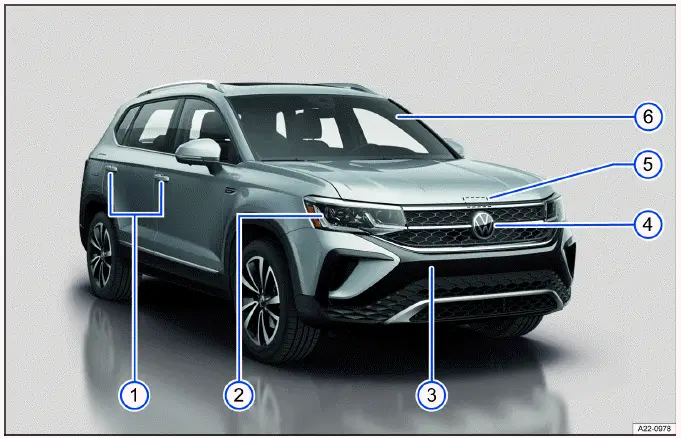
Fig. 2 Overview of vehicle from the front.
- Door handles ⇒ Doors and central locking button. These handles provide access to the passenger compartment and are part of the vehicle’s locking and unlocking system.
- Headlights ⇒ Exterior lighting. The front lighting units help provide road illumination, visibility to other drivers, and system-related lighting functions depending on equipment.
- Behind a cover: mount for towing eye ⇒ Towing. This covered mounting point is used when the vehicle must be moved or secured according to the towing instructions.
- Behind the Volkswagen emblem: radar sensor for assistance systems ⇒ Sensor system information, ⇒ Exterior care and cleaning. On the Volkswagen Taos, this area must remain clean and unobstructed so driver assistance systems can work as intended. Dirt, snow, stickers, protective films, or damage near the emblem may affect sensor performance.
- Opening lever for the hood ⇒ Opening and closing the hood. The hood release is used before accessing the engine compartment for inspection, washer fluid filling, service checks, or other maintenance-related procedures.
- Windshield:
- With VIN ⇒ Technical data. The vehicle identification number is used for registration, service records, parts selection, warranty information, and technical documentation.
- With windshield wipers ⇒ Operating the windshield wiper lever. The wipers clear rain, road spray, snow residue, and debris from the windshield to help maintain driver visibility.
- With camera for assistance systems in the interior rearview mirror area ⇒ Sensor system information, ⇒ Exterior care and cleaning. The camera area should be kept clean because camera-based systems may rely on a clear view through the windshield.
- With rain/light sensor in the interior rearview mirror area ⇒ Rain/light sensor, ⇒ Exterior care and cleaning. This sensor can support automatic wiper or lighting functions depending on equipment and vehicle settings.
Rear view
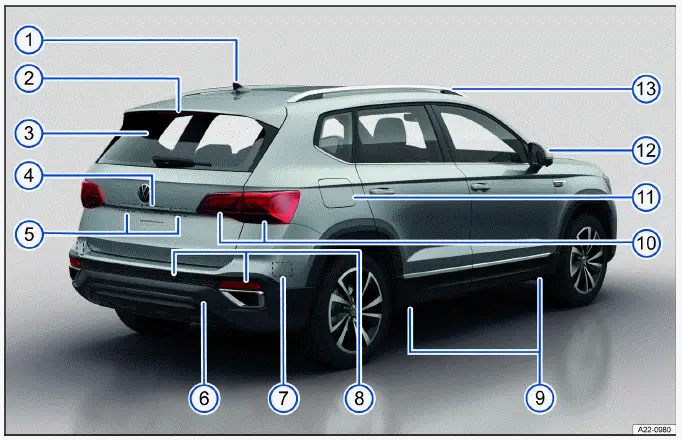
Fig. 3 Rear vehicle overview.
- Roof antenna ⇒ Infotainment system and aerials. The roof antenna supports reception and communication functions related to the vehicle’s infotainment and connected systems.
- High-mounted brake light. This brake light gives following traffic an additional visual signal when the brakes are applied.
- Rear window:
- With rear window defroster ⇒ Rear window defroster. The defroster helps clear fog, frost, or condensation from the rear glass for better rearward visibility.
- With rear window wiper ⇒ Operating the windshield wiper lever. The rear wiper helps keep the rear glass clear in rain, snow, or dirty road conditions.
- Area:
- Button to open the trunk lid ⇒ Trunk lid. This button is used to release the rear cargo area when the vehicle is unlocked or when the operating conditions allow it.
- Camera for parking systems ⇒ Rear View Camera, ⇒ Exterior care and cleaning. The camera lens should be kept clean because dirt, water drops, snow, or road salt can reduce the clarity of the image shown on the display.
- Number plate light ⇒ Exterior lighting. These lights illuminate the rear license plate when the exterior lighting is switched on.
- Behind a cover: mount for towing eye ⇒ Towing. This rear mounting point is used only according to the towing instructions and must be accessed carefully to avoid damage to the cover or bumper.
- Behind the bumper: radar sensor for assistance systems ⇒ Sensor system information, ⇒ Exterior care and cleaning. Sensors installed behind the bumper may not be visible from outside, but their operation can still be affected by damage, dirt buildup, ice, paint repairs, or incorrectly installed accessories.
- Sensors for assistance systems ⇒ Sensor system information, ⇒ Exterior care and cleaning. These sensors help support parking and driver assistance functions. Keep the surrounding surfaces clean and avoid covering the sensors.
- Mounting points for the vehicle jack ⇒ Wheel change. The specified jack points must be used when lifting the vehicle for a wheel change to reduce the risk of body damage or instability.
- Taillights ⇒ Exterior lighting. The taillights include rear lighting functions that help other road users recognize the vehicle’s position, braking, turning, and reverse movement depending on the active function.
- Fuel filler flap ⇒ Fuel types and refueling. The filler flap provides access to the fuel filler neck and should be opened, closed, and handled according to the refueling instructions.
- Outside mirrors ⇒ Outside mirrors
- With "Blind Spot" Monitor display ⇒ "Blind Spot" Monitor. If equipped, the display in the mirror can warn the driver about vehicles detected in the monitored side area.
- Roof rails ⇒ Roof rack. Roof rails are used as mounting points for approved roof rack systems and should only be loaded within the specified limits.
Driver door
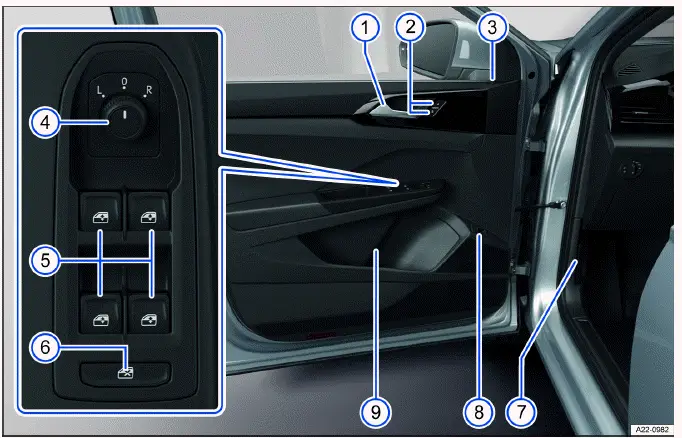
Fig. 4 Driver door: Controls.
- Door handle. The interior door handle is used to open the driver door from inside the vehicle.
- Central locking button to lock and unlock the vehicle ⇒ Central locking button. This button allows the driver to lock or unlock the vehicle doors from the cabin, depending on vehicle status and safety conditions.
- Central locking indicator light ⇒ Indicator light in the driver's door. The indicator light helps show the status of the locking system and can assist the driver in confirming whether the vehicle is secured.
- Knob for outside mirror positions and functions ⇒ Outside mirrors. The mirror control knob is used to adjust the outside mirrors and may also operate heating, folding, or other mirror functions depending on equipment.
- Buttons for operating the power windows
 ⇒ Opening and closing the
windows. The driver can use these switches to open and close the side windows, including one-touch functions if equipped.
⇒ Opening and closing the
windows. The driver can use these switches to open and close the side windows, including one-touch functions if equipped. - Button for deactivating the power window buttons in the rear doors
 ⇒ Opening and closing the
windows. This function helps prevent rear passengers, especially children, from operating the rear windows from their door switches.
⇒ Opening and closing the
windows. This function helps prevent rear passengers, especially children, from operating the rear windows from their door switches. - Hood release lever
 ⇒
Opening and closing the hood. The lever releases the hood latch before the hood can be opened from the front of the vehicle.
⇒
Opening and closing the hood. The lever releases the hood latch before the hood can be opened from the front of the vehicle. - Button for unlocking the fuel filler flap
 ⇒ Refueling. This button allows access to the fuel filler flap when refueling conditions are met.
 - Storage compartment
- With cup holder. The compartment can be used for suitable small items or a compatible drink container.
- With storage option for a reflective vest ⇒ Emergency equipment. Keeping a reflective vest in this area can make it easier to reach in an emergency before leaving the vehicle.
Driver side
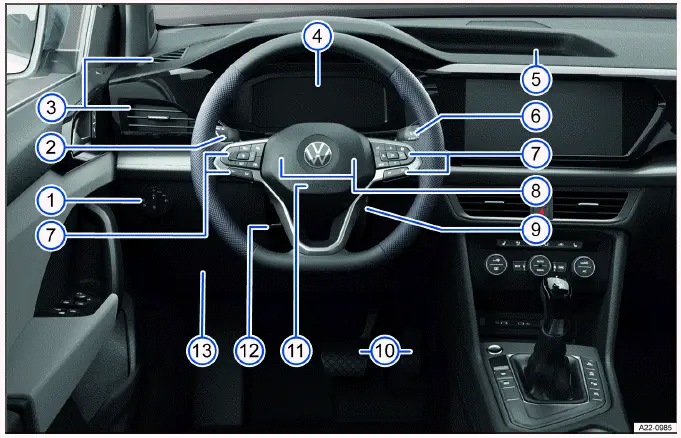
Fig. 5 Driver's side overview.
- Light switch ⇒ Exterior lighting. The light switch is used to control exterior lighting functions and may include automatic light operation depending on equipment.
- Turn signal and high beam lever ⇒ Switching the turn signals on and off, ⇒ Switching the high beam headlights on and off. This lever controls the turn signals, headlight high beam, and related lighting functions used while driving.
- Vents ⇒ Air distribution and blower speed. The vents direct airflow into the cabin and can be adjusted to improve comfort, defogging performance, or air circulation.
- Instrument cluster ⇒ Overview of the Volkswagen Digital Cockpit Pro
- With warning and indicator lights ⇒ Symbols in the instrument cluster. The instrument cluster displays driving information, vehicle messages, warning lights, indicator symbols, speed, fuel information, and other system data. In the Volkswagen Taos, these displays are important for recognizing service reminders, troubleshooting messages, and safety-related warnings.
- Storage compartment. This compartment provides space for small items that should be stored securely so they do not interfere with driving.
- Windshield wiper/washer lever ⇒ Window wipers. This lever operates the front wipers, washer system, and related wiping functions depending on the selected setting and vehicle equipment.
- Multi-function steering wheel controls:
- For driver assistance systems ⇒ Driver assistance systems. These buttons allow the driver to access or adjust certain assistance functions without removing their hands far from the steering wheel.
- For menu selection ⇒ Operating the Volkswagen Digital Cockpit Pro. The steering wheel controls help navigate menus, select displays, and confirm settings in the instrument cluster.
- For accepting telephone calls
 ⇒ Mobile phone interface. This control allows the driver to answer compatible phone calls through the vehicle system when a mobile phone is connected.
 - For audio, navigation
 ,
⇒ Infotainment system, ⇒ Navigation. These controls can be used for media, route guidance, and infotainment-related functions depending on system availability.
,
⇒ Infotainment system, ⇒ Navigation. These controls can be used for media, route guidance, and infotainment-related functions depending on system availability. - For adjusting the volume
 ⇒ First steps. The volume control adjusts audio output for media, calls, navigation prompts, or voice functions depending on what is active.
 - For activating voice control
 ⇒ Voice control. Voice control can help operate supported functions with spoken commands when the system is available and configured.
 - In order to switch between the current and previous menus
 ⇒ Operating the Volkswagen
Digital Cockpit Pro. This function helps move between menu views and makes it easier to return to a previous display while using the digital cockpit.
⇒ Operating the Volkswagen
Digital Cockpit Pro. This function helps move between menu views and makes it easier to return to a previous display while using the digital cockpit.
- Horn. The horn is used to warn other road users when necessary.
- On the right steering column: Area for the remote control vehicle key for an emergency start ⇒ Troubleshooting. If the key battery is weak or the key is not detected normally, this area may be used according to the emergency start procedure.
- Pedals ⇒ Information on the pedals. The accelerator and brake pedals must always move freely, and the floor area should remain clear of loose objects or improperly secured mats.
- Installation location of driver's front airbag ⇒ Airbag system. The driver’s front airbag is integrated into the steering wheel area and is part of the occupant protection system.
- Lever for adjusting the steering wheel position ⇒ Steering wheel. This lever allows the steering wheel position to be adjusted so the driver can maintain a safe and comfortable driving posture.
- Storage compartment. Use this area only for suitable small items and make sure stored objects cannot fall into the pedal area while driving.
Center console
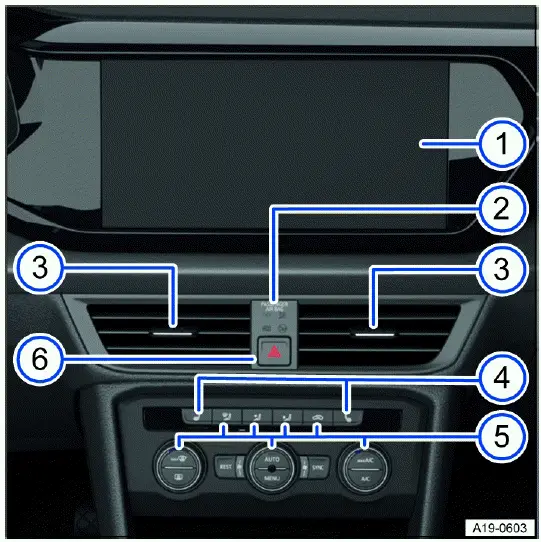
Fig. 6 Overview of the upper section of the center console.
- Infotainment system ⇒ Infotainment system. The infotainment display is the main control area for media, phone connection, vehicle settings, navigation functions if equipped, and several convenience features. In the Volkswagen Taos, this screen helps the driver and passengers access important information without searching through separate controls.
- Indicator light for front passenger's airbag deactivation
 ⇒ Airbag system. This indicator shows the status of the front passenger airbag system. Always check this light when carrying a passenger or when a child restraint system is being used according to the safety instructions in the manual.
 - Vents ⇒ Air distribution and blower speed. The center vents direct airflow into the cabin and can be adjusted to improve comfort, cooling, heating, or windshield and cabin air circulation.
- Buttons for the seat heating ⇒ Using Seat Heating and Seat Ventilation. These buttons control the seat heating function when equipped, allowing the front occupants to select a comfortable heat level in cold weather.
- Controls for the climate control system ⇒ Heating and air conditioning system. The climate controls are used to adjust temperature, blower speed, air distribution, defrosting, recirculation, and air conditioning functions. Proper use of these controls can help keep the interior comfortable and maintain clear visibility through the windows.
- Button for switching the emergency flashers on or off
 ⇒ In case of an emergency. The hazard warning light button activates all turn signals at the same time to warn other road users. Use this function when the vehicle is stopped in a hazardous location, during a breakdown, or whenever traffic safety requires additional visibility.
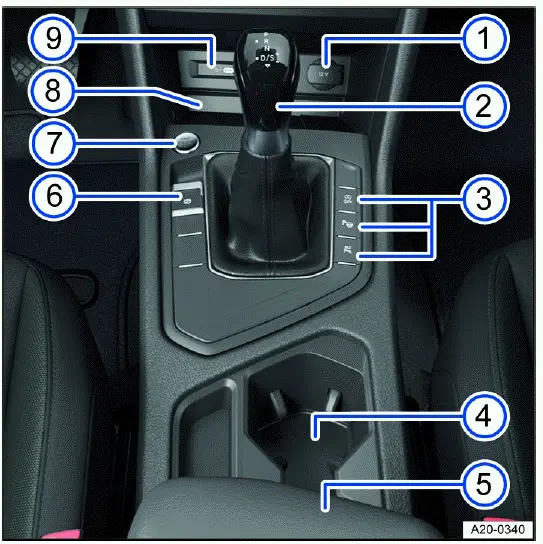
Fig. 7 Overview of the lower section of the center console.
- 12 V socket ⇒ Sockets. The 12 V socket can be used to power compatible accessories. Always check the permitted electrical load before connecting a device to avoid blown fuses or damage to the vehicle electrical system.
- Selector lever for the automatic gearbox ⇒ Automatic transmission. The selector lever is used to choose the driving range for the automatic transmission, including park, reverse, neutral, drive, and any available manual or sport-related driving functions depending on equipment.
- Buttons:
- For start/stop system ⇒ Start/Stop system. This button allows the driver to control the automatic engine start/stop function where available. The system may switch the engine off during certain stops to help reduce fuel use, then restart it when driving continues.
- For parking and maneuvering assist systems ⇒ Parking and maneuvering. These controls give access to parking-related functions that help the driver when moving in tight spaces, approaching obstacles, or using available assistance systems.
- Cup holders. The cup holders are designed for suitable drink containers and should be used carefully so that spilled liquids do not reach switches, electronic components, the selector lever, or storage areas.
- Center armrest with storage compartment. The center armrest provides added comfort for the front occupants and includes a storage area for small items that should be kept secure while driving.
- Electronic parking brake ⇒ Electronic parking brake. The electronic parking brake is used to secure the vehicle when parked and may also work together with other driving or safety functions depending on operating conditions.
- Button to start and stop the engine (Keyless Access with push-button start) ⇒ Starter button. This button starts or stops the engine when the vehicle key is detected inside the cabin. If the key battery is weak or the system does not recognize the key normally, follow the emergency start instructions in the Volkswagen Taos Owner’s Manual.
- Storage compartment
- With functionality for wireless charging in accordance with Qi standard ⇒ Charging Options for Mobile Devices. This compartment may allow compatible mobile devices to charge without a cable. For best charging performance, place the device flat in the charging area and remove metal objects, thick cases, or items that may interfere with charging.
- USB sockets with charge function for external device rechargeable batteries (depending on the vehicle equipment) ⇒ Charging Options for Mobile Devices. The USB sockets can be used to charge compatible devices and may support connection to infotainment functions depending on equipment, cable type, and device compatibility.
Passenger's side
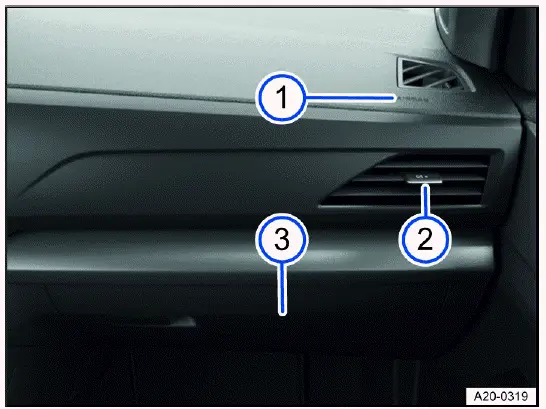
Fig. 8 Passenger's side: instrument panel overview
- Installation location of the front passenger's airbag in the instrument panel ⇒ Advanced Airbag System. The front passenger airbag is integrated into the instrument panel area and is part of the occupant protection system. Do not place objects, covers, stickers, or accessories over this area because they may interfere with airbag deployment.
- Adjustable vent ⇒ Air distribution and blower speed. The passenger-side vent can be adjusted to direct airflow toward or away from the occupant, helping improve comfort during heating, cooling, or ventilation.
- Glove compartment with handle. The glove compartment provides enclosed storage for documents and small items. Keep it closed while driving so stored objects remain secure and do not become a distraction.
Controls in the headliner
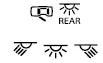 Buttons for interior/reading
lights ⇒ Interior/reading lights, ambient lighting. These controls operate the cabin lights and reading lights. Depending on equipment, they may also work with automatic interior lighting when doors are opened or closed.
Buttons for interior/reading
lights ⇒ Interior/reading lights, ambient lighting. These controls operate the cabin lights and reading lights. Depending on equipment, they may also work with automatic interior lighting when doors are opened or closed.
 Sunroof switch ⇒ Sunroof. The sunroof switch is used to open, close, tilt, or adjust the sunroof when the vehicle is equipped with this feature. Always make sure the opening is clear before operating the sunroof.
 Sunshade buttons ⇒ Sunshade in
the sunroof. These buttons control the sunshade for the sunroof, helping reduce sunlight entering the cabin and improving passenger comfort on bright days.
Sunshade buttons ⇒ Sunshade in
the sunroof. These buttons control the sunshade for the sunroof, helping reduce sunlight entering the cabin and improving passenger comfort on bright days.
 Buttons for Emergency Call,
Information Call and Roadside Assistance Call ⇒ Information Call, Roadside
Assistance Call and Emergency Call Service. These buttons provide access to support services when available, including emergency assistance, information services, and roadside help. Use them only according to the instructions and service availability described in the manual.
Buttons for Emergency Call,
Information Call and Roadside Assistance Call ⇒ Information Call, Roadside
Assistance Call and Emergency Call Service. These buttons provide access to support services when available, including emergency assistance, information services, and roadside help. Use them only according to the instructions and service availability described in the manual.