
Volkswagen Taos: Driver assistance systems
- Sensor system information
- Cruise control system
- Adaptive Cruise Control (ACC)
- Autonomous Emergency Braking (Front Assist)
- Lane Keeping System (Lane Assist)
- Comfort drive Travel Assist
- Semi-automatic vehicle control in a medical emergency (Emergency Assist)
- "Blind Spot" Monitor
Sensor system information
Introduction
Depending on vehicle equipment, driver assistance systems can increase driving convenience and support the driver in certain traffic situations. Some of these systems use sensors or cameras, referred to here as the sensor system, which may be only partly visible or not visible at all.
Driver assistance systems in the Volkswagen Taos are designed to help monitor certain areas around the vehicle, support comfort, and provide warnings or interventions within defined limits. These systems do not make the vehicle autonomous, and they cannot replace an attentive driver.
The sensors and cameras detect the surroundings visually, ultrasonically, or by using radar waves. Depending on the system, they may monitor vehicles ahead, lane markings, obstacles, traffic in blind spot areas, objects near the front or rear of the vehicle, or other driving-related information.
Installed sensor systems
Depending on vehicle equipment, the following sensor systems may be installed:
- Radar sensor in the front of the vehicle.
- Radar sensors in the rear of the vehicle.
- Camera behind the windshield.
- Ultrasonic sensors in the front of the vehicle.
- Ultrasonic sensors in the rear of the vehicle.
 You can find information on the relevant installation location in the vehicle overviews ⇒ Vehicle overviews.
These sensors must remain clean, correctly aligned, and free from damage. Dirt, ice, snow, stickers, accessories, paint repairs, body damage, incorrect mounting, or impacts near the sensor area can reduce system performance or cause the system to behave unexpectedly.
WARNING
Driver assistance systems are not a substitute for the driver's attention and operate only within their technical limits. They may not detect every traffic situation, may warn late, may not warn at all, or may react in a way the driver does not expect. If the driver relies too heavily on the systems, there is a risk of accidents, serious injuries, or death.
- Stay alert at all times and use the systems only as support. The driver is always responsible for steering, braking, accelerating, speed selection, and overall control of the vehicle.
- Understand the limits of the sensor system and the specific limitations of each individual assistance system.
- Always adapt speed and following distance to visibility, weather, road surface, traffic density, and the behavior of other road users.
- Be ready at any time to override, brake, steer, accelerate, or interrupt an automatic intervention.
- Pay attention to indicators and messages in the instrument cluster display, and respond to them only when the traffic situation allows it.
- Do not use driver assistance systems if you suspect a malfunction, sensor damage, camera obstruction, or incorrect system behavior.
Limits of the sensor system
Please read the introductory information and heed the Warnings and Notice ⇒
 Introduction.
Limits of the radar sensor
Driver assistance systems that use radar sensors may not respond, may respond late, or may behave unexpectedly in the following situations. The radar view can be limited by road shape, weather, dirt, reflections, surrounding objects, or damage near the sensor area:
- When driving in poor weather conditions, such as heavy rain, snow, fog, or heavy spray.
- When driving through construction zones, tunnels, toll stations, or areas with temporary barriers.
- When driving on winding roads, such as mountain roads or tight curves.
- In front of bumps, dips, crests, or sudden changes in road elevation.
- When driving off-road or on very uneven surfaces.
- When driving in parking ramps, multi-level garages, or narrow entrances.
- When driving on roads with embedded metal objects, such as railroad tracks.
- When driving on gravel roads or surfaces with loose material.
- In complex driving situations, such as traffic islands, merging lanes, or irregular road layouts.
- Following a violent impact affecting components within the radar sensor range, for example after a rear-end collision.
- If the radar sensors are covered, dirty, misaligned, damaged, iced over, or blocked by accessories.
Limits of the camera behind the windshield
Driver assistance systems that use the camera behind the windshield may not respond, may respond with a delay, or may behave in an unexpected way in the following situations. The camera depends on a clear field of view and enough visual contrast to interpret the road correctly:
- In front of bumps, dips, crests, or uneven road surfaces.
- When driving in construction zones with temporary lane markings, barriers, or confusing road guidance.
- When driving off-road.
- When driving in poor weather conditions, such as heavy rain, snow, fog, heavy spray, or on roads with poor surface visibility.
- In low sun, darkness, strong shadows, or glare from oncoming vehicles.
- If the camera is not available due to long exposure to direct sunlight or high ambient temperatures.
- If the camera field of view is covered, dirty, fogged, iced over, cracked, or damaged.
- If the camera is misaligned, for example after windshield replacement, body repair, or an impact.
Delayed reaction
If the sensor system is exposed to environmental conditions that limit its function, the driver assistance systems may detect the impairment only after a delay. For this reason, a display message showing that a function is limited may appear later when first starting to drive or while already driving.
This delayed reaction means the driver should not wait for a warning before adapting the driving style. If visibility is poor, the windshield is dirty, sensors are covered, or the road situation is complex, assume that assistance systems may be limited and drive more cautiously.
Limits in certain driving situations
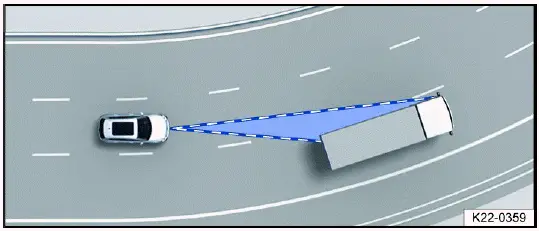
Fig. 107 Driving around curves.
The sensor system generally measures in the direction of travel. On tight curves, the system may detect vehicles in adjacent lanes by mistake, or it may fail to detect a vehicle ahead in the same lane. This can affect warnings or automatic reactions, especially when the road curves sharply or the vehicle ahead is positioned near the edge of the sensor range.
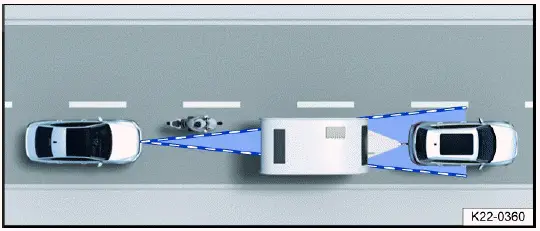
Fig. 108 Narrow vehicle.
Narrow vehicles or vehicles traveling close to your vehicle but outside the sensor range, such as motorcycles, may not be detected reliably. The same can apply to bicycles, small trailers, or vehicles positioned unusually within the lane.
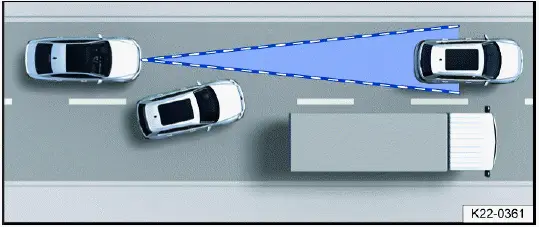
Fig. 109 Changing lanes.
Vehicles that move into your lane close in front of your vehicle may not be detected immediately. This also applies to vehicles with attachments or loads that extend beyond the normal vehicle dimensions. The driver must be ready to brake or steer even if no warning has appeared.
Specific system limitations
In addition to the general limits of the sensor system, every driver assistance system has its own function-related limitations. The driver should read the relevant sections and understand when each system may be unavailable, restricted, or unsuitable for use.
- Adaptive Cruise Control (ACC) ⇒ ACC system limitations.
- Autonomous Emergency Braking (Front Assist) ⇒ Front Assist system limitations.
- Lane Assist ⇒ Lane Assist system limitations.
- Comfort drive Travel Assist ⇒ Introduction.
- Emergency Assist ⇒ Introduction.
- "Blind spot" sensor ⇒ System limitations of the "Blind Spot" Monitor.
In everyday Volkswagen Taos driving, assistance systems can be helpful, but they work best when the sensors are clean, the road situation is clear, and the driver remains fully involved. Treat every warning, limitation message, or unusual system reaction seriously, and take manual control whenever the situation requires it.
Cruise control system
Introduction
The cruise control system helps the driver maintain a previously set speed during steady forward driving.
The cruise control system in the Volkswagen Taos is intended to make longer drives more relaxed when road, traffic, and weather conditions allow a constant speed. Once a speed is stored, the system helps maintain it without the driver continuously pressing the accelerator pedal. This can be useful on open highways, long straight roads, or other routes where speed changes are minimal.
The system does not monitor the road like the driver does and does not replace active speed control in changing traffic. The driver must always remain ready to brake, accelerate, steer, or switch the system off when conditions change.
Speed range
The cruise control system is available at speeds above approximately 20 km/h, or approximately 15 mph, when driving forward. Below this range, the system cannot regulate the speed.
Driving with the Cruise Control System
You can override the stored speed at any time, for example when passing another vehicle. When the accelerator pedal is pressed, the regulation function is temporarily paused while the vehicle accelerates. After the driver releases the accelerator pedal, the cruise control system resumes the stored speed if the operating conditions are still met.
Use this function only when the surrounding traffic allows it. If vehicles ahead are slowing down, the road becomes slippery, or the route begins to curve sharply, the driver should take over speed control manually.
Displays
If the cruise control system is switched on, the instrument cluster display shows the saved speed and the current status of the system. This helps the driver confirm whether speed regulation is active, ready, paused, or not currently regulating.
The following indicator lights may turn on depending on the driving situation and the instrument cluster version:
 Cruise control system is
switched on, speed regulation active.
Cruise control system is
switched on, speed regulation active.
If the cruise control system is not regulating the speed, the indicator lights may appear smaller or gray.
If no speed is stored, the instrument cluster display shows
 instead of the speed.
Driving downhill
The vehicle cannot maintain the saved speed in every driving situation. On downhill roads, the Volkswagen Taos may gain speed because gravity can overcome the engine braking effect. Always be ready to apply the brakes manually.
1. Downshift before traveling downhill for extended periods.
This allows the vehicle to use engine braking more effectively and reduces the load placed on the service brakes. On long descents, relying only on the brake pedal can increase brake temperature and reduce braking performance.
WARNING
If it is not possible to drive safely with enough distance and a steady speed, using the cruise control system can be dangerous. The system may maintain a speed that is unsuitable for traffic, visibility, road surface, or weather conditions. This can lead to accidents, serious injuries, or fatal injuries.
- Always adapt speed and following distance to vehicles ahead, visibility, weather, road surface, traffic density, and legal speed limits. The driver remains responsible for the selected speed at all times.
- Never use the cruise control system when visibility is poor, when there is not enough distance to other vehicles, or when roads are steep, winding, flooded, icy, snowy, wet, covered with gravel, or otherwise slippery.
- Never use the cruise control system when driving off-road or on unpaved roads.
Operating the cruise control system
Please read the introductory information and heed the Warnings and Notice ⇒
 Introduction.
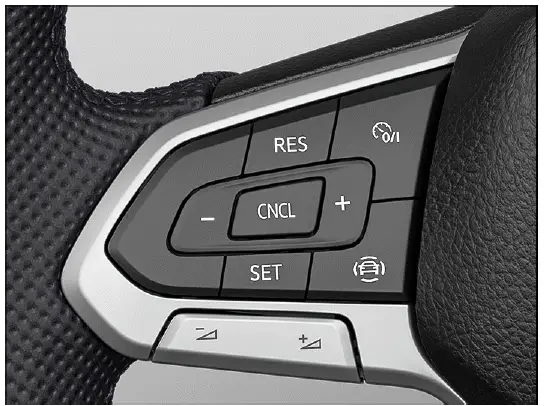
Fig. 110 Left side of the multi-function steering wheel (variant 1).
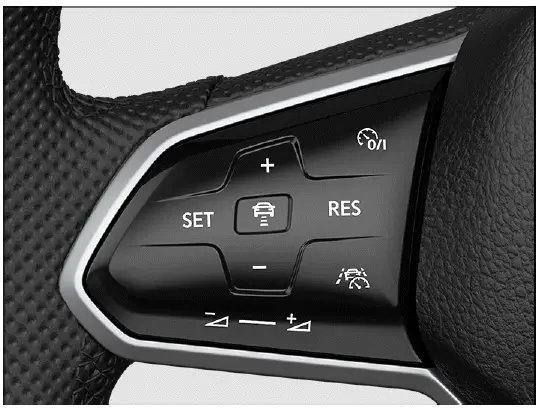
Fig. 111 Left side of the multi-function steering wheel (variant 2).
Switching on
1. Press the
 button.
No speed is saved at this stage. The system is switched on, but it will not yet regulate the vehicle speed until the driver stores a speed while driving.
Starting the regulation function
1. Press the
 button while
driving.
button while
driving.
The cruise control system saves the current speed and begins regulating it. The driver should check the traffic situation before storing the speed to make sure the selected value is suitable.
Setting the speed
You can adjust the saved speed as follows:
+ 1 km/h (1 mph): Press the
 button.
Steering wheel version 2: Alternatively, swipe the button from the bottom to the top.
- 1 km/h (1 mph): Press the
 button.
Steering wheel version 2: Alternatively, swipe the button from the top to the bottom.
To change the stored speed continuously, press and hold the respective button. Release it when the desired speed is reached.
The vehicle adjusts to the current speed by accelerating or decelerating. The vehicle does not brake actively. If the road slopes downhill or traffic ahead slows down, the driver must brake manually.
Canceling the regulation function
1. Press the
 or
or
 button briefly.
Or: Press the brake pedal.
The vehicle speed remains stored in the system. Regulation is paused, but the saved speed can be resumed later if the conditions are suitable.
Resuming the regulation function
1. Press the
 button.
The cruise control system resumes and maintains the saved speed. Before resuming, check whether the stored speed still matches the current road, traffic, and weather conditions.
WARNING
There is a risk of an accident if the vehicle resumes a saved speed unexpectedly or if the saved speed is too high for the current situation. Traffic may have slowed, the road may have become slippery, or the vehicle may be approaching a curve, descent, or obstacle. This may result in serious injury or death.
- Before resuming cruise control, check that the saved speed is suitable for the current road, traffic, visibility, and weather conditions.
- Switch off the cruise control system when it is not needed or when conditions are no longer suitable for steady-speed driving.
Switching off
1. Press and hold the
 button.
The cruise control system is switched off and the saved speed is deleted. The driver must then control the vehicle speed manually.
Troubleshooting
Please read the introductory information and heed the Warnings and Notice
⇒
 Introduction.
 Cruise control system
malfunction
Cruise control system
malfunction
Malfunction. The yellow indicator light turns on.
1. Switch off the cruise control system and seek assistance from an authorized Volkswagen dealer or authorized Volkswagen Service Facility. Volkswagen recommends contacting an authorized Volkswagen dealer or authorized Volkswagen Service Facility.
If the warning remains active or the system does not respond as expected, do not continue relying on the cruise control system. Drive manually and have the system checked by qualified professionals.
The regulation function is canceled automatically
- The vehicle has exceeded the stored speed for an extended period.
- No gear is engaged for driving forward.
- Brake assistance systems, for example ASR or ESC, are active.
- The vehicle has been braked by Autonomous Emergency Braking (Front Assist).
- If the problem persists, switch off the cruise control system and seek assistance from an authorized Volkswagen dealer or authorized Volkswagen Service Facility. Volkswagen recommends contacting an authorized Volkswagen dealer or authorized Volkswagen Service Facility.
Automatic cancellation is not always a malfunction. The system may pause regulation because another vehicle system has intervened, because the driving situation changed, or because the selected speed can no longer be maintained safely. In the Volkswagen Taos, the driver should always take over smoothly when cruise control regulation ends.
Adaptive Cruise Control (ACC)
Introduction
Adaptive Cruise Control (ACC) helps maintain the speed selected by the driver. When the vehicle approaches traffic ahead, ACC can automatically adjust the speed and help keep the set distance from the vehicle in front.
Does this vehicle have ACC?
The Volkswagen Taos has ACC if ACC settings can be adjusted in the Assistance systems menu in the Infotainment system. Depending on vehicle equipment and country, the available ACC functions, displays, and operating range may vary.
Speed range
You can set a speed between 30 km/h, or approximately 20 mph, and 210 km/h, or approximately 130 mph. The highest selectable speed may be lower depending on vehicle equipment, local market version, and country-specific regulations.
Driving with ACC
ACC is intended to support the driver during steady driving, especially on roads where traffic flows in the same direction and speed changes are predictable. If the system detects a vehicle ahead in the same lane, it can reduce speed to help maintain the selected distance. When the lane ahead is clear again, the system can accelerate back toward the stored speed.
You can override ACC at any time. The regulation function is canceled when you apply the brakes. When you accelerate, regulation is paused during acceleration and then resumes with the set speed after the accelerator pedal is released, provided the operating conditions are still suitable.
Even when ACC is active, the driver must continue monitoring traffic, lane position, road surface, and the behavior of vehicles ahead. The system cannot make safe decisions in every driving situation, and it cannot replace manual braking or steering when conditions demand it.
Driver intervention request
 If automatic deceleration by ACC is not sufficient, or if the system limits are reached, ACC will prompt you with a message in the instrument cluster to apply the brakes yourself. The red warning light also turns on and a warning tone sounds. Take over steering immediately and be ready to brake.
A driver intervention request must always be taken seriously. It means the system can no longer handle the situation within its limits. This may happen if traffic ahead slows suddenly, another vehicle cuts in, the road curves sharply, the sensors are limited, or the required braking force is greater than ACC can provide.
WARNING
ACC is not a substitute for the driver's attention and works only within its technical limits. ACC cannot detect every driving situation and may fail to react, may react late, or may react in an unexpected way. If the driver relies too heavily on the system, there is a risk of accidents, serious injuries, or death.
- Stay alert at all times and use ACC only as assistance. The driver is always responsible for steering, braking, speed selection, distance control, and overall vehicle control.
- Observe the system limitations ⇒ ACC system limitations.
- Always adapt speed and following distance to vehicles ahead based on visibility, weather, road surface, traffic density, and legal speed limits.
- Take over steering immediately if a driver intervention prompt appears in the instrument cluster display or if ACC deceleration is not sufficient.
- Apply the brakes if the vehicle continues to roll unintentionally, for example after a driver intervention prompt or when the situation ahead changes suddenly.
Special driving situations
Please read the introductory information and heed the Warnings and Notice ⇒
 Introduction.
The functions described below depend on vehicle equipment and are not available in all countries. The driver should check the vehicle displays and the Assistance systems menu to understand which ACC functions are installed and active.
Stop-and-go traffic
On vehicles with automatic transmissions, ACC can brake the vehicle to a stop in slow traffic and hold it stationary for a short time. ACC remains active, and the instrument cluster display shows that ACC is ready for a few seconds. During this time, the Volkswagen Taos can move off automatically when the vehicle ahead starts moving, provided no obstacle is detected in the path.
This function can make slow traffic more comfortable, but it still requires the driver's full attention. Pedestrians, cyclists, crossing traffic, objects on the road, or vehicles changing lanes may not always be detected as expected. Before the vehicle starts moving, the driver must check the area ahead and be ready to brake.
Extend drive-readiness or reactivate:
1. Press the
 button.
Driving off when drive-readiness has ended and the vehicle driving ahead has already started moving:
1. Press the
 button.
Or: Briefly press the accelerator pedal.
The ACC does not stay active in the following scenarios:
- The stationary phase lasts several minutes.
- A vehicle door is opened.
- The ignition is switched off.
WARNING
If ACC is ready appears in the instrument cluster display and the vehicle ahead starts moving, your vehicle may start driving automatically. The system may not detect every obstacle in the vehicle's path at that moment. This can cause accidents and serious injuries.
- Check the vehicle's path every time before starting off, and brake the vehicle if anything is in the way.
ACC system limitations
Please read the introductory information and heed the Warnings and Notice ⇒
 Introduction.
Limits of the sensor system
ACC detects driving situations using the radar and ultrasonic sensors in the front of the vehicle. The radar sensor has a range of up to approximately 120 m, or approximately 400 ft. This range can be reduced by weather, road layout, dirt, sensor obstruction, traffic complexity, or damage near the sensor area.
In the Volkswagen Taos, ACC works best on clear roads with vehicles traveling in the same direction. It is less reliable in complex or unpredictable situations, such as sharp curves, sudden lane changes, roadworks, poor visibility, or when objects are stationary.
WARNING
Using ACC outside its system limits can lead to dangerous situations. The system may not react correctly, may fail to detect relevant objects, or may maintain a speed that is unsuitable for the road and traffic conditions. This can cause accidents, serious injuries, and may also violate legal regulations.
- Be aware of the limits of the sensor system ⇒ Limits of the sensor system, and stop ACC regulation in the situations where the system may not work reliably.
Unrecognizable objects
ACC mainly detects vehicles moving in the same direction. The following will not be detected reliably or may not be detected at all:
- Pedestrians
- Animals
- Stationary vehicles
- Vehicles crossing the street or oncoming vehicles
- Other stationary obstacles
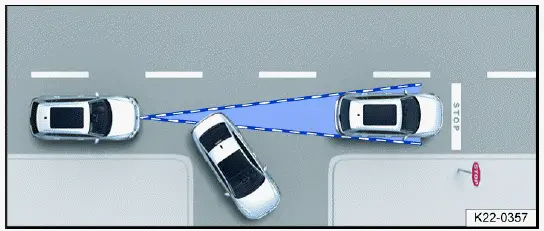
Fig. 112 Turning and stationary vehicles.
If, for example, a vehicle detected by ACC turns or changes lanes and there is a stationary vehicle in front of it, ACC may not react to the stationary vehicle fig. 112. The driver must be prepared to brake immediately, because the system may continue to regulate based on the previous moving vehicle until the situation changes.
This limitation is especially important at intersections, traffic lights, end-of-traffic queues, construction zones, and areas where vehicles may stop suddenly. ACC can support smoother driving, but it does not remove the need to watch the road ahead and react manually when the situation becomes unclear.
Switching ACC on and off
Please read the introductory information and heed the Warnings and
Notice ⇒
 Introduction.
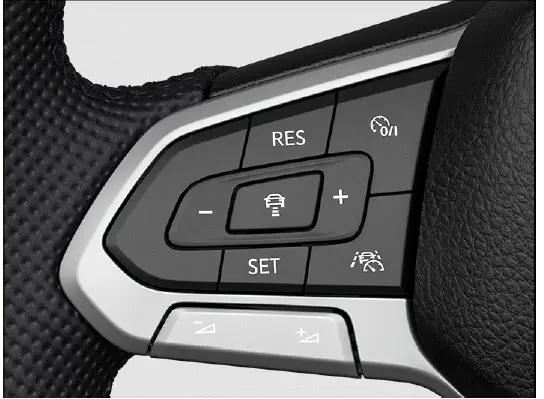
Fig. 113 Left side of the multi-function steering wheel (variant 1).
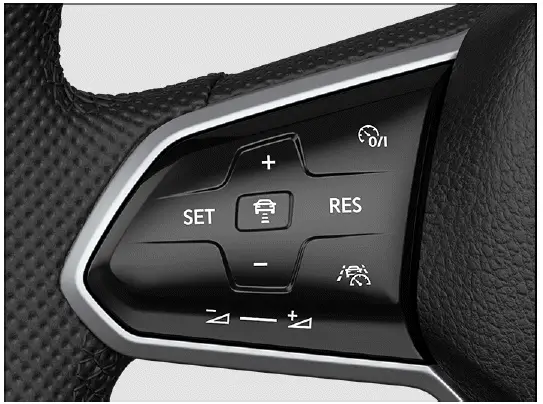
Fig. 114 Left side of the multi-function steering wheel (variant 2).
Switching on
1. Press the
 button.
ACC is switched on, but it is not yet regulating the vehicle speed or distance. At this point, the system is ready to be activated, but the driver must still set or confirm regulation while driving forward.
Starting the regulation function
1. Press the
 button while
driving forward.
button while
driving forward.
ACC saves the current speed and maintains the selected distance from traffic ahead when the system detects a vehicle in the same lane. If the current speed is outside the specified operating range, ACC adjusts to the minimum allowed speed when the vehicle is moving too slowly or to the maximum allowed speed when the vehicle is traveling too fast.
In addition, anti-slip regulation (ASR) is activated and ESC Sport is deactivated. This helps keep the Volkswagen Taos in a stability setting that is suitable for ACC operation.
The following indicator lights may turn on depending on the driving situation and the instrument cluster version:
 ACC is regulating - no
vehicle ahead detected.
ACC is regulating - no
vehicle ahead detected.
 ACC is
regulating - vehicle ahead detected.
ACC is
regulating - vehicle ahead detected.
If ACC is not functioning or is only ready without active regulation, gray indicator lights may appear, or no ACC indicator lights may be shown at all. The driver should always check the instrument cluster to confirm whether ACC is actively controlling speed and distance or only switched on.
Canceling the regulation function
1. Press the
 button briefly.
Or: Press the brake pedal.
The relevant indicator light for the driving situation comes on, and the speed and distance remain stored. Regulation is paused, but the last settings can be used again if the driver resumes ACC and the operating conditions are suitable.
If anti-slip regulation (ASR) is deactivated, Adaptive Cruise Control is stopped automatically. This is normal system behavior, because ACC requires certain stability and traction-support functions to be available.
Resuming the regulation function
1. Press the
 button.
ACC assumes the last set speed and the last set distance. The instrument cluster display shows the set speed, and the indicator lights turn on according to the current driving situation.
Before resuming, check whether the previously saved speed and distance still match traffic, weather, visibility, and road conditions. If the Volkswagen Taos resumes a speed that is too high for the situation, the driver must brake or cancel ACC immediately.
Switching off
1. Press and hold the
 button.
The set speed is deleted. The driver must then control speed and following distance manually until ACC is switched on and set again.
Adjusting the ACC settings
Please read the introductory information and heed the Warnings and
Notice ⇒
 Introduction.
Setting the distance
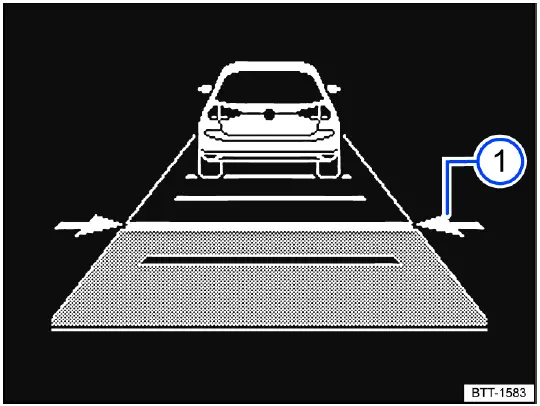
Fig. 115 In the instrument cluster display: set distance during control
(general example).
You can set the following distance at five levels, from very short to very long. A longer distance gives more time to react and is generally more suitable in rain, snow, poor visibility, dense traffic, or when the road surface is slippery.
1. Press the
 button.
2. Press the
 or
or
 button.
Steering wheel version 2: Alternatively, swipe vertically over the button area
from
 to
to
 or
or
 .
.
Or: Press the
 button repeatedly
until the preferred distance is set.
button repeatedly
until the preferred distance is set.
The instrument cluster display shows the selected level fig. 115 1. Always observe country-specific regulations for minimum distance, because the shortest setting may not be appropriate or legal in every situation.
In the Assistance systems menu of the Infotainment system, you can choose whether regulation should start with the distance that was set at the end of the previous journey or with a preselected distance. This allows the driver to keep a preferred setting or return to a standard distance when ACC is used again.
If ACC is not regulating, the set distance and the vehicle ahead will not be highlighted in the instrument cluster display. This means the system is not actively controlling the distance at that moment.
Setting the speed
You can adjust the stored speed within the specified speed range using the buttons on the multi-function steering wheel as follows:
+ 1 km/h (1 mph): Press the
 button.
Steering wheel version 2: Alternatively, swipe the button from the bottom to the top.
- 1 km/h (1 mph): Press the
 button.
Steering wheel version 2: Alternatively, swipe the button from the top to the bottom.
+ 10 km/h (5 mph): Press and hold the
 button. Pressing for the first time
changes to the next-largest tens digit in km/h or fives digit in mph.
button. Pressing for the first time
changes to the next-largest tens digit in km/h or fives digit in mph.
- 10 km/h (5 mph): Press and hold the
 button. Pressing for the first time
changes to the next-smallest tens digit in km/h or fives digit in mph.
button. Pressing for the first time
changes to the next-smallest tens digit in km/h or fives digit in mph.
Small speed changes are useful for fine adjustment in traffic, while larger steps make it easier to adapt to a new speed limit or a different road section. The driver should confirm that the selected speed is suitable before allowing ACC to continue regulating.
WARNING
ACC cannot recognize every driving situation correctly. If your vehicle is too close to the vehicle ahead, or if the speed difference is too large for ACC deceleration to handle, there is a risk of a rear-end collision. The system may not slow the vehicle enough in time, especially if traffic ahead brakes suddenly, another vehicle cuts in, or visibility and sensor detection are limited. This may result in serious injury or death.
- Always be ready to apply the brakes yourself, even when ACC is active.
- To override speed and distance control, press the accelerator pedal. In this case, ACC will not brake automatically while you are overriding the system.
- Follow the country-specific regulations regarding minimum distance.
- Always set a longer distance in rain, snow, fog, spray, poor visibility, dense traffic, or on slippery roads.
Adjusting the regulation function system settings
You can influence how dynamically ACC takes control. Depending on equipment, the vehicle may respond more gently or more directly when accelerating, decelerating, or adapting to traffic ahead.
- Vehicles with Driving Mode Selection:
Select the desired driving mode. The selected mode can influence how the Volkswagen Taos responds while ACC is regulating, for example by making acceleration feel calmer or more responsive.
- Vehicles without Driving Mode Selection:
Select the desired driving mode in the Assistance systems menu in the Infotainment system.
Deactivating distance control
1. Press the
 button.
2. Select Control system in the instrument cluster display.
Distance control is deactivated. The vehicle only maintains the set speed and no longer automatically adjusts the distance to a vehicle ahead.
When distance control is deactivated, the function behaves more like a conventional speed control system. The driver must watch traffic ahead closely and brake manually whenever the distance becomes too short. In the Volkswagen Taos, this setting should be used only when conditions are suitable and the driver can safely manage following distance without ACC support.
Troubleshooting
Please read the introductory information and heed the Warnings and Notice ⇒ Introduction
 ACC is not available
The yellow indicator light turns on. In addition, a message appears in the instrument cluster display. This means Adaptive Cruise Control cannot currently operate or is limited by a condition affecting the sensor system, vehicle systems, or the surrounding environment.
- The radar sensor may be dirty. Clean the radar sensor carefully ⇒ Vehicle care.
- The radar sensor view may be limited by weather conditions such as snow, heavy rain, ice, road spray, or by soap residue, wax, coatings, or dirt left on the vehicle.
Clean the radar sensor ⇒ Vehicle care.
- Radar sensor visibility may be blocked by attachments, decorative license plate frames, stickers, covers, or other objects near the sensor area. Clear the area around the radar sensor ⇒ Sensors and Cameras.
- The radar sensor may be misaligned or damaged, for example after damage to the front of the vehicle, a parking impact, bumper repair, or bodywork near the sensor area. Check whether visible damage is present ⇒ Sensors and Cameras.
- A malfunction or temporary fault may be present. Stop the engine, switch the ignition off, and restart the vehicle.
- Painting work may have been carried out on the front of the vehicle, or structural modifications may have been made in the sensor area ⇒ Repairs and technical modifications.
- The original Volkswagen emblem may not be installed. Volkswagen recommends using Volkswagen original parts or Volkswagen original accessories, which are available from an authorized Volkswagen dealer or authorized Volkswagen Service Facility.
- If the problem persists, contact an authorized Volkswagen dealer or authorized Volkswagen Service Facility. Volkswagen recommends contacting an authorized Volkswagen dealer or authorized Volkswagen Service Facility.
On the Volkswagen Taos, ACC depends on a clear and correctly aligned radar sensor. Even small changes around the front emblem, bumper, or license plate area can affect how the system detects traffic ahead. If cleaning does not restore normal operation, the system should be inspected rather than used in an unreliable condition.
ACC is not functioning as expected
- The radar sensor may be dirty. Clean the radar sensor ⇒ Vehicle care.
- The ultrasonic sensors may be dirty, covered, blocked, iced over, or damaged. Clean the ultrasonic sensors ⇒ Vehicle care.
Clear the area around the ultrasonic sensors and check whether there is visible damage ⇒ Sensors and Cameras.
- The system limitations may not be observed ⇒ ACC system limitations.
- The brakes may be overheating, and the regulation function may have been canceled automatically. Let the brakes cool down and check the function again when it is safe to do so.
- If the problem persists, contact an authorized Volkswagen dealer or authorized Volkswagen Service Facility. Volkswagen recommends contacting an authorized Volkswagen dealer or authorized Volkswagen Service Facility.
ACC behavior can also feel unusual in heavy traffic, on curves, near stationary vehicles, during poor weather, or when another vehicle cuts in close ahead. In such cases, the system may be working within its limits rather than malfunctioning. The driver should take over immediately whenever the vehicle response does not match the traffic situation.
 Additional information may be displayed in the vehicle status, depending on the malfunction ⇒ Vehicle settings menu.
The Adaptive Cruise Control cannot start
Make sure the following requirements are met before attempting to start ACC regulation:
- Vehicles with an automatic transmission: A gear is engaged for driving forward.
- The brake lights on the vehicle are functioning.
- ESC is not currently regulating.
- The brake pedal is not being pressed.
If any of these conditions are not met, ACC may remain switched on but will not begin active speed and distance regulation. Before using ACC in the Volkswagen Taos, check the instrument cluster display and confirm that the road, traffic, and weather conditions are suitable.
Unusual noises during automatic braking
Unusual noises during automatic braking can be normal and are not necessarily a cause for concern. Depending on the situation, the brake system, hydraulic control, and driver assistance functions may create sounds or pedal feedback when braking support is active.
If the noise is accompanied by warning lights, vibration, reduced braking performance, or repeated system messages, stop using ACC and have the vehicle checked by qualified professionals.
Autonomous Emergency Braking (Front Assist)
Introduction
Front Assist can recognize a possible forward collision and warn the driver before the situation becomes critical.
Depending on the situation and vehicle equipment, the system can also support braking and initiate an automatic braking maneuver.
Autonomous Emergency Braking, also known as Front Assist, is designed to help reduce the risk of certain forward collisions. The system can monitor the area ahead of the vehicle and warn the driver if it detects a possible collision. If the driver does not react in time, the system may support braking or apply the brakes automatically within its limits.
Front Assist in the Volkswagen Taos can help avoid accidents or reduce their severity, but it cannot replace the driver's attention. The system does not understand every traffic situation and cannot guarantee that a collision will be prevented.
Front Assist works only within the system limitations. Warning times vary depending on the traffic situation, vehicle speed, road conditions, driver behavior, object type, sensor visibility, and how quickly the situation develops.
Range of functions
Front Assist includes the following additional functions, depending on vehicle equipment and country:
- Pedestrian Monitoring.
The functions named are automatically active if Front Assist is switched on. Availability can vary by market and vehicle equipment, so the exact system behavior should be checked in the Assistance systems menu and in the instrument cluster messages.
Recognizable objects
Autonomous Emergency Braking (Front Assist) can recognize the following objects, depending on vehicle equipment and country:
- Vehicles.
- Bikes.
- Pedestrians.
The system's ability to recognize these objects depends on sensor visibility, object movement, contrast, distance, speed difference, weather, lighting, and road layout. Small objects, partially hidden pedestrians, unusual vehicle shapes, or objects entering the lane suddenly may not be detected reliably.
Driving with Front Assist
You can cancel automatic braking interventions by moving the steering wheel or pressing the accelerator pedal. This may be necessary if the driver deliberately chooses another safe maneuver, such as steering around an obstacle or accelerating to avoid a different hazard.
The driver should never wait for Front Assist to react before taking action. If a collision risk is visible, brake or steer as needed without delay.
Automatic braking
Front Assist can brake the vehicle to a stop. After that, the vehicle will not be held stationary by the system. Press the brake pedal to keep the vehicle stopped.
The brake pedal may feel firmer during an automatic braking maneuver. This can occur because the system is building brake pressure quickly to support deceleration.
WARNING
Front Assist is not a substitute for the driver's attention and operates only within its system limits. Front Assist cannot detect every driving situation and may fail to react, may react late, or may react in an unexpected way. If the driver relies too heavily on the system, there is a risk of accidents, serious injuries, or death.
- Stay attentive at all times and use the system only as support. The driver is always responsible for steering, braking, accelerating, speed choice, and overall vehicle control.
- Observe the system limitations ⇒ Front Assist system limitations.
- Always adapt speed and following distance to vehicles ahead based on visibility, weather, road surface, traffic density, and the behavior of other road users.
- Consider interrupting automatic Autonomous Emergency Braking (Front Assist) interventions if necessary and if the traffic situation allows a safer manual response.
- When Front Assist warns you, brake immediately or steer around the obstacle, depending on the driving situation and the available space.
- If you are unsure which Front Assist functions are included with your vehicle depending on equipment and country, consult suitably qualified professionals before starting your journey. Volkswagen recommends contacting an authorized Volkswagen dealer or authorized Volkswagen Service Facility.
Used correctly, ACC and Front Assist can make driving the Volkswagen Taos more comfortable and add an extra layer of support in certain situations. However, both systems depend on clean sensors, suitable road conditions, and driver supervision. The driver must always be ready to take full control whenever a warning appears, traffic changes suddenly, or the system response does not match the real situation.
Warning levels and braking support
Please read the introductory information and heed the Warnings and
Notice ⇒
 Introduction.
Speed ranges
Autonomous Emergency Braking, also known as Front Assist, can provide its strongest support only within defined speed ranges. The exact response depends on the object detected, the speed difference, road conditions, driver behavior, and the limits of the sensor system.
Autonomous Emergency Braking (Front Assist) provides maximum support within these speed ranges:
- Response to vehicles: Approximately 5 km/h, or approximately 3 mph, to approximately 250 km/h, or approximately 155 mph.
- Response to bikes: Approximately 5 km/h, or approximately 3 mph, to approximately 250 km/h, or approximately 155 mph.
- Response to pedestrians: Approximately 5 km/h, or approximately 3 mph, to approximately 65 km/h, or approximately 40 mph.
The support system can include a distance warning, an advance warning, an immediate warning, automatic braking, or braking support. Depending on the situation, the Volkswagen Taos may warn the driver first, prepare the brake system, or apply braking support more directly if the risk develops too quickly.
Influencing factors
Whether Autonomous Emergency Braking (Front Assist) reacts, and in which speed range it reacts to the named objects, depends on several important factors:
- Type of object.
- Movement direction of the object.
- Speed of the object.
- Speed of the vehicle.
The operating range can therefore be limited if the vehicle approaches an object very quickly and there is little time for the system to evaluate the situation. A fast-developing hazard may leave only a short moment for warning or braking support.
Not every warning level is passed through in every situation. Depending on speed, distance, and the suddenness of the hazard, there may be no advance warning or immediate warning. Instead, the system may proceed directly to an automatic braking maneuver to help reduce the severity of a possible collision.
Distance warning
 Front Assist detects if there is a safety hazard because the vehicle is following the vehicle ahead too closely.
The indicator light turns on. Increase the following distance immediately and adjust your speed to traffic conditions.
Front Assist detects if there is a safety hazard because the vehicle is following the vehicle ahead too closely.
The indicator light turns on. Increase the following distance immediately and adjust your speed to traffic conditions.
Advance warning
 Front Assist detects a possible collision and prepares the vehicle for possible emergency braking.
A warning tone sounds and the warning light turns on. Brake the vehicle or maneuver to avoid the collision, depending on the traffic situation and available space.
Front Assist detects a possible collision and prepares the vehicle for possible emergency braking.
A warning tone sounds and the warning light turns on. Brake the vehicle or maneuver to avoid the collision, depending on the traffic situation and available space.
Immediate warning
If the driver does not respond to the advance warning, the brakes may be applied briefly. This short braking impulse is intended to draw attention to the increasing collision risk and encourage immediate driver action.
Apply the brakes or maneuver to avoid the collision. Do not wait for the system to continue braking if you can already recognize the danger ahead.
Automatic braking
Autonomous Emergency Braking (Front Assist) can brake the vehicle automatically in several stages with increasing braking force. By reducing vehicle speed before impact, the system may help reduce the severity of damage and injuries in certain collision situations.
Automatic braking does not guarantee that a collision will be avoided. The driver must remain ready to brake harder, steer away, or take other appropriate action if the situation requires it.
Braking support
If the system detects that the driver is not braking strongly enough before a possible collision, Front Assist can increase the braking force. This may help reduce the risk of a collision or lower the impact speed. Braking support is active only while the driver is firmly pressing the brake pedal.
In the Volkswagen Taos, braking support is intended to assist an active driver response, not replace it. The system can add braking pressure, but the driver remains responsible for judging the situation and applying the brake pedal as needed.
Front Assist system limitations
Please read the introductory information and heed the Warnings and
Notice ⇒
 Introduction.
Limits of the sensor system
Front Assist detects driving situations using a radar sensor in the front of the vehicle. The radar sensor has a range of up to approximately 120 m, or approximately 400 ft. This range can be reduced by weather, road layout, traffic complexity, dirt, sensor obstruction, or damage near the front of the vehicle.
 Observe the limits of the radar sensor ⇒ Limits of the sensor system. Always remain attentive and intervene yourself if necessary.
After starting the vehicle
 Autonomous Emergency Braking may not be available, or its availability may be limited, directly after starting the vehicle or after restarting the system. During this time, the white indicator light in the instrument cluster display comes on.
This temporary limitation is normal in some situations while the system becomes ready. Until Front Assist is fully available, the driver must rely completely on manual observation, braking, and steering.
Unrecognizable objects
Autonomous Emergency Braking (Front Assist) may not react, or may react with a delay, to the following objects:
- Oncoming vehicles or vehicles crossing the street.
- Stationary or oncoming pedestrians; generally no reaction to people without Pedestrian Monitoring.
- Stationary cyclists, oncoming cyclists, or cyclists crossing the street.
- Pedestrians and cyclists who are not detected as such, for example because they are fully or partially hidden by vehicles, roadside objects, shadows, poor lighting, or other obstacles.
The system may also have difficulty if an object appears suddenly, moves unpredictably, is very small, has poor contrast with the background, or is partly outside the radar detection area. For this reason, the driver should not assume that Front Assist will detect every person, cyclist, vehicle, or obstacle ahead.
Functional limitations
In addition to the situations specified in the sensor system limitations, Front Assist may not react, may react late, or may behave in an unexpected way in the following situations, among others:
- When driving in reverse.
- If ESC is regulating.
- If Offroad driving mode is switched on, depending on vehicle equipment.
- If multiple brake lights on the vehicle are malfunctioning.
- If the vehicle is accelerating very quickly or the accelerator pedal is pressed all the way down.
- In unclear traffic situations, for example if vehicles driving ahead brake suddenly, turn, change lanes, or partially leave the detection area.
- If Front Assist is malfunctioning.
These limitations are especially important in dense traffic, construction zones, intersections, parking areas, and on roads where other vehicles or cyclists may move unpredictably. If the Volkswagen Taos gives a warning or reacts in a way that does not match the real situation, the driver must take control immediately.
Switching off Front Assist
Depending on the system, Front Assist may not be suitable in the following situations and must be switched off if they occur ⇒
 :
:
- If the vehicle is not being driven on public roads, for example during off-road driving or on a racetrack.
- If the vehicle is being towed or transported.
- If add-ons such as auxiliary headlights cover the radar sensor.
- If the radar sensor is malfunctioning.
- Following a violent impact affecting components within the range of the radar sensor, for example after a rear-end collision.
- If there are multiple unwanted activations.
Front Assist should not be used when its sensor view is blocked or when the driving situation does not match normal road traffic. In these cases, unwanted warnings or automatic braking may occur, or the system may fail to respond when expected.
WARNING
Using Front Assist in situations where the system is not suitable can result in unexpected braking, missing warnings, incorrect reactions, accidents, serious injuries, or fatal injuries.
- Switch off Front Assist in the specified situations and use manual vehicle control.
For safe operation, keep the radar sensor area clean and free from obstruction, follow the system limitation information, and never depend on Front Assist as the only protection against a collision. In the Volkswagen Taos, this system is a driver assistance feature, not a substitute for attentive driving.
Using Front Assist
Please read the introductory information and heed the Warnings and
Notice ⇒
 Introduction.
When the ignition is switched on, Front Assist and, depending on the country, the advance warning are switched on automatically. This means the system is normally ready to support the driver as soon as the vehicle systems complete their startup checks.
 However, Front Assist is not available, or its availability is restricted, while the white indicator light is turned on.
Volkswagen recommends leaving Front Assist, distance warning, and advance warning switched on during normal driving. These functions can provide useful support in everyday traffic, but they should only be switched off in the situations described under ⇒ Front Assist system limitations.
In the Volkswagen Taos, Front Assist is intended to assist the driver by monitoring certain traffic situations ahead of the vehicle. It does not replace careful observation, proper braking distance, or the driver's responsibility to react when the road situation changes.
Switching on and off
You can manually switch Autonomous Emergency Braking on or off and check whether the function is currently active. The selected setting may be shown in the instrument cluster display or in the Assistance systems menu, depending on the equipment.
In the instrument cluster display:
1. Press the
 button.
2. Switch Autonomous Emergency Braking on or off.
 Depending on the vehicle
equipment, the
Depending on the vehicle
equipment, the
 button is
located either on the multi-function steering wheel or the turn signal
and high beam lever.
button is
located either on the multi-function steering wheel or the turn signal
and high beam lever.
In the Infotainment system:
1. Open the Assistance systems menu.
2. Switch Autonomous Emergency Braking on or off in the corresponding submenu.
 If you switch off Front
Assist, the advance warning and distance warning will also be switched off. The
yellow indicator light turns on in the instrument cluster display.
If you switch off Front
Assist, the advance warning and distance warning will also be switched off. The
yellow indicator light turns on in the instrument cluster display.
Adjusting the distance and advance warning setting
If Front Assist is switched on, the following settings can be adjusted in the Assistance systems menu of the Infotainment system, depending on the vehicle equipment and country:
- Switch the distance warning on or off.
- Switch the advance warning on or off.
- Set the warning period for the advance warning.
The distance warning can help remind the driver when the vehicle is following traffic ahead too closely. The advance warning can provide an earlier alert before a possible collision develops, giving the driver more time to brake or steer. In the Volkswagen Taos, these settings should be chosen so that they support the driver's normal driving style without encouraging delayed reactions.
Troubleshooting
Please read the introductory information and heed the Warnings and
Notice ⇒
 Introduction.
 Autonomous Emergency Braking
starts
Autonomous Emergency Braking
starts
The white indicator light comes on.
- Autonomous Emergency Braking (Front Assist) is temporarily not available or is available only with limitations. After driving straight for a short distance, Autonomous Emergency Braking is usually available again and the indicator light goes out. If the vehicle does not drive, the indicator light stays on.
This condition can occur after starting the vehicle or after the system has been restarted. During this time, the driver should not assume that Front Assist is providing full support. Drive attentively and be prepared to brake or steer manually.
Front Assist is not available, and the radar sensor does not have sufficient visibility
- The radar sensor is dirty. Clean the radar sensor ⇒ Vehicle care.
- The visibility of the radar sensor is limited by weather conditions, such as snow, ice, heavy rain, road spray, or by soap residue, wax, coatings, dirt, or other deposits.
- Clean the radar sensor ⇒ Vehicle care.
- Radar sensor visibility is limited by attachments, decorative frames on license plate holders, stickers, covers, or other objects near the sensor area. Clear the area around the radar sensor ⇒ Sensors and Cameras.
- The radar sensor is misaligned or damaged, for example because of damage to the front of the vehicle, a parking impact, bumper repair, or another incident near the sensor area. Check whether noticeable damage is present ⇒ Sensors and Cameras.
- Painting work was carried out on the front of the vehicle, or structural modifications were made in the sensor area ⇒ Repairs and technical modifications.
- The original Volkswagen emblem is not used. Volkswagen recommends the use of Volkswagen original parts or
- Volkswagen original accessories, which you can acquire from an authorized Volkswagen dealer or authorized
- Volkswagen Service Facility.
- If the problem persists, switch off Autonomous Emergency Braking and contact suitably qualified professionals. Volkswagen recommends contacting an authorized Volkswagen dealer or authorized Volkswagen Service Facility.
The radar sensor area must remain clean, correctly aligned, and free from unsuitable parts or accessories. On the Volkswagen Taos, even small changes around the front emblem, bumper, or license plate area can reduce sensor visibility and limit Front Assist operation.
Front Assist is not functioning as expected or has been triggered multiple times unnecessarily
- The radar sensor is dirty. Clean the radar sensor ⇒ Vehicle care.
- The system limitations are not being observed ⇒ Front Assist system limitations.
- If the problem persists, switch off Autonomous Emergency Braking and contact suitably qualified professionals. Volkswagen recommends contacting an authorized Volkswagen dealer or authorized Volkswagen Service Facility.
Unexpected warnings or repeated unnecessary braking interventions can occur if the system misinterprets the situation ahead, the sensor is obstructed, or the driving conditions fall outside the system limits. This may happen near roadworks, tight curves, parked vehicles, traffic islands, metal structures, steep entrances, or in poor weather.
If Front Assist behaves unusually, continue driving manually and do not rely on the system until the cause is found. Keeping the sensor area clean and observing the system limitations helps Front Assist operate more predictably in everyday Volkswagen Taos driving.
Lane Keeping System (Lane Assist)
Introduction
Lane Assist helps the driver keep the vehicle within the lane, within the limits of the system. This function is not designed to drive the vehicle independently or to keep it centered in the lane without driver supervision.
Lane Assist in the Volkswagen Taos is intended to support the driver when the vehicle begins to move too close to a detected lane marking. If the system recognizes that the vehicle may unintentionally leave the lane, it can provide corrective steering assistance to help guide the vehicle back toward the lane. The driver can override this steering intervention at any time by steering manually.
This system is a support feature only. It does not replace looking ahead, holding the steering wheel, checking mirrors, using the turn signals, or judging whether the road markings are clear enough for reliable operation. The driver must remain in full control of the vehicle at all times.
Speed range
Lane Assist is ready to take control, meaning the system status is active, when a lane marking is detected within the system limits at speeds above approximately 60 km/h, or approximately 35 mph. If the markings are unclear, missing, covered, or outside the camera's detection range, the system may remain inactive even when the vehicle is traveling above this speed.
WARNING
Lane Assist is not a substitute for the driver's attention and works only within its system limits. The system cannot detect every road situation and may fail to react, may react late, or may intervene in a way the driver does not expect. If the driver relies too much on Lane Assist, there is a risk of accidents, serious injuries, or death.
- Stay attentive at all times and use the system only as assistance. The driver is always responsible for keeping the vehicle safely within the lane.
- Observe the system limitations ⇒ Lane Assist system limitations.
- Always adapt speed and following distance to vehicles ahead based on visibility, weather, road surface, lane markings, traffic density, and the behavior of other road users.
- Always keep both hands on the steering wheel so that you are ready to steer immediately.
- Override the system at once by steering manually if it intervenes when it should not or if the vehicle path does not feel safe.
- Pay attention to indicators and prompts in the instrument cluster display, and respond only when the traffic situation allows it.
Lane Assist system limitations
Please read the introductory information and heed the Warnings and
Notice ⇒
 Introduction.
Limits of the sensor system
Lane Assist detects lane markings using the camera behind the windshield. The camera must have a clear view of the road ahead and enough contrast to recognize the lane markings correctly.
 Observe the limits of the
camera ⇒ Limits of the sensor system. Always remain attentive and intervene
yourself if necessary.
Observe the limits of the
camera ⇒ Limits of the sensor system. Always remain attentive and intervene
yourself if necessary.
Camera performance can be affected by dirt, ice, snow, fogged glass, strong sunlight, glare from oncoming vehicles, heavy rain, road spray, poor lighting, damaged windshield areas, or temporary markings in construction zones. If the camera cannot interpret the road correctly, Lane Assist may be limited or unavailable.
Lane markings not detected or not correctly recognized
Lane Assist does not correctly detect all lane markings. If lane markings are not detected, or if other road structures are incorrectly interpreted as lane markings, Lane Assist may fail to intervene when assistance would be useful or may intervene when the driver does not want it. In addition to the situations specified in the camera limitations, this may also occur in the following situations, among others:
- If lane markings are not present.
- When the driving style is very dynamic.
- When the vehicle is not on highways or well-developed roads.
- On poor road surfaces, near road structures, or close to objects that may be mistaken for lane markings.
- In the event of reflections, glare, shadows, wet pavement, road repairs, or dazzling effects.
Always remain attentive and intervene yourself if necessary by immediately overriding unwanted steering interventions from the system.
Temporarily switch off Lane Assist if the road markings are confusing, the system reacts unexpectedly, or the driving situation is not suitable for lane support. In the Volkswagen Taos, this can be helpful on narrow roads, construction zones, rural roads with poor markings, or areas with temporary traffic guidance.
Lane Assist not ready to take control
Lane Assist is not ready to take control, meaning the system status is inactive, under the following conditions:
- The vehicle speed is less than around 55 km/h, or around 30 mph.
- Lane Assist has not detected a lane marking.
- If lanes and curves are too narrow.
- Temporarily, when the driving style is very dynamic.
- When the turn signals are switched on before a manual lane change.
- When the driver oversteers during a system intervention.
- When there is no reaction from the driver to a driver intervention prompt.
If Lane Assist becomes inactive, the driver must guide the vehicle without steering support from the system. The change in status may be shown in the instrument cluster display, depending on equipment and the current situation.
Driving with Lane Assist
Please read the introductory information and heed the Warnings and
Notice ⇒
 Introduction.
Switching on and off
You can view whether Lane Assist is switched on in the instrument cluster display and in the Infotainment system. You can also switch Lane Assist on or off there, depending on the vehicle equipment.
In the instrument cluster display:
1. Press the
 button.
2. Switch Lane Assist on or off.
 Depending on the vehicle
equipment, the
Depending on the vehicle
equipment, the
 button is located
either on the multi-function steering wheel or the turn signal
and high beam lever.
button is located
either on the multi-function steering wheel or the turn signal
and high beam lever.
When Lane Assist is switched on, it can provide support only when the system recognizes suitable lane markings and the operating conditions are met. If the Volkswagen Taos is being driven on roads with unclear markings, changing lane layouts, or poor visibility, the driver should not expect consistent steering assistance.
For the best operation, keep the windshield area in front of the camera clean and free of stickers, dirt, snow, ice, condensation, or damage. If the camera view is blocked or the system status changes, rely on manual steering and use Lane Assist only when the road conditions are appropriate.
In the Infotainment system:
1. Open the Assistance systems menu.
2. Switch Lane Assist on or off in the corresponding submenu.
 If there is a system malfunction, Lane Assist may switch off automatically.
If the function switches off by itself, continue steering manually and check the instrument cluster display for messages. Lane Assist in the Volkswagen Taos depends on a clear camera view, readable lane markings, and correct system operation, so the driver should not expect steering support when a fault or limitation is displayed.
Displays
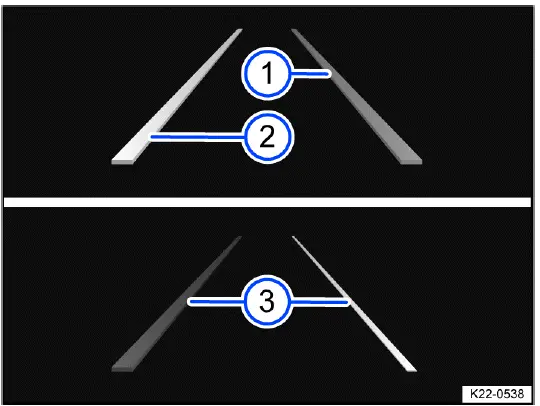
Fig. 116 In the instrument cluster display: displays of Lane Assist
- Lane marking detected. The system is ready to monitor on the indicated side.
- Lane marking detected. The system is monitoring on the indicated side.
- The system is not ready to monitor on the indicated side, depending on vehicle equipment.
The display helps the driver understand whether Lane Assist has detected lane markings and whether steering support may be available. Depending on the instrument cluster version, the lane markings may be shown differently when the system is inactive, ready, or actively intervening.
One of the following indicator lights may come on, depending on the driving situation and the instrument cluster version:
 System active and ready to
control.
System active and ready to
control.
 System in operation
(corrective steering intervention).
System in operation
(corrective steering intervention).
If the indicator light does not light up, Lane Assist is not ready for operation on both sides, meaning the system status is inactive, or the function is switched off. In this condition, the driver must keep the vehicle in the lane without assistance from the system.
 If Travel Assist is actively
controlling, there will not be any steering intervention and no Lane Assist
display.
If Travel Assist is actively
controlling, there will not be any steering intervention and no Lane Assist
display.
When another assistance function is actively controlling the vehicle path, the Lane Assist display may not appear separately. This does not mean the driver can stop supervising the road. The driver must always keep hands on the steering wheel and be ready to take over immediately.
Driver intervention request
If there is no steering activity, Lane Assist prompts the driver to guide the vehicle in the center of the lane with an indicator in the instrument cluster display and warning chimes. This request means the system has detected that the driver may not be actively steering.
If the driver does not respond accordingly, Lane Assist becomes inactive. Once inactive, the system no longer provides corrective steering support, and the driver must steer the Volkswagen Taos manually.
Depending on vehicle equipment, semi-automatic vehicle control in a medical emergency, known as Emergency Assist, may be activated. This function is equipment-dependent and operates only within its own system limitations.
Independently of steering activity, the driver may also be prompted by an indicator in the instrument cluster display and by a warning chime to drive in the middle of the lane if the corrective steering intervention continues for a long time. This can happen if the vehicle remains close to a lane marking or if the system needs repeated steering corrections.
Steering wheel vibration
The following situation may cause the steering wheel to vibrate:
- A lane is no longer detected during a sharp corrective steering intervention by the system.
In addition, you can select the Vibration or Steering wheel vibration option in the Assistance systems menu in the Infotainment system. If this option is selected, the steering wheel will vibrate if Lane Assist is active and the vehicle drifts onto a road lane marking detected by the system.
Steering wheel vibration is intended to draw attention to a possible lane departure. It should be treated as a prompt to check the lane position, road markings, traffic around the vehicle, and steering direction. In the Volkswagen Taos, this feedback is a support signal, not a replacement for active steering.
Troubleshooting
Please read the introductory information and heed the Warnings and
Notice ⇒
 Introduction.
Fault message, Lane Assist not available
An indicator light comes on in the instrument cluster. In addition, a message is shown in the instrument cluster display. This means Lane Assist is currently limited, unavailable, or unable to detect the driving situation reliably.
- The camera field of view is dirty. Clean the windshield ⇒ Vehicle care.
- The camera's view is limited due to weather conditions, such as snow, ice, fog, heavy rain, road spray, or from soap residue, wax, coatings, or dirt. Clean the windshield ⇒ Vehicle care.
- The camera's view is limited by attachments, stickers, tint strips, accessories, or objects near the windshield camera area. Clear the area around the field of view of the camera ⇒ Sensors and Cameras.
- The camera is misaligned or damaged, for example as a result of windshield damage, windshield replacement, stone impact, or repair work near the camera area. Check whether visible damage is present ⇒ Sensors and Cameras.
- The camera was automatically deactivated because of high ambient temperature or long exposure to direct sunlight. Lane Assist will be available once the camera is available again. Stop the engine and restart.
- A malfunction or fault may be present. Stop the engine and restart the vehicle.
- If the problem persists, contact an authorized Volkswagen dealer or authorized Volkswagen Service Facility. Volkswagen recommends contacting an authorized Volkswagen dealer or authorized Volkswagen Service Facility.
Because Lane Assist uses the windshield camera to read lane markings, even a small obstruction in the camera area can affect system operation. Keep the windshield clean, avoid placing stickers or accessories near the camera, and have any windshield damage checked if warning messages continue.
 It can take a few seconds
once the ignition has been switched on for a system fault to be recognized.
It can take a few seconds
once the ignition has been switched on for a system fault to be recognized.
This means a fault message may not appear immediately after startup. Wait for the vehicle systems to complete their checks and continue to monitor the instrument cluster display.
 If Lane Assist is not
available, Emergency Assist is not available either.
If Lane Assist is not
available, Emergency Assist is not available either.
 If Lane Assist is not
available, Travel Assist is not available either.
If Lane Assist is not
available, Travel Assist is not available either.
Some assistance systems depend on the same camera information or lane recognition. If Lane Assist is unavailable, related systems may also be limited or switched off until the camera view and system status are restored.
The system is functioning differently than expected
1. Do not mount any objects on the steering wheel.
Objects attached to the steering wheel can interfere with driver monitoring, steering input, or the driver's ability to respond quickly. If Lane Assist behaves unexpectedly, remove any accessories from the steering wheel, check the camera view, review the system status in the display, and drive the Volkswagen Taos manually until the cause is clear.
Comfort drive Travel Assist
Introduction
Comfort drive Travel Assist can help the vehicle maintain a driver-selected distance from the vehicle ahead and support the preferred position within the lane through adaptive lane guidance, within the limits of the system.
Travel Assist in the Volkswagen Taos combines functions of Adaptive Cruise Control (ACC) and Lane Keeping System (Lane Assist) to support the driver during suitable driving situations. The system can help regulate speed, maintain distance from traffic ahead, and assist with steering within detected lane markings. It is designed to make steady driving more comfortable, not to replace the driver.
Does this vehicle have Travel Assist?
The vehicle has Travel Assist if the
 button on the multi-function
steering wheel is available.
button on the multi-function
steering wheel is available.
Depending on vehicle equipment and country, the exact Travel Assist functions, displays, and operating behavior may vary. Check the Assistance systems menu and the instrument cluster display to confirm which functions are available in the vehicle.
Speed range
You can set a speed between 30 km/h, or approximately 20 mph, and 210 km/h, or approximately 130 mph. This speed range may vary depending on the country, vehicle equipment, and applicable regulations.
Travel Assist system limitations
Travel Assist detects driving situations using the same sensor technology as Adaptive Cruise Control (ACC) and Lane Keeping System (Lane Assist). This means the system depends on radar sensor information, camera recognition, readable lane markings, and suitable driving conditions.
 Note the system limitations
and information regarding ACC and Lane Assist. Always pay attention and
intervene yourself if necessary!
Note the system limitations
and information regarding ACC and Lane Assist. Always pay attention and
intervene yourself if necessary!
If the radar sensor, windshield camera, lane markings, weather, or traffic situation limits system detection, Travel Assist may not respond as expected. The driver must be ready to take over steering, braking, and acceleration at any time.
Driving with Travel Assist
Travel Assist can automatically regulate the speed and support steering within the lane when the operating conditions are met. Within the system limitations, Travel Assist can also bring the Volkswagen Taos to a stop behind a stopping vehicle and then drive on again when conditions allow.
You can override the Travel Assist regulation function at any time. Steering manually, braking, or accelerating can change or interrupt system control, depending on the situation. The driver should always monitor traffic ahead, lane position, surrounding vehicles, and the system messages shown in the instrument cluster.
Travel Assist works best on well-marked roads with clear lane markings, predictable traffic flow, and good visibility. It is less suitable in road construction zones, sharp curves, poor weather, heavy urban traffic, unclear lane layouts, or situations where vehicles move unpredictably.
Displays
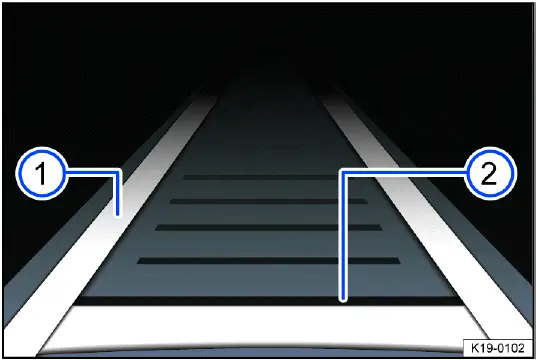
Fig. 117 In the instrument cluster display: Display during active control.
- Adaptive lane guidance is active.
- Set distance, no vehicle recognized in front.
The instrument cluster display helps the driver understand whether Travel Assist is active, whether adaptive lane guidance is available, and whether a vehicle ahead has been detected. The display may change depending on lane recognition, traffic ahead, and the current status of ACC and Lane Assist functions.
Indicator lights on the instrument cluster display show the Travel Assist status, depending on the vehicle equipment:
 Travel Assist active,
Adaptive Cruise Control and adaptive lane guidance active.
Travel Assist active,
Adaptive Cruise Control and adaptive lane guidance active.
 Travel Assist active, Adaptive
Cruise Control active and adaptive lane guidance passive.
Travel Assist active, Adaptive
Cruise Control active and adaptive lane guidance passive.
If adaptive lane guidance is passive, Travel Assist may still regulate speed and distance through ACC, but steering support may be limited or unavailable. The driver must check the display and guide the vehicle manually whenever steering support is not active.
Driver intervention request
If you remove your hands from the steering wheel, the system will ask you to take over the steering wheel after a few seconds with a message in the instrument cluster display and audible warnings. This request means the system has detected that the driver may not be actively supervising steering.
If you do not respond, the system warns you with a brief braking maneuver. This braking impulse is intended to attract attention and prompt immediate driver action.
Travel Assist is then deactivated.
Alternatively, Emergency Assist may be activated, depending on vehicle equipment. If Emergency Assist is unavailable, Travel Assist will be deactivated.
The driver intervention request must never be ignored. If the system asks the driver to take over, place both hands on the steering wheel, check the traffic situation, and take control of steering and braking as needed.
WARNING
Travel Assist is not a substitute for the driver's attention and works only within its system limits. Travel Assist cannot detect every driving situation and may fail to react, may react late, or may react in a way the driver does not expect. If the driver relies too heavily on the system, there is a risk of accidents, serious injuries, or death.
- Stay attentive at all times and use the system only as assistance. The driver is always responsible for steering, braking, acceleration, speed choice, distance control, and overall vehicle control.
- Note the system limitations of ACC ⇒ ACC system limitations and Lane Assist ⇒ Lane Assist system limitations.
- Always adapt speed and following distance to vehicles ahead based on visibility, weather, road surface, lane markings, traffic density, and the behavior of other road users.
- Always keep your hands on the steering wheel so that you are ready to steer immediately.
- Take over steering immediately if a driver intervention prompt appears in the instrument cluster display or if deceleration by Travel Assist is not sufficient.
- Apply the brakes if the vehicle continues to roll unintentionally, for example after a driver intervention prompt or when traffic ahead changes suddenly.
For safe use, keep the radar sensor and windshield camera area clean, observe all instrument cluster messages, and use Travel Assist only when the road and traffic situation are suitable. In the Volkswagen Taos, Travel Assist can reduce driving effort in the right conditions, but the driver must remain fully involved from start to finish.
Operating Travel Assist
Please read the introductory information and heed the Warnings and
Notice ⇒
 Introduction.
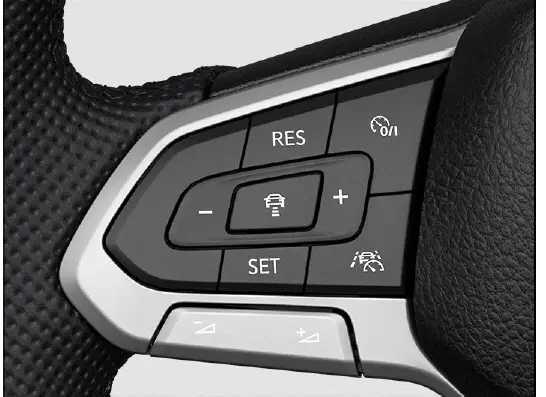
Fig. 118 Left side of the multi-function steering wheel (variant 1).
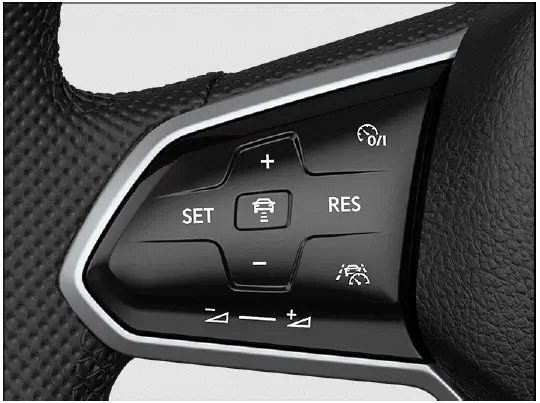
Fig. 119 Left side of the multi-function steering wheel (variant 2).
Switching on and starting the regulation function
1. During forward travel with ACC switched on, press the
 button on the multi-function
steering wheel.
button on the multi-function
steering wheel.
The vehicle switches from ACC to Travel Assist. Depending on the road markings, the vehicle ahead, and the current driving situation, Travel Assist may begin supporting both speed and lane guidance or may remain available without active steering support.
Depending on the driving situation, the vehicle switches to the following system status in Travel Assist:
- If ACC is regulating, Travel Assist maintains the current speed and the preset distance from the vehicle driving ahead. If adaptive lane guidance is not yet available, the system status may remain inactive for steering support.
- At the same time, the vehicle is kept in its lane by steering movements when road markings are detected and the system status is active.
If ACC is not regulating, Travel Assist is switched on, but remains deactivated until the required operating conditions are met.
1. Press the
 button.
Travel Assist switches the driving situation accordingly to an active or inactive system status. The Volkswagen Taos may show different instrument cluster indications depending on whether only speed regulation is active, whether lane guidance is also active, or whether the system is only ready.
The indicator or warning light corresponding to the driving situation comes on in the instrument cluster display. A notification is also displayed. Always confirm the system status visually and do not assume that steering or distance control is active unless the display shows it.
Canceling the regulation function
1. Press the
 button briefly.
Or: Press the brake pedal.
The set distance remains saved. Regulation is paused, but the last selected distance can be used again when Travel Assist or ACC is resumed, provided the operating conditions are suitable.
Changing to ACC
1. Press the
 button on the
multi-function steering wheel.
button on the
multi-function steering wheel.
The vehicle switches from Travel Assist to the ACC system status that corresponds to the driving situation. In this mode, the Volkswagen Taos may continue to regulate speed and following distance, but adaptive lane guidance from Travel Assist is no longer the active function.
Adjusting further settings
The further operation of Travel Assist corresponds to the operation of ACC ⇒ Adjusting the ACC settings. This includes adjusting the set speed, selecting the following distance, resuming regulation, and adapting the driving response where available.
Because Travel Assist uses ACC and Lane Assist functions together, any settings or limitations affecting those systems can also influence Travel Assist behavior. The driver should check both the selected speed and the lane guidance status before relying on the system for support.
Troubleshooting
Please read the introductory information and heed the Warnings and
Notice ⇒
 Introduction.
 Travel Assist is not
available or is not functioning as expected
Travel Assist is not
available or is not functioning as expected
The yellow indicator light turns on. In addition, a message is shown in the instrument cluster display. This means Travel Assist is currently unavailable, limited, or unable to provide the expected support.
- There may be a malfunction in the sensor system. Check the causes and troubleshooting measures described in the information on ACC and Lane Assist.
- A malfunction or temporary fault may be present. Stop the engine and restart the vehicle.
- The system limitations may not be observed, for example because lane markings are unclear, sensors are covered, weather conditions are poor, or traffic conditions are unsuitable.
- If the problem persists, contact an authorized Volkswagen dealer or authorized Volkswagen Service Facility. Volkswagen recommends contacting an authorized Volkswagen dealer or authorized Volkswagen Service Facility.
Travel Assist depends on clean sensors, a clear windshield camera view, readable lane markings, and correct operation of ACC and Lane Assist. If one of these inputs is limited, the system may switch off, remain inactive, or provide only partial support.
 Take over the steering
The white warning light comes on and a message is shown in the instrument cluster display.
You have let go of the steering wheel for a few seconds.
1. Take hold of the steering wheel and take over steering the vehicle.
This request should be handled immediately. Travel Assist is designed to support an attentive driver, not to operate without hands on the steering wheel. Keep your hands on the wheel and guide the vehicle yourself whenever the system requests intervention.
 Take over the steering
immediately
Take over the steering
immediately
The red warning light comes on and a message is shown in the instrument cluster display. An audible warning sounds or the steering wheel vibrates, depending on the driving situation.
You have let go of the steering wheel for a long period of time, or the system limits have been reached.
1. Immediately take hold of the steering wheel and take over steering the vehicle.
A red takeover request means the situation requires direct driver control. In the Volkswagen Taos, this may occur if the system can no longer recognize the lane reliably, if steering support is limited, if road conditions change, or if the driver has not responded to earlier prompts.
Comfort drive Travel Assist switches off automatically
Vehicles without Emergency Assist:
- You have let go of the steering wheel for a long period of time.
- A malfunction or fault may be present. Stop the engine and restart the vehicle.
- If the problem persists, contact an authorized Volkswagen dealer or authorized Volkswagen Service Facility. Volkswagen recommends contacting an authorized Volkswagen dealer or authorized Volkswagen Service Facility.
If Travel Assist switches off automatically, continue driving manually and monitor the instrument cluster for additional messages. Do not attempt to rely on the system again until the reason for the deactivation is clear and the driving situation is suitable.
The regulation function is canceled unexpectedly
- You have operated the turn signal.
Using the turn signal can indicate an intended lane change, so Travel Assist may cancel or change its regulation behavior. This is normal in many driving situations. The driver should complete the lane change manually and reactivate the desired assistance function only when the Volkswagen Taos is safely positioned in the new lane.
Semi-automatic vehicle control in a medical emergency (Emergency Assist)
Introduction
Emergency Assist is designed to identify a possible lack of driver activity and, within its operating limits, help keep the vehicle positioned in its lane. If the driver does not respond, the vehicle may reduce speed and come to a controlled stop. In a Volkswagen Taos, this technology can help lower the risk of a collision or reduce the severity of an accident when a medical emergency or sudden driver incapacity occurs.
Emergency Assist system limitations
Emergency Assist evaluates the driving situation using the same basic sensor network and driving support features used by Adaptive Cruise Control (ACC) and the Lane Keeping System (Lane Assist). Because of this, it depends on clear lane markings, suitable road conditions, correct sensor visibility, and the availability of the related driver assistance features.
In the Volkswagen Taos, Emergency Assist should be understood as a support feature, not as an autonomous driving capability. It can help in very specific circumstances, but it does not replace the driver's awareness, judgment, or responsibility for controlling the vehicle at all times.
WARNING
Emergency Assist is not a substitute for an attentive driver and only operates within defined limits. It may not recognize every driving situation, may respond too late, may respond unexpectedly, or may not respond at all. The feature also cannot guarantee that an accident or serious injury will be avoided. If the driver is careless, distracted, tired, or relies too heavily on driver assistance technology, there is a risk of accidents, severe injuries, and death.
- Always remain attentive and ready to take over immediately. The driver is always responsible for steering, braking, accelerating, and maintaining control of the vehicle.
- Observe the operating limits of Adaptive Cruise Control (ACC) ⇒ ACC system limitations and Lane Assist ⇒ Lane Assist system limitations.
- Adjust your speed and following distance to the vehicles ahead, weather, visibility, road surface, traffic flow, and surrounding driving conditions.
- If the Volkswagen Taos reacts in a way that does not match the traffic situation, cancel the Emergency Assist intervention by steering, braking, or accelerating as needed.
Driving with Emergency Assist
Please read the introductory information and heed the Warnings and
Notice ⇒
 Introduction.
Switching on and off
When the ignition is switched on, Emergency Assist is available only when the required supporting features and driving conditions are present. It is linked to Lane Assist and Adaptive Cruise Control (ACC), so it cannot operate independently from those technologies.
Emergency Assist is active under the following conditions:
- The Lane Assist system and Adaptive Cruise Control (ACC) are switched on and ready to operate.
- A forward driving gear is selected.
- The camera can detect lane markings on both the left and right sides of the vehicle.
If the lane markings are unclear, covered, worn away, missing, or difficult for the camera to read, Emergency Assist may not be available. The same can happen on sharp curves, construction zones, narrow roads, roads with confusing markings, or in poor weather conditions.
 If Lane Assist is not available, Emergency Assist is not available either.
Driver intervention request
If Emergency Assist detects that the driver is not actively participating in driving, it first attempts to get the driver's attention. The vehicle may use warning chimes, visual messages in the instrument cluster, and a short braking maneuver to prompt the driver to take over immediately.
The purpose of this warning phase is to give the driver a clear opportunity to respond before stronger intervention begins. The driver should place both hands on the steering wheel, check traffic conditions, and resume full control without delay.
In addition, a message is shown in the instrument cluster display.
System intervention
If the driver does not react to the warning prompts, Emergency Assist can begin regulating the vehicle. Depending on the situation, it may keep the vehicle within the detected lane and reduce speed in a controlled manner. In the instrument cluster display, one of the following indicator lights comes on:
 System is regulating.
You can stop the regulation at any time by accelerating, braking, or steering as appropriate for the traffic situation.
Whenever Emergency Assist is actively controlling the vehicle, the emergency flashers switch on after a short delay to alert other road users. This warning helps nearby drivers recognize that the vehicle may be slowing down or stopping unexpectedly.
If the remaining stopping distance is sufficient, the vehicle slows down as needed and may come to a complete stop. This depends on the current speed, the road layout, traffic conditions, and whether the lane markings remain readable.
As soon as the vehicle comes to a standstill, the following happens:
- The electronic parking brake is switched on to help secure the vehicle.
- Depending on the vehicle equipment, an emergency call is made automatically.
This Emergency Assist feature in the Volkswagen Taos is intended to support the driver in rare and critical situations, such as a sudden medical emergency. It must not be used deliberately as a convenience feature, and the driver must never allow the vehicle to take over because of distraction, fatigue, or unsafe behavior.
Troubleshooting
Please read the introductory information and heed the Warnings and
Notice ⇒
 Introduction.
The system is triggered unwantedly or is functioning differently than expected
A malfunction, sensor issue, camera restriction, electronic fault, or unfavorable driving condition may cause Emergency Assist to behave unexpectedly. It may issue warnings when they are not needed, fail to activate when expected, or limit availability if Lane Assist or ACC cannot operate as intended.
- Switch off the Lane Keeping System (Lane Assist) if the vehicle behavior feels unusual or inappropriate for the current road situation.
- Do not use semi-automated driving assistance such as Travel Assist until the cause has been checked.
- Make sure the windshield area in front of the camera and the radar sensor area are clean, unobstructed, and free from snow, ice, heavy dirt, stickers, or accessories that could interfere with sensor operation.
- Contact suitably qualified professionals to have the vehicle checked. Volkswagen recommends contacting an authorized Volkswagen dealer or authorized Volkswagen Service Facility.
After any windshield replacement, front-end repair, wheel alignment work, sensor-related repair, or driver assistance warning message, Emergency Assist should be checked if its operation appears limited or inconsistent. Correct calibration and clear sensor visibility are essential for reliable driver assistance performance.
"Blind Spot" Monitor
Introduction
The "Blind Spot" Monitor supports the driver by observing traffic approaching from behind and from the rear side areas of the vehicle. In the Volkswagen Taos, this feature is intended to make lane changes more predictable by giving a visual warning when another vehicle may be traveling in a difficult-to-see area.
Radar sensors located behind the rear bumper cover monitor the area to the rear and sides of the vehicle. The system compares the distance and relative speed of nearby vehicles, then informs the driver through visual signals in the outside mirrors when a vehicle is detected in or near the blind spot zone.
The "Blind Spot" Monitor is especially useful on multi-lane roads, highways, and urban roads with steady traffic flow. However, it is not designed to replace mirror checks, shoulder checks, turn signal use, or the driver's own judgment before changing lanes.
Only use the "Blind Spot" Monitor on paved roads.
Speed range
When the "Blind Spot" Monitor is switched on, it becomes active at speeds above approx. 15 km/h (approx. 9 mph). Below this range, the system may remain inactive or may not provide warnings, depending on the driving situation and vehicle equipment.
WARNING
The "Blind Spot" Monitor is not a replacement for the driver's attention and operates only within defined system limitations. The "Blind Spot" Monitor cannot detect every driving situation or every object in the surrounding area. It may fail to warn, may warn too late, or may provide a warning in a way that is not expected. If the driver is careless, distracted, or relies only on this feature, there is a risk of accidents, serious injuries, and death.
- Always stay attentive and do not rely solely on the system. The driver is always responsible for controlling the vehicle and for making safe lane changes.
- Observe the system limitations ⇒ System limitations of the "Blind Spot" Monitor.
- Always adapt your speed and distance to vehicles driving ahead based on visibility, weather, road surface, traffic density, and surrounding conditions.
- Always keep your hands on the steering wheel so that you are prepared to steer at any time.
- Pay attention to the displays in the outside mirror glass and in the instrument cluster display, and respond according to the traffic situation.
- Before changing lanes in the Volkswagen Taos, always check the mirrors, look over your shoulder, use the turn signal, and confirm that the adjacent lane is clear.
System limitations of the "Blind Spot" Monitor
Please read the introductory information and heed the Warnings and
Notice ⇒
 Introduction.
Limits of the sensor system
The "Blind Spot" Monitor detects driving situations through radar sensors installed in the rear area of the vehicle. These sensors require a clear detection area and can be affected by road conditions, weather, dirt, ice, bumper damage, or accessories installed near the rear bumper.
Because the radar sensors evaluate movement and relative speed, the warning may vary depending on how quickly another vehicle approaches from behind, how close it is to the side of the vehicle, and whether the traffic pattern is stable or changing quickly.
 Note the limits of the radar
sensors ⇒ Limits of the sensor system and always pay attention!
Note the limits of the radar
sensors ⇒ Limits of the sensor system and always pay attention!
Functional limitations
Among other possibilities, the "Blind Spot" Monitor may not interpret the traffic situation correctly in the following situations:
- When driving in the center of two lanes.
- When lanes have different widths.
- When certain types of equipment are on the side of the road, such as high or offset guard rails.
- When driving through tight curves, ramps, construction zones, or areas with unusual lane markings.
- When another vehicle approaches very quickly or remains in a position where the radar reflection is weak.
- When the rear bumper area is dirty, covered with snow or ice, damaged, repainted incorrectly, or blocked by objects.
For this reason, the driver should treat the warning in the mirror as additional information rather than as final confirmation that a lane change is safe. The Volkswagen Taos can assist with awareness, but the decision to move into another lane must always be made by the driver.
Restricted visibility
Sunlight may reduce the visibility of the indicator light in the outside mirrors.
Visibility of the mirror indicator may also be reduced by glare, heavy rain, dirty mirror glass, tinted reflections, or bright surrounding light. If the indicator is difficult to see, drive more cautiously and rely on direct visual checks before changing lanes.
Driving with the "Blind Spot" Monitor
Please read the introductory information and heed the Warnings and
Notice ⇒
 Introduction.
Switching on and off
You can view whether the "Blind Spot" sensor is switched on in the instrument cluster display and in the Infotainment system. You can also switch the "Blind Spot" sensor on or off from these menus, depending on equipment and vehicle settings.
If the feature has been switched off, the mirror warning indicators will not assist with lane changes. After starting the vehicle, check the current status if you expect the "Blind Spot" Monitor to be available during the drive.
In the instrument cluster display:
1. Press the
 button.
2. Switch the "Blind Spot" Monitor on or off.
 Depending on the vehicle
equipment, the
Depending on the vehicle
equipment, the
 button is located
either on the multi-function steering wheel or the turn signal
and high beam lever.
button is located
either on the multi-function steering wheel or the turn signal
and high beam lever.
In the Infotainment system:
1. Open the Assistance systems menu.
2. Switch the "Blind Spot" Monitor on or off in the corresponding submenu.
When the "Blind Spot" Monitor is ready for operation, the yellow
 indicator light comes on once
briefly in the outside
mirrors.
indicator light comes on once
briefly in the outside
mirrors.
This brief illumination confirms that the indicator lamps are functioning. If the light does not appear when expected, or if a warning message is shown, the driver should check whether the feature is available before relying on it during lane changes.
 If there is a system
malfunction, the "Blind Spot" Monitor may switch off automatically.
If there is a system
malfunction, the "Blind Spot" Monitor may switch off automatically.
If the system switches off by itself, it may be caused by a temporary obstruction, sensor contamination, electrical fault, or driving condition that prevents reliable monitoring. Clean the rear bumper area if necessary and continue to drive attentively. If the message remains or returns repeatedly, have the vehicle checked by suitably qualified professionals.
Displays in the outside mirror
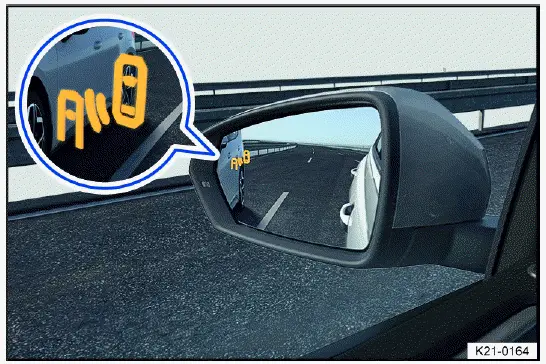
Fig. 120 In the mirror glass of the outside mirrors: Blind Spot Monitor
indicator.
The indicator in the outside mirror warns the driver when another vehicle is detected in the monitored area or is approaching from behind in a way that could make a lane change unsafe. If the turn signal is used while a vehicle is detected on that side, the warning may become more noticeable depending on equipment, helping draw attention to the possible hazard.
Even when no warning is displayed, the driver must still check the surrounding traffic carefully. Small motorcycles, fast-approaching vehicles, vehicles moving at unusual angles, or objects outside the radar detection range may not always be recognized. For safe use in the Volkswagen Taos, combine the mirror display with normal lane-change habits and direct observation.
 Flashing: A vehicle has been detected in the blind spot area and the turn signal has also been activated in the direction of the detected vehicle. This warns the driver that changing lanes could create a critical situation.
 lit: your own vehicle is being overtaken, or you are overtaking another vehicle with a speed difference of up to approx. 10 km/h (approx. 6 mph).
There is no indicator if the passing speed is clearly faster. In that case, the detected vehicle may move through the monitored area too quickly for the mirror display to remain useful as a steady warning.
The faster another vehicle approaches from behind, the sooner the display in the outside mirrors will turn on. This early visual warning helps the driver recognize traffic approaching from the rear side before making a lane change.
Even when the warning lamp is not illuminated, the driver must still check the mirrors, look over the shoulder, use the turn signal properly, and confirm that the adjacent lane is clear. The "Blind Spot" Monitor in the Volkswagen Taos is a driver awareness feature, not a substitute for safe lane-changing habits.
"Blind Spot" Sensor "Plus"
On vehicles with Lane Assist, the yellow
 indicator light in the instrument cluster display will flash even without activating the turn signal when leaving a lane if Lane Assist is switched on ("Blind Spot" Monitor "Plus"). You will be notified of a potential critical situation through information and warning levels, and the vehicle may provide corrective steering support.
Corrective steering can also occur if the turn signal is activated for the respective side and another vehicle is detected in the monitored area. If the driver overrides the corrective steering, an additional warning may be given through steering wheel vibration. For this vibration warning to occur, steering wheel vibration must be activated in the vehicle settings in the Infotainment system.
In the Volkswagen Taos, "Blind Spot" Sensor "Plus" works together with Lane Assist to help draw attention to a possible side collision risk. The driver remains fully responsible for steering and must always decide whether the lane change is safe based on actual traffic conditions.
Troubleshooting
Please read the introductory information and heed the Warnings and
Notice ⇒
 Introduction.
 "Blind Spot" Monitor
malfunction
"Blind Spot" Monitor
malfunction
A malfunction or fault has been detected. The yellow indicator light in the instrument cluster display lights up to inform the driver that the monitoring feature may not be available or may not operate correctly.
1. If a malfunction or fault message appears, stop the engine and restart the vehicle. This may clear a temporary electronic fault if the cause was only a short-term communication or sensor issue.
2. If the problem persists, contact an authorized Volkswagen dealer or authorized Volkswagen Service Facility. Volkswagen recommends contacting an authorized Volkswagen dealer or authorized Volkswagen Service Facility.
Do not rely on the mirror warning lamps while a malfunction message is active. Until the cause is corrected, use extra caution when changing lanes and depend on direct visual checks, mirror checks, and traffic awareness.
Malfunctioning sensor view, malfunction message, system switches off automatically
- Clean the radar sensors and remove stickers, attachments, dirt, ice, snow, or other obstructions from the radar sensor area or the bumper ⇒ Exterior care and cleaning, ⇒ Sensors and Cameras.
- Check whether there is any visible damage near the rear bumper or radar sensor area ⇒ Sensors and Cameras.
- If the problem persists, contact an authorized Volkswagen dealer or authorized Volkswagen Service Facility. Volkswagen recommends contacting an authorized Volkswagen dealer or authorized Volkswagen Service Facility.
If the "Blind Spot" Monitor switches off automatically, the cause may be temporary, such as heavy dirt, road spray, snow, water on the bumper, or weather-related sensor restriction. It may also be caused by damage, incorrect repairs, or accessories mounted near the detection area.
 The system only becomes
available again once you have switched the ignition off and back on and switched
on the "Blind
Spot" Monitor.
The system only becomes
available again once you have switched the ignition off and back on and switched
on the "Blind
Spot" Monitor.
The system is functioning differently than expected
- The radar sensors could be dirty. Clean the radar sensors ⇒ Exterior care and cleaning.
- The radar sensors could be covered by water, road spray, snow, or ice.
- The view of the radar sensors may be limited due to weather conditions, such as snow, heavy rain, fog, dirt, soap residue, wax, polish, or surface coatings.
- Clean the radar sensors carefully and avoid abrasive cleaning methods that could damage the bumper surface ⇒ Exterior care and cleaning.
- The operating limits are not being observed ⇒ System limitations of the "Blind Spot" Monitor.
- The vehicle could be damaged in the radar sensor area, for example from parking barriers, minor rear impacts, or contact with objects near the bumper. Check whether there is any noticeable damage ⇒ Sensors and Cameras.
- The view of the radar sensors is limited by attachments, bicycle rack systems, trailer equipment, bumper covers, stickers, or other objects. Clear the area around the radar sensor field of view ⇒ Sensors and Cameras.
- Painting work was carried out on, or structural modifications were made to, the area around the radar sensors, the rear of the vehicle, or the suspension ⇒ Repairs and technical modifications.
- The side mirrors have been covered with after-market tinting films, which can reduce the visibility of the warning indicators ⇒ Repairs and technical modifications.
- If the problem persists, contact an authorized Volkswagen dealer or authorized Volkswagen Service Facility. Volkswagen recommends contacting an authorized Volkswagen dealer or authorized Volkswagen Service Facility.
For reliable operation in the Volkswagen Taos, the rear bumper area must remain clean and free of unauthorized modifications. After rear bumper repair, repainting, accident damage, sensor replacement, or suspension work, the driver assistance sensors may need inspection or calibration by qualified professionals.
If the warning behavior changes suddenly, becomes inconsistent, or appears without a clear reason, do not assume the feature is working normally. Continue driving attentively, check surrounding traffic manually, and have the vehicle inspected if the condition returns.