
Volkswagen Taos: Lights
Exterior lighting
Switching the turn signals on and off
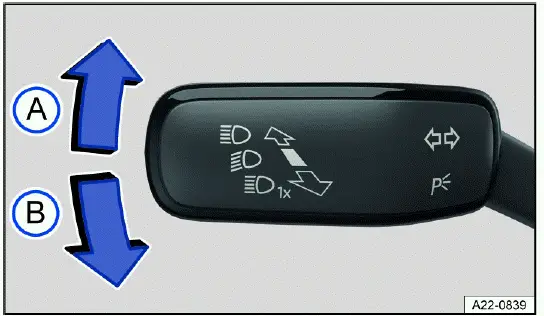
Fig. 76 On the left side of the steering column: turn signal and high beam lever.
- Right turn signal
 .
. - Left turn signal
 .
.
Switching the turn signals on and off
1. Switch the ignition on.
2. Move the lever out of the center position into the desired position fig. 76.
3. To cancel the turn signal, move the lever back to its basic position.
The turn signals tell other road users what you intend to do before you change direction. Use them early enough before turning, changing lanes, entering traffic, leaving a parking space, or passing another vehicle.
If no chime sounds when the turn signal is on, contact suitably qualified professionals and have the vehicle checked.
Volkswagen recommends contacting an authorized Volkswagen dealer or authorized Volkswagen Service Facility.
3-blink turn signal
1. Move the lever upward or downward to the pressure point and then release the lever.
The turn signal will blink three times.
To stop the 3-blink turn signal before it ends, move the lever immediately to the pressure point in the opposite direction and release.
The 3-blink turn signal can be activated and deactivated in the vehicle settings in the Infotainment system ⇒ Vehicle settings menu.
The 3-blink function is useful for short lane changes when a full turn-signal cycle is not needed. In the Volkswagen Taos, this convenience feature should still be used with enough time for nearby drivers, cyclists, and pedestrians to understand your movement.
WARNING
Using the turn signals incorrectly, not using the turn signals, or forgetting to turn the turn signal off can mislead other road users. This can cause accidents and serious or fatal injuries.
- Always activate the turn signals correctly when changing lanes, passing, or turning.
- Switch the turn signal off again every time you finish changing lanes, passing, or turning.
After completing a turn or lane change, confirm that the turn signal has cancelled. A signal left on for too long can make other road users expect a maneuver that you are no longer planning to make.
The emergency flashers also work when the ignition is switched off ⇒ In case of an emergency.
Switching the lights on and off
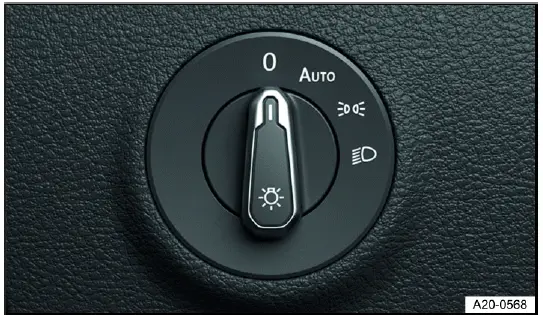
Fig. 77 Next to the steering wheel: light switch (one version).
Switching the lights on
1. Switch the ignition on.
2. Turn the light switch to the desired position fig. 77:
 The side lights or parking lights and daytime running lights are switched on.
 Automatic headlight control: the headlights will switch on or off depending on the brightness and weather conditions ⇒
  , ⇒ Automatic headlight control.
 The side lights or parking lights and daytime running lights are switched on. The green symbol in the light switch turns on.
 The low beam headlights are switched on.
The correct lighting position depends on visibility, traffic, weather, and local requirements. Even if automatic lighting is available, the driver must still decide when low beam headlights are needed for safe visibility.
Switching the lights off
1. Switch the ignition off.
2. Turn the light switch to the desired position:
 The lights are switched off.
 The orientation lighting can be switched on ⇒ "Exit lighting" and "Entry lighting" function (orientation lighting).
 The parking light is switched on ⇒ Parking lights. The green symbol in the light switch turns on.
 The low beam headlights are switched off.
Vehicles with starter button: As long as the driver door is closed, the parking light continues to light up.
Before leaving the vehicle parked, check that the selected light position is appropriate so the lights do not stay on longer than intended. This helps prevent unnecessary discharge of the 12 V vehicle battery.
Daytime running lights
The optional daytime running lights can increase the visibility of your vehicle in traffic during the daytime. They are intended to make the vehicle easier to notice in daylight, but they are not a substitute for low beam headlights in darkness or poor weather.
The daytime running light turns on automatically every time the ignition is switched on if the light switch is in the  ,
,  or
or  position, if brightness is detected.
The daytime running lights cannot be switched on or off manually.
For Volkswagen Taos exterior lighting, remember that daytime running lights improve front visibility during the day, but they may not illuminate the rear of the vehicle. Use low beam headlights when the vehicle must be visible from both front and rear.
Daytime running lights parking function
Depending on the equipment, the vehicle may have a daytime running lights parking function to turn off the daytime running lights temporarily when the ignition is switched on.
Switch off the daytime running lights:
1. Switch the ignition on.
2. Turn the light switch to the  position.
3. Set the electronic parking brake.
Switch on the daytime running lights:
1. Switch off the electronic parking brake.
This parking function can be useful when the vehicle is stationary and the driver wants to reduce exterior light output. Before driving away, make sure the lighting system returns to the correct operating mode.
WARNING
If the vehicle lighting is not used appropriately for the weather conditions, the road will not be illuminated sufficiently. The vehicle will not be visible to other road users or will be difficult to see. This can cause accidents and serious or fatal injuries.
- Always turn on the low beam headlight in the dark, when it is raining, and when visibility is poor.
- Regularly check that the lighting system and turn signals are functioning correctly.
Fog, heavy rain, snow, dusk, shaded roads, tunnels, and spray from other vehicles can reduce visibility faster than the driver may expect. In these conditions, switch on the low beam headlights manually if automatic lighting does not respond soon enough.
WARNING
The parking lights or daytime running lights are not bright enough to illuminate the road sufficiently and to be seen by other road users. The taillights do not switch on with the daytime running lights. The vehicle may not be seen by other road users in the dark, in the fog, and when visibility is poor if its taillights are not turned on. This can cause accidents and serious or fatal injuries.
- Always turn on the low beam headlight in the dark, when it is raining, and when visibility is poor.
Do not rely on daytime running lights when rear visibility matters. If other vehicles need to see the Volkswagen Taos from behind, use the lighting mode that activates the rear lights as well.
WARNING
The automatic headlights  are for assistance only. The driver is always responsible for turning on the correct vehicle lighting. Automatic headlight control
  only turns the low beam headlights on and off when there are changes in brightness. Insufficient lighting on the road may cause accidents and serious or fatal injuries.
- Turn on the low beam headlights manually in certain weather conditions, such as in fog.
Automatic headlight control may not always recognize fog, road spray, snowfall, or rapidly changing visibility in the same way a driver does. Check the lighting status regularly and switch to low beam manually whenever visibility or legal requirements demand it.
Switching the high beam headlights on and off
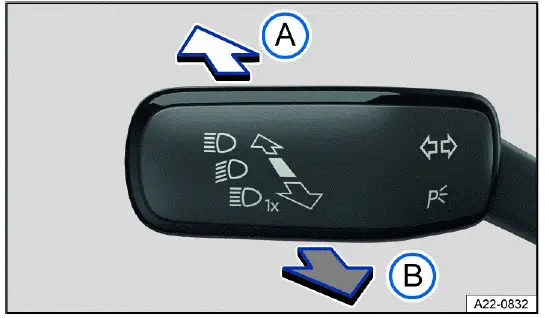
Fig. 78 On the left side of the steering column: turn signal and high beam lever.
-
 Turn on the high beam headlight.
 - Activate the headlight flashers or turn off the high beam headlights.
When the high beam headlights or the headlight flashers are operating, the blue
 indicator light appears in the Volkswagen Digital Cockpit ⇒
 . This symbol confirms that the high beam lighting function is active and reminds the driver to monitor the road ahead carefully.
Turning on the high beam headlight
1. Switch the ignition on.
2. Switch on the low beam headlight.
3. Press the turn signal and high beam lever forward out of the center position fig. 78. In the Volkswagen Taos, this lever controls both the turn signals and the high beam function, so the movement should be firm but controlled.
Turning off the high beam headlight
1. Pull the turn signal and high beam lever backward out of the center position fig. 78. The blue high beam indicator should go out when the high beams are no longer active.
Turning the headlight flasher on and off
1. Pull the turn signal and high beam lever backward out of the center position and hold it fig. 78.
Release the turn signal and high beam lever to turn the headlight flasher off. The flasher function is intended for brief signaling only, for example to alert another road user, and should not be used as a substitute for normal headlight operation.
High beam assistance
Depending on the vehicle equipment, an automatic high beam assistance may be available → page, High beam assistance (Light Assist). On equipped Volkswagen Taos models, this feature can reduce the need for repeated manual switching during nighttime driving, but it does not remove the driver’s responsibility to choose the correct lighting.
WARNING
Incorrect use of the high beam headlight may distract and blind other road users. This can cause accidents and serious or fatal injuries.
- Use the high beam headlights only if other road users cannot be distracted or blinded.
High beam assistance (Light Assist)
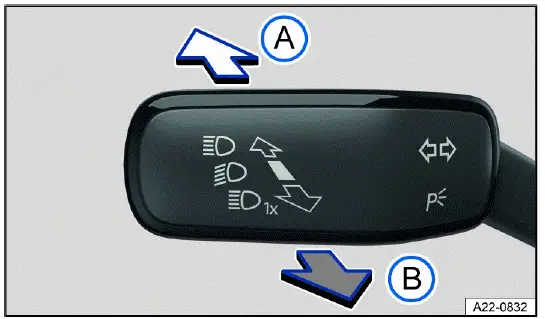
Fig. 79 On the left side of the steering column: turn signal and high beam lever.
The high beam assistance system, also called Light Assist, automatically dims the high beams when it detects oncoming traffic or vehicles traveling ahead. The system can also recognize many brightly illuminated areas, such as towns, city streets, or well-lit road sections, and it deactivates the high beam headlights when stronger lighting is not suitable.
The high beam headlights switch on and off automatically within the limits of the system, depending on the surrounding light, traffic conditions, road layout, and vehicle speed ⇒
 . Light Assist is designed to support the driver during dark-road driving, but it cannot interpret every traffic situation in the same way a driver can.
 Switching on high beam assistance (Light Assist)
1. Switch the ignition on.
2. Switch on the automatic headlights
 ⇒ Switching the lights on and off.
3. Tap the lever forwards out of the basic position fig. 79. The action should be a short, deliberate movement rather than a long hold unless the sensitivity setting is being adjusted.
When high beam control (Light Assist) is switched on, the
 indicator light lights up in the Volkswagen Digital Cockpit display. If Light Assist is active and the system has switched on the high beams, the blue
 indicator light for the high beams in the instrument cluster will turn on.
Adjusting the sensitivity of Light Assist
Depending on the country, the sensitivity of Light Assist can be set in two stages. Increase sensitivity: push the lever forwards out of the starting position and hold it in place for approx. 15 seconds fig. 79. This setting may make the system react earlier in certain driving situations, depending on the equipment and market configuration of the Volkswagen Taos.
The
 indicator light on the instrument cluster will blink three times to confirm that this has been applied.
Reset sensitivity to standard setting: push the lever forwards out of the starting position and hold it in place for approx. 15 seconds fig. 79.
The
 indicator light on the instrument cluster will blink three times in quick succession to confirm that this has been applied. After the reset, the system returns to its normal response behavior.
Switching off high beam control (Light Assist)
1. Switch off the automatic headlights
 ⇒ Switching the lights on and off.
Or: if high beam control (Light Assist) is switched on and active, pull the lever backwards fig. 79.
Or: if high beam control (Light Assist) is switched on and is not active, press the lever forwards fig. 79. The manual high beam headlights are now switched on. To switch off the manual high beam if necessary, pull the lever backwards B. This allows the driver to override the system quickly when road or traffic conditions require immediate manual control.
System limitations
The high beams must be switched off manually in the following situations, because Light Assist may not switch them off at the right time or at all. The system depends on camera visibility, lighting contrast, traffic movement, and the condition of the windshield, so the driver must stay attentive and intervene whenever necessary.
- In poorly lit towns which cannot be recognized as a town by the system.
- On poorly lit roads with strongly reflective signs.
- If there are others on the road who have inadequate lighting, such as pedestrians or cyclists.
- If there is cross traffic at perpendicular intersections.
- On tight curves where the view of traffic is partially obstructed, on steep rises, or in dips.
- When there are oncoming vehicles on roads with a center barrier and the drivers in the oncoming vehicle can clearly see above the barrier, for example truck drivers.
- In fog, snow, and heavy rain.
- When there are dust and sand in the air.
- If the windshield is damaged in the camera's field of vision.
- If the camera visual field is fogged over, dirty, or covered by a sticker, snow, or ice.
- If the camera switches off automatically due to a high ambient temperature or exposure to direct sunlight for a prolonged period. Light Assist will be available once the camera is available again.
- If the camera is faulty and the power supply is interrupted.
For reliable operation in the Volkswagen Taos, the area of the windshield in front of the camera should remain clean and unobstructed. Even a small patch of ice, road film, interior fogging, or an aftermarket sticker in the camera’s viewing area can affect how accurately the system detects lights and road conditions.
WARNING
Light Assist may not detect all traffic situations correctly and the function may be restricted in certain situations. High beam control (Light Assist) is only an aid. The driver is always responsible for turning on the correct vehicle lighting.
Switching on the high beam headlight at the wrong time may distract and blind other road users. This can cause accidents and serious or fatal injuries.
- Always control the headlights yourself and adapt them to the lighting, visual, and traffic conditions.
- Switch the high beam off manually if it could blind other road users.
WARNING
If the camera lens is dirty, covered, or damaged, the Light Assist function may be limited. This is also the case if the vehicle lighting system is changed, such as by adding auxiliary headlights. This can cause accidents and serious or fatal injuries.
- Regularly clean the camera view area and keep it free of snow and ice.
- Do not cover the camera view area.
- Regularly check the windshield for damage in the camera lens area.
Dynamic cornering light
The dynamic cornering lights help improve roadway illumination by directing additional light into the path of travel when the vehicle is turning. In the Volkswagen Taos, this function is designed to make curves, intersections, driveways, and poorly lit side roads easier to see, especially during nighttime driving or in low-visibility conditions.
The dynamic cornering light only works when the automatic headlights
 are switched on and at speeds of more than approximately 10 km/h (approximately 6 mph). When these conditions are met, the lighting system can adjust the direction of the light pattern so that the area ahead of the turn is illuminated more effectively.
The dynamic cornering light can be activated and deactivated in the vehicle settings in the Infotainment system ⇒ Vehicle settings menu. This allows the driver to tailor the lighting behavior to personal preference, road conditions, or local driving needs without changing the basic headlight operation.
Troubleshooting
 Turn signal indicator light
The green indicator light blinks.
If a turn signal light on the vehicle is not working, the indicator light will blink twice as fast. This faster blinking is a warning that one of the exterior turn signal lamps may have failed or that there may be a fault in the related lighting circuit.
1. Check the lights and replace any bulbs as necessary ⇒ Introduction. Walk around the vehicle and confirm that the front, rear, and side turn signal lights are operating as expected.
2. If the malfunction persists, contact a suitably qualified professional. Volkswagen recommends contacting an authorized Volkswagen dealer or authorized Volkswagen Service Facility. Continuing to drive with a turn signal fault may reduce how clearly other road users can understand your driving intentions.
 Exterior lighting malfunction
The yellow indicator light turns on.
The headlights have completely or partially failed. Depending on the type of fault, low beams, high beams, parking lights, turn signals, or part of the exterior lighting system may be affected.
1. Check the lights and replace any bulbs as necessary ⇒ Introduction. Make sure that the lighting switch, automatic headlight setting, and visible lamp units are checked before continuing to drive in darkness.
2. If the malfunction persists, contact a suitably qualified professional. Volkswagen recommends contacting an authorized Volkswagen dealer or authorized Volkswagen Service Facility. A professional inspection is especially important if the warning returns after replacing a bulb or if several lighting functions fail at the same time.
 Rain/light sensor malfunction
The yellow indicator light turns on.
In the
 light switch position, the vehicle lighting will not turn on or off automatically. If this happens, the driver must operate the headlights manually and should not rely on automatic lighting activation in tunnels, at dusk, during rain, or in shaded areas.
1. Switch the ignition off and on. This may reset the system if the warning was caused by a temporary electronic fault.
2. If the malfunction persists, contact a suitably qualified professional. Volkswagen recommends contacting an authorized Volkswagen dealer or authorized Volkswagen Service Facility. The rain/light sensor is part of the automatic lighting logic, so a fault may affect several convenience and visibility functions in the Volkswagen Taos.
Dynamic cornering light
The swinging behavior of the bulbs can be influenced by the selected driving mode in vehicles with driving mode selection. For example, a more comfort-oriented mode may provide smoother lighting movement, while a more responsive mode may make the light distribution feel quicker during steering input, depending on equipment and software calibration.
If the dynamic cornering light malfunctions, this is indicated on the instrument cluster display. Contact a suitably qualified professional. Volkswagen recommends contacting an authorized Volkswagen dealer or authorized Volkswagen Service Facility. Until the issue is checked, drive with extra attention at night because the road edge and curve entry may not be illuminated as effectively as intended.
Parking lights
Parking lights
Parking lights
If the
 parking light function is switched on, both headlights will come on, along with the parking lights, sections of the taillights, the license plate light and various buttons in the vehicle interior. This lighting makes the parked vehicle easier to recognize when it is standing along a road, in a dim parking area, or near moving traffic.
Automatic parking light deactivation
The vehicle detects that the 12 V vehicle battery is low and switches off the parking light early enough to ensure that the engine can still be started, but not until at least two hours have passed. This battery protection function helps reduce the risk of being unable to restart the Volkswagen Taos after the parking lights have been left on for an extended period.
If the battery capacity is not sufficient for the parking light to run for two hours, the 12 V vehicle battery may drain to such an extent that the engine can no longer be started. Battery condition, outside temperature, vehicle age, and the use of electrical consumers can all influence how long lighting functions can remain active.
WARNING
If the vehicle is stopped without enough lighting and cannot be seen or is difficult for others on the road to see, this can cause accidents and serious or fatal injuries.
- Always stop the vehicle safely and with enough lighting.
- Follow the country-specific legal regulations.
"Exit lighting" and "Entry lighting" function (orientation lighting)
When you are entering and exiting the vehicle in the dark, the "Exit lighting" and "Entry lighting" function illuminates the immediate area around the vehicle. This orientation lighting can help the driver and passengers see the ground, door area, nearby obstacles, or the path to and from the vehicle.
The "Coming home" and "Leaving home" function controls the rain/light sensor automatically. When darkness is detected, the system can switch on selected exterior lights for a limited time after the vehicle is locked, unlocked, or shut off.
The lighting time can be adjusted in the vehicle settings in the Infotainment system and the function can be activated or deactivated ⇒ Vehicle settings menu. On equipped Volkswagen Taos models, this setting lets the driver choose how long the surrounding area remains illuminated after entering or leaving the vehicle.
Switching the "Exit lighting" function on
1. Switch the ignition off.
The "Coming home" lighting switches on if the automatic headlight control
 is switched on and the rain/light sensor detects darkness. This helps illuminate the area after the driver has parked and is walking away from the vehicle.
The lighting time begins when the last vehicle door or trunk lid is closed. The lights then remain on only for the selected period, helping balance convenience with battery protection.
Switching the "Exit lighting" function off
1. Turns off automatically after the set lighting time has elapsed.
Or: Automatically if a vehicle door or the trunk lid is still open approximately 30 seconds after switching on.
Or: Switch off the light.
Or: Switch on the ignition. Any of these actions ends the exit lighting sequence and returns the lighting system to normal operation.
Switching the "Entry lighting" function on
1. Unlock the vehicle when the automatic headlight control
 is switched on and the rain/light sensor detects darkness. The surrounding lights then help guide the driver and passengers toward the vehicle before the doors are opened.
Switching the "Entry lighting" function off
1. Turns off automatically after the lighting time has elapsed.
Or: Lock the vehicle.
Or: Switch off the light.
Or: Switch on the ignition. The lighting function ends once the vehicle is secured, the lights are manually switched off, or the vehicle is prepared for driving.
 If the "Coming home" function is switched on, the warning tone to indicate that the lights are still turned on will not sound when opening the driver door.
Light functions
Automatic headlight control
If automatic headlights
 are switched on, the vehicle lighting and the instrument illumination are controlled automatically according to the surrounding conditions. In the Volkswagen Taos, this function helps the driver maintain suitable lighting without constantly operating the light switch manually.
- The light sensor has detected darkness, such as at night, in a tunnel, inside a garage, or in heavily shaded areas.
- The windshield wipers are switched on for a long time, which can indicate rain, spray, or poor weather conditions where exterior lighting improves visibility.
When the lights are turned on, the yellow indicator light
 turns on ⇒ Switching the lights on and off. This display confirms that the lighting system has activated the exterior lights under the current driving conditions.
Automatic headlight control is merely an aid and cannot always accurately detect all driving situations. The driver must still check the lighting status and switch the lights on manually whenever visibility, weather, traffic, or legal requirements demand it.
If the vehicle is equipped accordingly, the activation time of the automatic headlights can be adjusted in the vehicle settings in the Infotainment system ⇒ Vehicle settings menu. This allows the response of the automatic lighting to be matched more closely to the driver’s preference and typical driving environment.
Headlight range control
The headlight range must always be adapted to the vehicle load level. Correct adjustment gives the driver the best possible view of the road while preventing the low beam from shining too high and dazzling oncoming traffic. To find out whether your vehicle features headlight range control, contact an authorized Volkswagen dealer or authorized Volkswagen Service Facility. Volkswagen recommends contacting an authorized Volkswagen dealer or authorized Volkswagen Service Facility.
Without headlight range control
The beam of the low beam headlights must be adjusted by an authorized Volkswagen dealer or authorized Volkswagen Service Facility to take into account the vehicle's load ⇒
 . Volkswagen recommends contacting an authorized Volkswagen dealer or authorized Volkswagen Service Facility. This adjustment is especially important if the vehicle is frequently driven with passengers, luggage, cargo, or accessories that change the rear ride height.
Dynamic headlight range control
The headlight range automatically adjusts to the vehicle load when the headlights are switched on ⇒
 . On equipped Volkswagen Taos models, the system helps keep the light beam at a suitable height even when the vehicle load changes, reducing glare and improving nighttime driving comfort.
WARNING
Heavy objects in the vehicle can cause the vehicle height to change such that the headlights dazzle and distract other road users. This can cause accidents and serious or fatal injuries.
- Always adjust the light cone to the vehicle load so that other road users are not dazzled.
WARNING
If the headlight range control fails or malfunctions, the headlights may blind and distract other road users. This can cause accidents and serious or fatal injuries.
- Have the headlight range control inspected immediately by an authorized Volkswagen dealer or authorized Volkswagen Service Facility. Volkswagen recommends contacting an authorized Volkswagen dealer or authorized Volkswagen Service Facility.
Warning tones when lights are not turned off
If the ignition has been switched off and the driver door is opened, warning tones will sound under the following conditions. These tones are intended to remind the driver that an exterior light function is still active and may discharge the 12 V vehicle battery if left on for too long:
- With the side lights switched on
 .
.
If the orientation lighting is switched on, the warning tone to indicate that the light is still turned on will not sound when leaving the vehicle ⇒ "Exit lighting" and "Entry lighting" function (orientation lighting). This is normal because the lighting is being managed by the timed Coming home or Leaving home function rather than being left on unintentionally.
Interior lighting
Instrument and switch illumination
You can adjust the brightness of the instrument illumination in the vehicle settings in the Infotainment system ⇒ Vehicle settings menu. This setting changes how clearly the displays, controls, and selected switch symbols appear during nighttime driving or in low-light conditions.
The selected brightness will automatically adjust to the changing brightness in the vehicle. As outside light increases or decreases, the interior lighting level can be adapted so that the gauges remain readable without creating unnecessary glare.
If the automatic headlights
 are switched on, a sensor switches the dipped beams and the instrument and switch lighting on and off automatically based on outside brightness. In the Volkswagen Taos, this coordination helps the cabin lighting match the exterior lighting status more naturally.
 The instrument illumination for the needles and dials turns on when the ignition is on and the lights are off. The lighting for the gauges reduces automatically and eventually turns off as brightness outside increases. This function should remind the driver to turn off low beam headlights at the right time, such as when driving through tunnels.
Interior/reading lights, ambient lighting
Switching on or off interior and reading lights
The scope and the representation of the controls in the headliner vary depending on the vehicle equipment. Depending on the version, the overhead console may include separate controls for front reading lights, rear interior lights, and automatic door-activated lighting.
Press the corresponding button:
 Switch the rear interior lights on or off.
 The interior lights will switch on automatically when unlocking or leaving the vehicle.
 Switch the reading lights on or off.
Glove compartment and luggage compartment lights
When opening and closing the glove compartment or trunk lid, a light will turn on or off. These small convenience lights help locate items in dark conditions and switch off automatically when the compartment or trunk lid is closed.
Ambient lighting
Depending on vehicle equipment, ambient lighting can provide indirect lighting in various areas of the vehicle interior. This soft illumination improves cabin orientation at night without distracting from the road ahead.
The footwell can also be illuminated. Footwell lighting can make entering the vehicle easier and helps passengers see the lower cabin area in the dark.
The brightness and, depending on the vehicle equipment, the color of the ambient lighting, can be adjusted in the vehicle settings in the Infotainment system ⇒ Vehicle settings menu. On equipped Volkswagen Taos versions, these settings allow the driver to personalize the interior atmosphere while keeping the lighting practical and comfortable.
 After the ignition has been switched off, the lights will turn off when the vehicle is locked or automatically after a few minutes. This reduces the risk of the 12 V vehicle battery being drained.