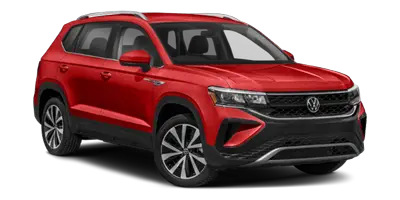
Volkswagen Taos: Parking and maneuvering
- Parking the vehicle
- Information about the parking systems
- Park Distance Control (PDC)
- Rear View Camera (Rear View)
- Rear Traffic Alert
- Braking assistance systems
Parking the vehicle
Parking
1. Press and hold the brake pedal firmly. Keep the vehicle completely stopped before selecting the final parking position or switching off the ignition.
2. In vehicles with an automatic transmission, move the selector lever into the P position. This helps secure the drivetrain and prevents unintended movement when the Volkswagen Taos is parked.
3. Set the electronic parking brake. Do not release the brake pedal until you are sure the parking brake has engaged.
4. On uphill and downhill slopes, turn the steering wheel so that the vehicle will roll into a curb if it begins moving. This extra step can help reduce the risk of the vehicle rolling into traffic or an obstacle.
5. Stop the engine and switch the ignition off. Make sure all driving functions are fully ended before leaving the driver seat.
The red
 indicator light in the
instrument cluster display will turn on ⇒
indicator light in the
instrument cluster display will turn on ⇒
 .
.
6. Release the brake pedal only after confirming that the vehicle is held securely by the parking brake and, where applicable, the transmission is in P.
7. To engage the steering lock, you may need to turn the steering wheel slightly. A small movement of the wheel may be enough for the lock to engage after the ignition has been switched off.
8. Exit the vehicle ⇒
 . Pay
attention to other road users, cyclists, pedestrians, and passing vehicles before opening the door.
. Pay
attention to other road users, cyclists, pedestrians, and passing vehicles before opening the door.
9. Take all vehicle keys with you and lock the vehicle. Before walking away, check that the doors, liftgate, windows, and sunroof, if equipped, are closed and secured.
WARNING
Parking the vehicle incorrectly can allow it to roll, even on a slight downhill slope. This can lead to accidents, serious injuries, or fatal injuries. Always complete the parking procedure carefully and in the correct order.
- Before exiting the vehicle, make sure the electronic parking brake is activated and the red warning light
 comes on in the Volkswagen Digital Cockpit display once the ignition has
been switched off.
comes on in the Volkswagen Digital Cockpit display once the ignition has
been switched off. - Ignition switch: Never remove the remote vehicle key from the ignition switch when the vehicle is in motion.
Otherwise, the steering lock could engage suddenly. Then you would not be able to steer the vehicle, which could cause a loss of control.
- When parking the vehicle, always follow the steps in the specified order. Skipping steps or releasing the brake too early may allow the vehicle to move unexpectedly.
WARNING
If you leave children, people requiring assistance, or animals unattended in the vehicle, they may accidentally set the vehicle in motion, operate electrical equipment, lock themselves inside, or be exposed to very high or very low temperatures.
There is a risk of accidents and serious or fatal injuries.
- Never leave children, people requiring assistance, or animals unattended in the vehicle, even for a short time.
- Always take the vehicle key with you when leaving the Volkswagen Taos, because an unattended key can allow occupants or other people to operate vehicle functions.
- Before locking the vehicle, check the rear seating area, cargo area, and all occupied positions to make sure no one has been left inside.
Parking spaces and surroundings
To avoid damage and dangerous situations, always park the vehicle in a suitable parking area ⇒
 .
.
Choose a firm, level, and stable surface whenever possible. Avoid parking where the tires may sink into soft ground, where the vehicle may lean sharply, or where the underbody could contact an obstacle. When parking near curbs, walls, posts, parking stops, or steep driveways, move slowly and leave enough clearance around the bumpers and lower body panels.
NOTICE
Any unevenness in the ground, as well as sand or mud, may prevent the vehicle from being parked safely. This can result in damage to the vehicle or unintended movement after parking.
- Always park the vehicle on firm and level ground.
- If the ground surface does not look stable, select another parking space before switching off the vehicle.
NOTICE
Vehicle components that are low to the ground, such as the bumpers, spoilers, underbody covers, and parts of the suspension, may collide with objects protruding up from the ground when they are driven over. The vehicle can be damaged.
- Drive carefully over driveways, ramps, curbs, parking barriers, fixed obstacles, and uneven surfaces, as well as when driving through dips.
- When maneuvering the Volkswagen Taos in tight spaces, use mirrors, direct visibility, and available parking assistance features, but do not rely on them alone.
Rear seat information
The function depends on the vehicle equipment.
If the ignition is switched off, a message appears in the Infotainment system to remind you not to leave behind passengers in the rear seats ⇒
 .
.
This reminder is intended to help the driver check the rear seating area before leaving the vehicle. It may be especially useful after a rear door was opened before driving, after short trips, or when the driver may be distracted by luggage, passengers, or routine stops.
If a rear door was used prior to driving, a message will also be displayed in the instrument cluster and a warning tone will sound if necessary. The warning tone can be set in the vehicle settings of the Infotainment system.
 Rear seat information muted.
Muting the rear seat information only affects the reminder notification. It does not check whether the rear seats are actually occupied. Always look inside the vehicle before locking it, especially when children, passengers requiring assistance, pets, bags, or personal items have been in the rear area.
Proper parking habits help protect the vehicle, passengers, and other road users. Before leaving the Volkswagen Taos, confirm that the vehicle is secured, the parking brake is engaged, the key is removed from the vehicle area, and the surroundings are safe.
Electronic parking brake
The electronic parking brake is used to secure the parked vehicle and help prevent it from rolling away. In an emergency, it can also provide braking support if the vehicle cannot be stopped normally with the brake pedal.
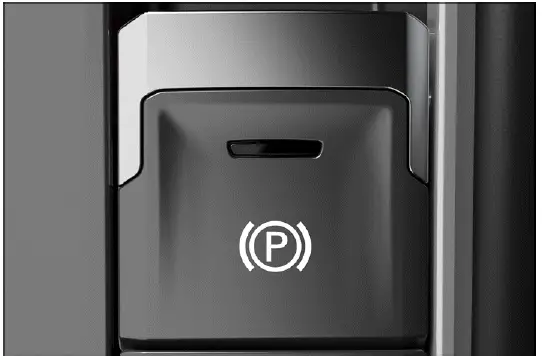
Fig. 121 In the center console: button for the electronic parking brake.
Switching on
 The red warning light in the
instrument cluster comes on when the vehicle is held securely in place.
The red warning light in the
instrument cluster comes on when the vehicle is held securely in place.
1. When the vehicle is stationary, pull and hold the button for the electronic parking brake
 fig. 121. Keep the brake pedal pressed until you have confirmed that the parking brake has engaged.
The yellow indicator light in the
 button comes on and the red
 warning light in the instrument cluster comes on.
The electronic parking brake is engaged. Before leaving the Volkswagen Taos, make sure the vehicle is fully stopped, the parking brake warning light is displayed, and the vehicle cannot move unintentionally.
Switching off
1. Switch the ignition on.
2. Press the brake pedal and press the
 button.
The indicator light in the
 button
and the red
button
and the red
 warning light in the
Volkswagen Digital Cockpit will turn off.
warning light in the
Volkswagen Digital Cockpit will turn off.
The electronic parking brake has been released only when the indicator lights go out and the vehicle is ready to move normally. If the warning light remains on, do not force the vehicle to move; check whether the release conditions have been met.
Automatic switch-on if you leave the vehicle incorrectly
On vehicles with an automatic transmission, if the system detects that the vehicle has been exited improperly, it can switch on the electronic parking brake automatically ⇒
 .
.
This automatic function is intended to reduce the chance of the vehicle rolling away if the driver leaves the seat without securing the vehicle correctly. It should not replace the normal parking procedure, because the driver must always confirm that the Volkswagen Taos is safely parked before exiting.
WARNING
Parking the vehicle incorrectly can result in the vehicle rolling, even on slight downhill slopes. Accidents and serious or fatal injuries could result.
- When parking the vehicle, always follow the steps of the parking procedure in the specified order ⇒ Parking.
- Before exiting the vehicle, make sure the electronic parking brake is activated and the red
 warning light in
the Volkswagen Digital Cockpit display comes on after switching off the
ignition.
warning light in
the Volkswagen Digital Cockpit display comes on after switching off the
ignition. - Never leave the vehicle until you are certain that it is held securely, especially on slopes, uneven ground, or in parking areas with traffic nearby.
Automatic switch-off when starting to drive
If one of the following situations occurs when the driver door is closed, the electronic parking brake will release automatically as you drive off ⇒
 :
:
- Automatic transmission: A gear is engaged and the accelerator pedal is pressed.
This automatic release helps the driver start smoothly after parking. However, the driver should always check the surrounding area before pressing the accelerator, particularly in tight parking spaces, near pedestrians, or on steep inclines.
WARNING
If the accelerator pedal is accidentally pressed when the electronic parking brake is activated, this may release the electronic parking brake. The vehicle will start moving. Accidents and serious injuries could result.
- Do not press the accelerator pedal when the engine is running and a gear is engaged if the vehicle is to be brought to a standstill.
- Keep the brake pedal pressed whenever you are selecting a gear, preparing to park, or waiting in a situation where the vehicle must not move.
Starting to drive on steep inclines or with increased vehicle weight
You can prevent the electronic parking brake from releasing automatically if you pull the
 button upward for a
short time
while starting to drive.
button upward for a
short time
while starting to drive.
If more engine power is required when starting to drive, the electronic parking brake will release only after the
 switch is
released.
switch is
released.
This can be useful when the Volkswagen Taos is starting on a steep road, carrying heavier cargo, or moving from a position where a brief rollback could be unsafe. Apply the accelerator smoothly and release the switch only when the vehicle is ready to move forward in a controlled manner.
Holding Force on Steep Inclines
If the gradient of the parking area is too steep, the vehicle may not be held securely in place. In this situation, the electronic parking brake may not be able to provide enough holding force for the slope and surface conditions.
 The warning light in the
instrument cluster display will flash red and a message will appear.
The warning light in the
instrument cluster display will flash red and a message will appear.
1. Park the vehicle in a different parking space with a lower gradient.
The vehicle is not held securely in place until the
 indicator light stays on.
If this warning appears, do not ignore it. Keep the brake pedal pressed, select a safer parking location, and avoid leaving the vehicle on a slope where the parking brake cannot hold it reliably.
Driving through a car wash
If you would not like the electronic parking brake to switch on automatically, e.g. in a car wash, note the following:
1. Automatic transmission: Put the vehicle in neutral N.
Follow the car wash instructions carefully, because some automatic car washes require the vehicle to remain movable during the wash process. Make sure the driver remains in control and that the vehicle cannot roll unexpectedly before selecting neutral.
Emergency braking function
Only use the emergency braking function in an emergency, if the vehicle cannot be stopped using the brake pedal ⇒
 .
.
1. Pull and hold the
 switch.
The vehicle will brake abruptly. A warning chime will also sound at the same time.
The electronic parking brake is switched on when the vehicle is stationary.
The emergency braking function is intended only for exceptional situations, such as when the normal brake pedal cannot slow the vehicle. Because braking can be sudden and strong, the driver must hold the steering wheel firmly and be prepared for a change in vehicle behavior.
WARNING
The electronic parking brake is not designed for regular braking while driving, as doing so increases the braking distance. This could result in accidents and serious or fatal injuries.
- Always use the brake pedal to brake the vehicle and never the electronic parking brake unless it is an emergency.
- Use the emergency braking function only when normal braking is not possible and immediate action is needed to reduce danger.
 Noises can be heard when you
switch the electronic parking brake on of off. This may also occur during an
automatic
check.
Noises can be heard when you
switch the electronic parking brake on of off. This may also occur during an
automatic
check.
These operating noises are usually normal and may come from the parking brake motors or the automatic self-check. A brief sound during activation, release, or inspection does not necessarily indicate a fault.
Troubleshooting
 Electronic parking brake
malfunction
Electronic parking brake
malfunction
The yellow central warning light comes on. The
 symbol with a message is
additionally shown in the instrument cluster
display.
symbol with a message is
additionally shown in the instrument cluster
display.
There is a system malfunction. The parking brake may not engage, release, or hold the vehicle as expected.
1. Contact a suitably qualified professional. Volkswagen recommends contacting an authorized Volkswagen dealer or authorized Volkswagen Service Facility.
Until the fault has been checked, park only on level ground if possible, keep the vehicle secured, and do not rely on the electronic parking brake if a warning indicates that it may not be operating correctly.
The electronic parking brake does not switch off
- The requirements for switching off the electronic parking brake are not met ⇒ Electronic parking brake.
- The 12 V vehicle battery is drained ⇒ Preparing and Performing a Jump-start.
- The brake pedal may not be pressed firmly enough, the ignition may not be on, or the driver door status may prevent automatic release.
- If the brake remains engaged after the normal release procedure, do not try to force the vehicle to move. Check the warning messages and seek qualified assistance if needed.
Information about the parking systems
Safety instructions
WARNING
Parking systems are designed to support the driver during parking and low-speed maneuvering, but they are not a replacement for attention, careful observation, or safe driving judgment. They can only operate within their technical and physical limitations.
Parking systems cannot recognize every driving situation, every person, or every object around the vehicle. They may not react, may react too late, or may respond in a way that does not match the driver's expectations. If the driver is careless or relies only on the parking display or warning tones, there is a risk of accidents, serious injuries, and death.
- Always remain attentive and do not rely solely on the system. The driver is always responsible for controlling the vehicle.
- Always watch the direction of travel and the entire area around the Volkswagen Taos when parking or maneuvering.
- Pay particular attention to small children, animals, pedestrians, cyclists, shopping carts, low objects, and obstacles close to the ground.
- Do not allow the parking system display, camera image, or warning chimes to distract you from traffic around the vehicle.
- Bear in mind that the parking system may not react if the vehicle approaches an obstacle too quickly and may not issue a warning in time.
- Always adapt your speed and driving style to visibility, weather, road surface, available space, traffic conditions, and the layout of the parking area.
NOTICE
When you maneuver in a parking space without a curb, the vehicle may be damaged by obstacles that are difficult to see from the driver's seat or on the camera display.
- Keep a safe distance of approx. 50 cm (around 20 in) from walls, buildings, posts, barriers, and fixed objects.
- Move slowly and stop immediately if you are unsure about the distance to an obstacle.
Sensor and camera boundaries
Various sensors and cameras that detect the vehicle surroundings ultrasonically, by radar waves, and visually are located on and in the vehicle. Different parking systems use different combinations of sensors, cameras, and control logic. All sensors have technical and physical limits ⇒
 :
:
- In some situations, certain objects may not be detected, for example trailer draw bars, narrow poles, fences, posts, trees, very low or very high obstacles, or trunk lids that are opening or already open ⇒
 .
. - The parking system coverage areas have blind spots where people, animals, and objects may not be detected.
- Dirt, ice, snow, or water on the sensors and cameras may be interpreted as obstacles or may prevent objects from being detected. Soap residue, wax, polish, protective coatings, or road film can also reduce the sensor range → page, Exterior care and cleaning.
- External noises, strong echoes, and certain object surfaces or clothing materials can affect sensor signals. In some cases, people and objects may not be detected or may be detected incorrectly.
- Certain objects, such as small posts, chains, grating, thin barriers, or low curbs, may not appear clearly or may not be shown adequately because of screen resolution, camera angle, or poor lighting.
- The cameras only show two-dimensional images on the screen. Because depth perception is limited, protruding objects, recesses in the road, sloped surfaces, and obstacles close to the bumper may be difficult or impossible to identify.
- Bright sunlight, darkness, reflections, rain, snow, fog, or dirty camera lenses can reduce the quality of the image shown on the Infotainment system screen.
For this reason, the driver should use the parking systems in the Volkswagen Taos as an additional aid, not as final confirmation that the area is clear. Direct visual checks, mirror checks, slow movement, and careful steering remain essential when parking.
 Volkswagen recommends
practicing with the parking systems in a location or parking space with no
traffic in order to
become acquainted with the functions.
Volkswagen recommends
practicing with the parking systems in a location or parking space with no
traffic in order to
become acquainted with the functions.
Practice helps the driver understand how warning tones, display zones, camera images, and distance indications behave in real parking situations. This is especially useful before using the assistance features in narrow garages, crowded parking lots, steep driveways, or areas with pedestrians nearby.
Requirements
 The use of parking systems,
e.g. with camera assistance, may not be allowed in some countries and regions
according to
legal provisions.
The use of parking systems,
e.g. with camera assistance, may not be allowed in some countries and regions
according to
legal provisions.
General information
So that the sensors and cameras can detect the area surrounding the vehicle as accurately as possible and display the image on the Infotainment system screen, the following requirements must be met. If one or more conditions are not fulfilled, the parking aid may be limited, may provide incorrect information, or may be deactivated.
- The doors and trunk lid are closed.
- The outside mirrors must not be folded in.
- Sensors or cameras are not covered by attachments, such as bicycle rack systems, trailer equipment, protective covers, stickers, or license plate holders with decorative frames. The decorative license plate holder must not protrude at the sides or bottom.
- The vehicle must be on level ground whenever possible.
- The vehicle must not be loaded primarily in the rear or on one side, because uneven loading can change the vehicle angle and affect how the surroundings are displayed.
- The engine is running.
- Braking assistance systems such as ESC or ASR are switched on.
- The camera lenses and sensor areas are clean, uncovered, and free from snow, ice, mud, water film, or heavy dirt.
 If you use any other
functions in the Infotainment system while you are parking, the parking function
and its warning
chimes will be deactivated.
If you use any other
functions in the Infotainment system while you are parking, the parking function
and its warning
chimes will be deactivated.
If the parking display closes or the warning tones stop, do not continue maneuvering as though the assistance feature is still active. Slow down, check the surroundings directly, and reactivate the parking view if needed before continuing.
Finding a suitable parking space
- The length and width of the parking space must be larger than the vehicle measurements and provide enough room to maneuver without contacting nearby vehicles, curbs, walls, or obstacles.
- The distance when driving past the parking space is approx. 1 m (approx. 3 feet).
- The parking space should be clearly visible, firm, and free from objects that could be hidden below the camera view or outside the sensor detection range.
- When parking the Volkswagen Taos near high curbs, posts, garage walls, or narrow barriers, move slowly and use both the parking systems and direct observation.
Parking assistance can make maneuvering easier, but it cannot remove the need for careful driving. Always control the Volkswagen Taos at a walking pace in tight spaces, remain ready to brake, and stop if the display, warning sound, or surroundings do not appear clear.
Automatic braking intervention
The automatic braking function of the parking system can help reduce the risk of a collision when an obstacle is detected during low-speed maneuvering. It is designed as a support feature, not as a replacement for the driver's own braking, attention, and control.
Parking systems with braking support
Depending on the vehicle equipment, the vehicle may be equipped with parking systems that include maneuver braking and/or emergency braking support ⇒
 .
.
These features are intended to assist the driver when parking, reversing, or moving slowly in tight areas. They may help when an obstacle is detected behind or near the vehicle, but they cannot evaluate every situation or replace careful use of the brake pedal.
The automatic braking support of Park Distance Control is only possible in the rear area.
WARNING
Automatic braking support is not a substitute for the driver's attention and operates only within the limits of the parking system. In some driving situations, braking support may be restricted, may intervene unexpectedly, or may not activate at all. If the driver is careless, distracted, or relies only on the assistance feature, there is a risk of accidents, serious injuries, and death.
- Always stay attentive and do not rely solely on the system. The driver is always responsible for controlling the vehicle.
- In a hazardous situation, brake with the brake pedal before reaching an obstacle.
- React quickly to parking system warnings, for example Park Distance Control warning tones or visual distance displays.
- Always maneuver the Volkswagen Taos slowly in confined spaces, garages, parking lots, and areas where pedestrians or objects may be close to the vehicle.
When is automatic braking available?
 A parking system has been
activated by the driver.
A parking system has been
activated by the driver.
 When maneuvering, the vehicle is
not driving faster than approx. 10 km/h (approx. 6 mph).
When maneuvering, the vehicle is
not driving faster than approx. 10 km/h (approx. 6 mph).
Automatic braking support is mainly intended for slow parking movements. If the vehicle is moving faster than the operating range, or if the sensors cannot clearly recognize the obstacle, the feature may not brake in time or may not brake at all.
What happens during an automatic braking intervention?
The vehicle brakes to a stop and is kept stationary for around two seconds. The driver must then take over immediately, press the brake pedal, check the surroundings, and decide how to continue maneuvering safely.
 Automatic braking by the
maneuver braking function. Stop the vehicle with the brake pedal!
Automatic braking by the
maneuver braking function. Stop the vehicle with the brake pedal!
 Automatic braking
intervention by Rear Traffic Alert. Stop the vehicle with the brake pedal!
Automatic braking
intervention by Rear Traffic Alert. Stop the vehicle with the brake pedal!
Depending on the vehicle equipment, there may be a message on the instrument cluster display. The message can help identify whether the braking intervention came from maneuver braking, Rear Traffic Alert, or another related parking support feature.
After the vehicle has stopped, do not continue moving until you have checked the area behind and around the Volkswagen Taos. Another obstacle, person, wall, curb, or parked vehicle may still be close to the bumper.
Maneuver braking for Park Distance Control
Maneuver braking brakes only in the event of obstacles in the rear area and is automatically switched on after each time the ignition is switched on.
This rear-area braking support is intended to help reduce contact with obstacles while reversing slowly. It does not guarantee that every object will be recognized, especially if the object is very low, narrow, angled, moving, or outside the sensor detection range.
Maneuver braking can be temporarily deactivated via the
 function key in the Park Distance
Control screen display.
function key in the Park Distance
Control screen display.
Temporary deactivation may be useful in certain situations where automatic braking occurs too often or is not desired, such as when maneuvering close to soft vegetation, uneven ground, a garage wall, or objects that the driver has already identified and is avoiding carefully.
 After a braking
intervention, maneuver braking may be inactive for a short distance or may only
be ready for operation
after a gear change. Drive carefully for the first few meters, e.g. in case of
further obstacles in the vicinity.
After a braking
intervention, maneuver braking may be inactive for a short distance or may only
be ready for operation
after a gear change. Drive carefully for the first few meters, e.g. in case of
further obstacles in the vicinity.
Because the braking function may need a short reset phase after an intervention, the driver should continue with extra caution. Move at a walking pace, keep the brake pedal ready, and check the camera image, mirrors, warning tones, and direct surroundings before driving on.
General information
 Switch the parking system
off temporarily if automatic braking support happens too frequently or when
undesired and
maneuver the vehicle carefully, for example when driving off-road or parking in
your garage.
Switch the parking system
off temporarily if automatic braking support happens too frequently or when
undesired and
maneuver the vehicle carefully, for example when driving off-road or parking in
your garage.
When parking in a garage, near a narrow wall, beside tall grass, close to a ramp, or on uneven ground, sensors may interpret nearby surfaces differently than expected. If the feature is temporarily switched off, the driver must control the vehicle with even greater care and brake manually whenever necessary.
 Following a Rear Traffic
Alert emergency braking intervention, it will take approx. 10 seconds before
automatic braking
support can occur again.
Following a Rear Traffic
Alert emergency braking intervention, it will take approx. 10 seconds before
automatic braking
support can occur again.
During this short interval, do not assume that the vehicle will brake automatically again. Check cross traffic, pedestrians, shopping carts, bicycles, and nearby parked vehicles before continuing to reverse or maneuver.
Troubleshooting
The parking system is functioning differently than expected
- The requirements for the parking system are not met ⇒ Requirements.
The areas detected by the sensors or camera may be blocked by accessories such as bicycle racks, trailer equipment, license plate frames, protective covers, stickers, or other attachments.
The sensors are dirty or covered in ice ⇒ Exterior care and cleaning, ⇒
 .
.The camera is dirty or icy and the camera image is unclear ⇒ Exterior care and cleaning, ⇒
 .
.Sources of noise interfere with the ultrasonic signal, e.g. driving over cobblestones, near loud machinery, in heavy rain, or close to objects that reflect sound unusually ⇒
 .
.The vehicle may be damaged in the radar sensor area, for example, due to parking barriers, a rear impact, curb contact, or an accident ⇒
 .
.There may have been changes to the paint or vehicle structure in the area where the sensors or camera are located, for example on the front of the vehicle, rear bumper, body panels, or suspension ⇒
 .
.
If the parking system reacts too late, gives warnings without an obvious obstacle, fails to show the expected display, or switches off by itself, first check whether the sensor and camera areas are clean and unobstructed. Dirt, ice, water film, wax, soap residue, or an accessory mounted near the detection area can affect the way the Volkswagen Taos interprets its surroundings.
Fault displays
1. Note any messages on the instrument cluster display and in the Infotainment system. These messages may indicate which part of the parking assistance system is restricted, deactivated, or malfunctioning.
NOTICE
If you use the parking system despite a malfunction, the vehicle may be damaged because warnings, camera images, sensor ranges, or automatic braking support may not be available as expected.
- Contact an authorized Volkswagen dealer or authorized Volkswagen Service Facility in the event of a parking system malfunction. Volkswagen recommends contacting an authorized Volkswagen dealer or authorized Volkswagen Service Facility.
 No
sensor range or Park Distance Control malfunction
No
sensor range or Park Distance Control malfunction
If a sensor malfunctions, the affected sensor area is deactivated. The
 symbol
shows the affected sensor area in the Infotainment
system.
symbol
shows the affected sensor area in the Infotainment
system.
Park Distance Control is switched off completely if necessary.
If Park Distance Control is malfunctioning, a continuous tone will sound for several seconds when you switch it on. Where applicable, a message will appear in the instrument cluster display.
1. Check if one of the causes listed above is responsible. Clean the sensors and camera areas, remove possible obstructions, and inspect the bumpers for visible damage.
2. Once the source of the issue has been resolved, switch the system on again.
3. If the problem persists, contact an authorized Volkswagen dealer or authorized Volkswagen Service Facility. Volkswagen recommends contacting an authorized Volkswagen dealer or authorized Volkswagen Service Facility.
 Maneuver
braking restricted or not available
Maneuver
braking restricted or not available
A message is displayed in the Infotainment system or instrument cluster.
Automatic braking occurs unexpectedly or does not occur as usual. If the function is switched off, automatic braking does not occur.
1. Check the sensors on the vehicle for damage or dirt and clean them if necessary ⇒ Exterior care and cleaning.
2. Switch the ignition off and back on again. This may restore availability if the restriction was temporary.
3. If the problem persists, contact an authorized Volkswagen dealer or authorized Volkswagen Service Facility. Volkswagen recommends contacting an authorized Volkswagen dealer or authorized Volkswagen Service Facility.
Until the warning has been resolved, do not rely on automatic braking during parking. Maneuver slowly, brake manually, and keep enough distance from walls, curbs, posts, other vehicles, and pedestrians.
Malfunction of Camera Image of the Rear View Camera System
The camera image is unclear, flickering, distorted, too dark, washed out by glare, or has been disabled.
A technical malfunction may have occurred. In some cases, the cause may also be dirt, snow, ice, water drops, bright sunlight, poor lighting, or a contaminated camera lens.
1. In the event of an unclear camera image, clean the Rear View Camera system ⇒ Exterior care and cleaning.
2. If the problem persists, contact an authorized Volkswagen dealer or authorized Volkswagen Service Facility. Volkswagen recommends contacting an authorized Volkswagen dealer or authorized Volkswagen Service Facility.
Do not reverse using only an unclear or unavailable camera image. Check the mirrors, look directly around the vehicle, and ask another person to guide you if visibility is limited.
Parking Function Screen Not Displayed Following Activation
The parking system has been switched on or activated, yet the display in the Infotainment system does not change to the function-specific screen, such as the segment display for Park Distance Control or the camera display during Park Assist.
1. Switch the parking system off and on again.
2. If the screen is still not displayed, a system malfunction has occurred. Contact a suitably qualified professional.
Volkswagen recommends contacting an authorized Volkswagen dealer or authorized Volkswagen Service Facility.
If the parking screen does not appear, continue only with direct observation and normal mirror checks. The parking aids in the Volkswagen Taos are helpful only when they are active, visible, and operating correctly.
Park Distance Control (PDC)
Introduction
Park Distance Control helps the driver when parking and maneuvering at low speeds by warning about obstacles near the vehicle. In the Volkswagen Taos, this feature supports safer parking by combining distance detection with visual information and warning chimes.
System function
Park Distance Control uses ultrasonic sensors to measure the distance between the vehicle and nearby obstacles. The system is intended to assist during parking, reversing, and tight maneuvering where objects may be difficult to judge from the driver seat.
The Park Distance Control warns you of a possible collision through colored segments on the screen of the Infotainment system and through warning chimes fig. 122, ⇒
 .
.
The closer the vehicle moves toward an obstacle, the more urgent the visual and audible warnings become. The driver should react immediately, reduce speed, and brake before the vehicle reaches the obstacle.
If the driver does not respond to an approaching obstacle, automatic braking support may intervene depending on the vehicle equipment → page, Automatic braking intervention.
WARNING
Park Distance Control is not a substitute for the driver's attention and only operates within system limitations. Park Distance Control may not detect some obstacles, may react too late, may not react at all, or may react in an unexpected way. If the driver does not remain careful, there is a risk of accidents and serious injuries.
- Always stay attentive and do not rely solely on the system. The driver is always responsible for controlling the vehicle.
- React quickly to the Park Distance Control visual warnings and warning chimes.
- Apply the brakes using the brake pedal before encountering an obstacle.
- Always check mirrors, camera images, direct surroundings, pedestrians, animals, curbs, posts, and low objects when maneuvering the Volkswagen Taos.
NOTICE
The system only provides visual and audible warnings for obstacles within the vehicle's path. The collision area has been reached at the latest when the second-to-last segment is displayed in the Park Distance Control screen or when a continuous warning tone sounds. There is a risk of vehicle damage.
- Always brake the vehicle in good time before encountering an obstacle.
- Do not continue moving toward an obstacle simply because the display still shows distance remaining.
NOTICE
Depending on the vehicle equipment, distances to obstacles in the side areas may also be displayed. Obstacles that enter these side areas from outside the previously scanned zone may not be shown. The vehicle may be damaged in this instance.
- In order to fully scan and display the side areas, move the vehicle a few meters forwards or backwards.
- When parking close to walls, posts, garage edges, or curbs, move slowly and use direct visual checks in addition to the display.
Screen display
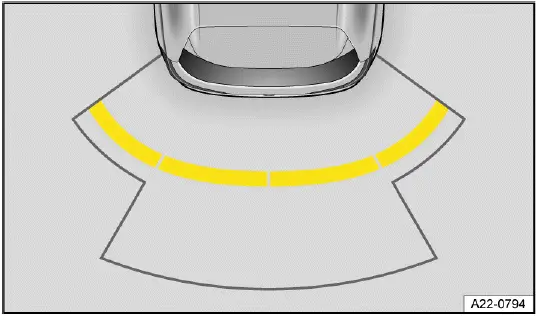
Fig. 122 Infotainment system: display of rear Park Distance Control (general
example).
 Red section of the image:
Nearby obstacle. The vehicle is at risk. Brake!
Red section of the image:
Nearby obstacle. The vehicle is at risk. Brake!
 Yellow section of the image:
Obstacle in the
path of the vehicle. The vehicle is at risk. Steer around the obstacle.
Yellow section of the image:
Obstacle in the
path of the vehicle. The vehicle is at risk. Steer around the obstacle.
 White or gray section of the
image: Obstacle outside
of the vehicle's path.
White or gray section of the
image: Obstacle outside
of the vehicle's path.
 Switch
maneuver braking on and off (depending on the vehicle equipment).
Switch
maneuver braking on and off (depending on the vehicle equipment).
 Mute the warning
chimes.
Mute the warning
chimes.
The colored display should be read together with the warning tones. A red segment or continuous tone means the vehicle is very close to an obstacle and the driver should stop immediately. A yellow segment means an obstacle is in the path and the driver must steer or brake carefully. White or gray segments can indicate objects outside the calculated driving path, but they still require attention.
Park Distance Control settings
Depending on the vehicle equipment, settings for Park Distance Control can be adjusted in the vehicle settings in the Infotainment system ⇒ Vehicle settings menu.
Available settings may include warning volume, warning tone behavior, automatic activation, and related parking assistance options. After changing settings, the driver should confirm that the alerts are easy to hear and understand before using the system in tight spaces.
Switching Park Distance Control (PDC) on and off
Please read the introductory information and heed the Warnings and
Notice ⇒
 and
and
 Safety instructions.
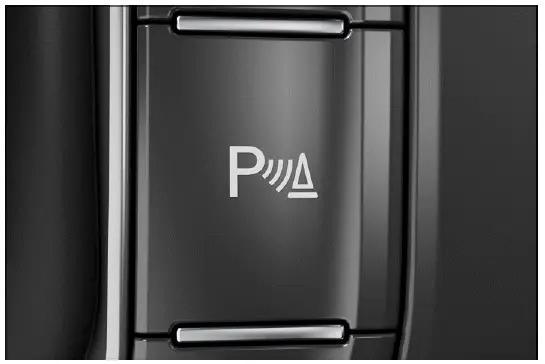
Fig. 123 In the center console: Park Distance Control button (depending on
the vehicle equipment).
The Park Distance Control button is located in the center console or in the Infotainment system, depending on the vehicle equipment.
In the Volkswagen Taos, the feature may also activate automatically in certain low-speed situations, depending on vehicle configuration and current settings. The driver should still know how to switch it on or off manually when needed.
Switching on
1. Select the reverse gear.
Or: tap the
 function key in the
Infotainment system (depending on the vehicle equipment).
function key in the
Infotainment system (depending on the vehicle equipment).
Or: Press the
 button in the center
console (depending on the vehicle equipment) fig. 123.
button in the center
console (depending on the vehicle equipment) fig. 123.
Or: The vehicle will roll backward.
When Park Distance Control is active, observe the display carefully and listen for warning chimes. Before moving, check the area around the vehicle directly, especially if people, animals, shopping carts, curbs, or low obstacles are nearby.
Switching off
1. Tap the
 function key in the
Infotainment system (depending on the vehicle equipment).
function key in the
Infotainment system (depending on the vehicle equipment).
Or: Press the
 button in the center
console (depending on the vehicle equipment) fig. 123.
button in the center
console (depending on the vehicle equipment) fig. 123.
Or: engage the P selector lever position.
Park Distance Control also switches off when forward travel becomes faster.
If the display closes or the warning chimes are muted, do not assume the area is clear. Continue maneuvering only when you have confirmed the surroundings visually and can control the vehicle safely.
Automatic activation when driving forwards
Park Distance Control can activate automatically when an obstacle is detected in the front area, for example in dense traffic, while entering a garage, or when maneuvering near a wall, post, or parked vehicle.
The function can be deactivated in the Park Distance Control settings in the Infotainment system.
1. To close the screen, tap the home button
 in the Infotainment system.
 No automatic braking
intervention takes place → page, Automatic braking intervention. The braking
support can be
switched on via the
No automatic braking
intervention takes place → page, Automatic braking intervention. The braking
support can be
switched on via the
 function key.
If braking support is switched off, the driver must brake manually in every situation. Move slowly, keep the brake pedal ready, and respond immediately to visual or audible distance warnings.
The function is available again under the following conditions:
- The vehicle has been accelerated to more than approx. 15 km/h (approx. 9 mph) and then the speed has fallen below this again.
Or: the ignition has been switched off and on again.
Or: parking lock P has been changed to a gear.
 If an obstacle is detected in
front of the vehicle, the Park Distance Control display appears in the
Infotainment system. If
the vehicle continues to approach the obstacle, a warning chime also sounds.
If an obstacle is detected in
front of the vehicle, the Park Distance Control display appears in the
Infotainment system. If
the vehicle continues to approach the obstacle, a warning chime also sounds.
The warning chime is intended to draw the driver's attention to the obstacle as the distance decreases. If the tone becomes continuous or the display shows a critical distance, stop the vehicle and reassess the space before continuing.
 If Park Distance Control
only has sensors in the rear area, automatic activation is not possible when
driving forward or
when the vehicle rolls backward.
If Park Distance Control
only has sensors in the rear area, automatic activation is not possible when
driving forward or
when the vehicle rolls backward.
On vehicles with rear-only sensors, the driver must pay closer attention when moving forward in tight spaces because front obstacles are not monitored by Park Distance Control. Use direct visibility, mirrors, and careful low-speed control to avoid contact with objects near the front of the vehicle.
Rear View Camera (Rear View)
Introduction
The Rear View Camera system shows the area behind the vehicle on the Infotainment system screen and helps the driver when reversing, parking, and maneuvering in confined spaces. In the Volkswagen Taos, this feature improves rearward visibility, but it must always be used together with mirrors, direct observation, and careful control of the vehicle.
System function
The Rear View Camera system displays the area behind the vehicle on the Infotainment system screen. Depending on the selected mode and vehicle equipment, orientation lines may appear on the image to help the driver judge the rearward path, align the vehicle, and position it more accurately while reversing ⇒
 .
.
The camera view can make it easier to see the rear boundary of a parking space, low objects near the bumper, or the general direction of travel when backing up. However, the image is limited by lens angle, lighting, lens cleanliness, screen resolution, and the shape or position of objects behind the vehicle.
WARNING
The Rear View Camera system is not a replacement for the driver's attention and works only within the system limitations.
Using the camera image to estimate the distance to people, vehicles, curbs, walls, posts, or other obstacles may not be precise. If the driver does not remain careful, there is a risk of accidents and serious injuries.
- Always stay attentive and do not rely solely on the system. The driver is always responsible for control of the vehicle.
- Bear in mind that camera lenses can enlarge, compress, or distort the field of vision.
- Before reversing, check the mirrors, look directly behind and around the vehicle, and make sure the area is clear.
- Reverse slowly and be prepared to stop immediately if a person, animal, vehicle, curb, wall, post, or other obstacle appears.
 The orientation lines
superimposed on the camera image are shown by the system regardless of the
vehicle's surroundings.
The orientation lines
superimposed on the camera image are shown by the system regardless of the
vehicle's surroundings.
There is no automatic obstacle detection by the camera while it is active. The driver must evaluate whether the vehicle will fit in the parking space.
The orientation lines are only a visual guide. They do not confirm that the driving path is free, that the surface is level, or that the rear of the Volkswagen Taos will not contact an obstacle. Always compare the displayed image with the actual surroundings before continuing to reverse.
 If a camera is installed in
the trunk lid, the orientation lines are also hidden if the trunk lid is open.
If a camera is installed in
the trunk lid, the orientation lines are also hidden if the trunk lid is open.
Switching the Rear View Camera system on and off
Please read the introductory information and heed the Warnings and
Notice ⇒
 and
and
 Safety instructions.
The operation of the Rear View Camera system depends on the vehicle equipment. Some versions show the camera image only after reverse gear is selected, while other versions allow parking mode selection through the Infotainment system or a vehicle button.
Switching on
Rear View Camera system without parking mode selection:
1. Select the reverse gear. The rear camera image appears on the Infotainment system screen when the camera view is ready.
Rear View Camera system with parking mode selection:
1. Select the reverse gear.
Or: tap the
 function key in the
Infotainment system (depending on the vehicle equipment).
function key in the
Infotainment system (depending on the vehicle equipment).
Or: press the
 button (depending on
the vehicle equipment).
button (depending on
the vehicle equipment).
After the image appears, check whether the view is clear and usable. Dirt, snow, ice, rain drops, glare, darkness, or a partially covered lens can reduce visibility and make the camera less reliable during parking.
Switching off
Rear View Camera system without parking mode selection:
1. Disengage reverse gear.
Rear View Camera system with parking mode selection:
1. Tap the
 function key in the
Infotainment system (depending on the vehicle equipment).
function key in the
Infotainment system (depending on the vehicle equipment).
Or: press the
 button (depending on
the vehicle equipment).
button (depending on
the vehicle equipment).
The Rear View Camera system also switches off when forward travel becomes faster.
If the display leaves the camera view, continue maneuvering only after checking the surroundings directly. The driver must not assume that the area remains clear simply because it was visible on the screen a moment earlier.
Parking (Rear View Camera system without parking mode selection)
Please read the introductory information and heed the Warnings and
Notice ⇒
 and
and
 Safety instructions.
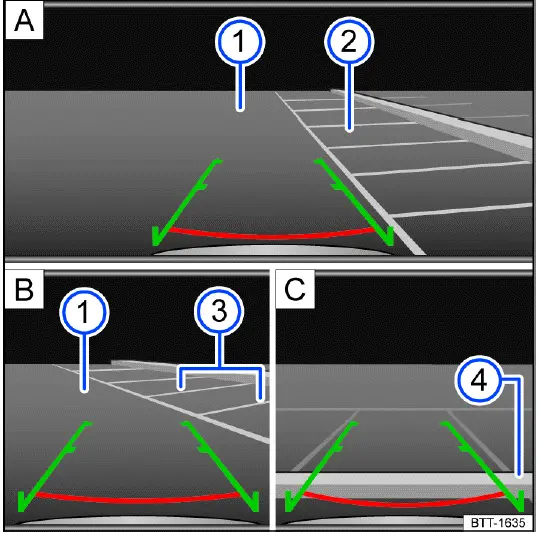
Fig. 124 Infotainment system: Parking with the Rear View Camera system.
- Searching for a parking space.
- Steering toward the selected parking space.
- Aligning the vehicle within the parking space.
- Road surface.
- Selected parking space.
- Side boundaries of the selected parking space.
- Rear boundary of the parking space.
Screen display
 Red line: Boundary or safety
distance from the vehicle.
Red line: Boundary or safety
distance from the vehicle.
 Green
side line: Extension of the vehicle.
Green
side line: Extension of the vehicle.
 Adjust the
brightness, contrast, and color.
Adjust the
brightness, contrast, and color.
Depending on the country, if the camera image on a parking system has been switched on by engaging the reverse gear, no function keys are displayed for safety reasons. These function keys can be displayed again by tapping the function key
 .
.
1. Position your vehicle in front of the parking space fig. 124 A - 2.
2. Select the reverse gear.
3. Slowly reverse while steering so that the green side lines line up with the selected parking space. The green lines must line up with the side boundaries of your parking space fig. 124 B - 3.
4. Stop when the red horizontal line reaches the rear boundary fig. 124 C -4.
Move at a walking pace while using the Rear View Camera. If the guide lines and the actual space do not appear to match, stop the vehicle, check the surroundings again, and correct the steering before continuing.
Parking (Rear View Camera system with parking mode selection)
Please read the introductory information and heed the Warnings and
Notice ⇒
 and
and
 Safety instructions.
Screen display
 Perpendicular parking: Guide
lines help when parking in reverse perpendicular to the road.
Perpendicular parking: Guide
lines help when parking in reverse perpendicular to the road.
 Parallel parking:
Guide lines and boxes help when parking in reverse parallel to the road.
Parallel parking:
Guide lines and boxes help when parking in reverse parallel to the road.
 Turn the steering wheel (parallel
parking
mode).
Turn the steering wheel (parallel
parking
mode).
 Stop the vehicle (parallel
parking mode).
Stop the vehicle (parallel
parking mode).
 Cross traffic:
Depiction of the area behind the vehicle and the areas
to the side of the vehicle at a wide angle.
Cross traffic:
Depiction of the area behind the vehicle and the areas
to the side of the vehicle at a wide angle.
 Trailer or terrain assistance:
Depiction of the area immediately behind the
vehicle with a high zoom factor and guide lines.
Trailer or terrain assistance:
Depiction of the area immediately behind the
vehicle with a high zoom factor and guide lines.
 Red line: Boundary or safety
distance from the vehicle.
Red line: Boundary or safety
distance from the vehicle.
Red frame: Outline of the vehicle (parallel parking).
 Yellow lines: the vehicle's
path based on the steering angle.
Yellow lines: the vehicle's
path based on the steering angle.
Yellow assisting box: front or rear edge of the parking space (parallel parking).
 Green horizontal lines:
Boundaries.
Green horizontal lines:
Boundaries.
Green line on the side: turning point when parking (parallel parking).
Green frame: outline of the vehicle (parallel parking).
 Adjust the brightness,
contrast, and color.
Adjust the brightness,
contrast, and color.
Depending on the country, if the camera image on a parking system has been switched on by engaging the reverse gear, no function keys are displayed for safety reasons. These function keys can be displayed again by tapping the function key
 .
.
The different viewing modes are intended to help the driver judge the parking path more easily. They do not measure every obstacle automatically and do not guarantee that the vehicle will fit into the space without correction.
Parking mode: Parking perpendicular to the road
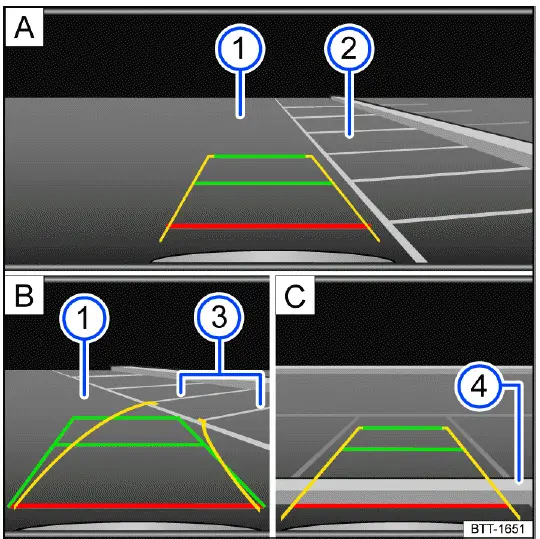
Fig. 125 Infotainment system: Parking perpendicular to the road.
- Searching for a parking space.
- Steering toward the selected parking space.
- Aligning the vehicle within the parking space.
- Road surface.
- Parking space.
- Side boundary of the parking space.
- Rear boundary of the parking space.
1. Press the
 button or function
key before driving past the parking space.
button or function
key before driving past the parking space.
2. To select the parking mode, tap the
 function key in the Infotainment
system.
function key in the Infotainment
system.
3. Position your vehicle in front of the parking space fig. 125 A - 2.
4. Steer so that the yellow lines lead into the parking space. The green and yellow lines must align with the side boundary lines fig. 125 B - 3.
5. Stop when the red line reaches the rear boundary fig. 125 C - 4.
When parking perpendicular to the road, watch both sides of the vehicle as well as the rear boundary. The camera view helps with alignment, but nearby vehicles, curbs, pillars, walls, or pedestrians may still require direct checking outside the screen.
Parking mode: Parallel parking
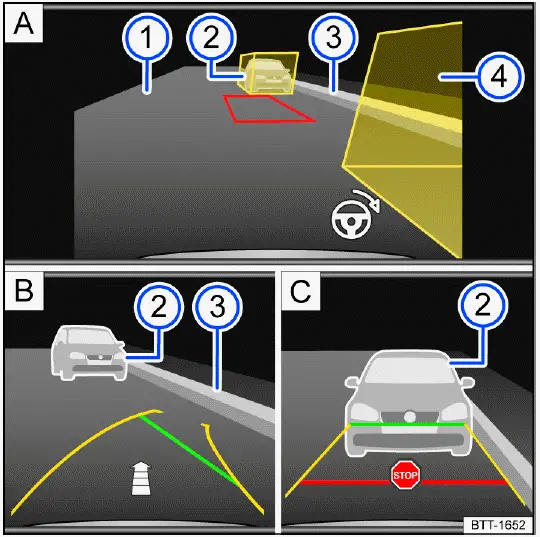
Fig. 126 Infotainment system: Parking parallel to the road.
- Searching for a parking space.
- Steering toward the selected parking space.
- Aligning the vehicle within the parking space.
- Road surface.
- Obstacle or assisting box.
- Side boundary of the parking space.
- Obstacle or assisting box.
1. Press the
 button or function
key before driving past the parking space.
button or function
key before driving past the parking space.
2. To select the parking mode, tap the
 function key in the Infotainment
system.
function key in the Infotainment
system.
3. Turn on the turn signal for the corresponding side of the road.
4. Position the vehicle at a distance of approx. 1 m (approx. 3 ft) parallel to the parking row. The yellow assisting boxes must cover the obstacles fig. 126 A - 2 or 4. The area in between must be free of obstacles.
5. Select the reverse gear. A red frame represents the target position of your vehicle fig. 126 A.
6. Turn the steering wheel until the red frame moves between the assisting boxes and becomes green fig. 126 A. Hold the steering wheel in this position while driving in reverse.
If the steering wheel angle needs to change, one of the yellow side lines will become red. The
 steering wheel
symbol indicates to the driver when the steering wheel must be turned.
steering wheel
symbol indicates to the driver when the steering wheel must be turned.
7. Drive slowly in reverse until the
 stop symbol appears or the green line aligns with the side boundary of the parking
space fig. 126 C. An fig. 126 B arrow indicates the remaining distance to be driven based on the number of displayed segments.
stop symbol appears or the green line aligns with the side boundary of the parking
space fig. 126 C. An fig. 126 B arrow indicates the remaining distance to be driven based on the number of displayed segments.
8. Stop the vehicle. Steer in the opposite direction until the steering angle is reached and a direction arrow is no longer displayed.
9. Keep driving in reverse until the
 stop symbol appears or until the red line reaches the rear boundary.
During parallel parking, make small steering corrections and keep vehicle speed very low. The Rear View Camera can assist with positioning, but the driver must still monitor passing traffic, cyclists, pedestrians, the curb, and the front corner of the vehicle while the rear is moving into the space.
Rear Traffic Alert
Rear Traffic Alert monitors cross traffic when the vehicle is reversing out of a parking space or maneuvering at low speed. In the Volkswagen Taos, this feature helps warn the driver about vehicles, cyclists, or other moving objects approaching from the rear side areas.
System function
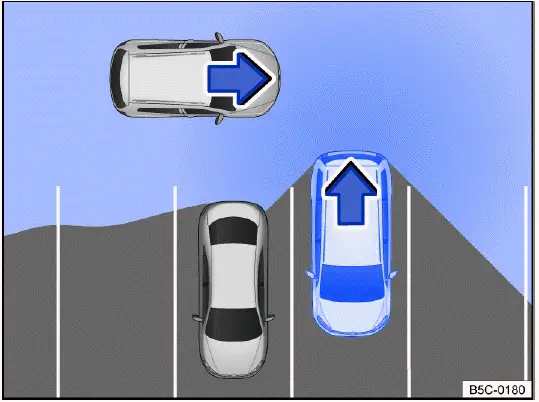
Fig. 127 Monitored area around the vehicle that is exiting a parking space
(general example).
Radar sensors installed behind the rear bumper cover monitor the rear and side areas of the vehicle. They are designed to detect traffic approaching from the left or right when the vehicle is backing out of a parking space, driveway, or other confined area with limited visibility.
In the event of approaching or moving objects, the driver is warned of an obstacle fig. 127, ⇒
 .
.
If an obstacle is detected, a warning signal will sound. Depending on the vehicle equipment, a colored display of the obstacle area is shown in the Infotainment system fig. 128, or a warning light with a message is displayed in the instrument cluster.
 Obstacle detected.
If the driver does not respond, automatic braking support may intervene → page, Automatic braking intervention. This braking support is intended to reduce the risk of a collision, but it does not remove the need to brake manually and check the surroundings before continuing.
 If Park Distance Control is
deactivated, the driver cannot be sent any feedback. Rear Traffic Alert is also
temporarily
deactivated.
If Park Distance Control is
deactivated, the driver cannot be sent any feedback. Rear Traffic Alert is also
temporarily
deactivated.
For this reason, the driver should make sure the parking assistance functions are active before relying on Rear Traffic Alert. If warning tones, screen displays, or related parking functions are unavailable, reverse only with direct observation, mirrors, and extra caution.
WARNING
Rear Traffic Alert is not a replacement for the driver's attention and works only within system limitations. Approaching objects, pedestrians, cyclists, vehicles moving quickly, or objects outside the radar detection range may not always be detected. If the driver is careless or relies only on the warning display, there is a risk of accidents, serious injuries, and death.
- Always stay attentive and do not rely solely on the system. The driver is always responsible for control of the vehicle.
- Pay attention to the traffic situation and the vehicle environment when leaving a parking space.
- React quickly to the visual warnings and warning chimes of the Rear Traffic Alert system.
- Reverse slowly and stop immediately if cross traffic, pedestrians, shopping carts, bicycles, or other obstacles may be approaching.
- When reversing the Volkswagen Taos from between parked vehicles, always check both sides carefully because the radar sensors cannot replace direct visibility.
Switching on and off
1. Press the
 button.
Or: Depending on the vehicle equipment, press the button for driver assistance systems.
Or: Depending on the vehicle equipment, open the vehicle settings in the Infotainment system ⇒ Vehicle settings menu.
2. Switch Rear Traffic Alert on or off.
If the feature is switched off, no Rear Traffic Alert warning will be provided while reversing. Before backing out of a parking space, confirm the current setting if you expect the system to assist.
Screen display
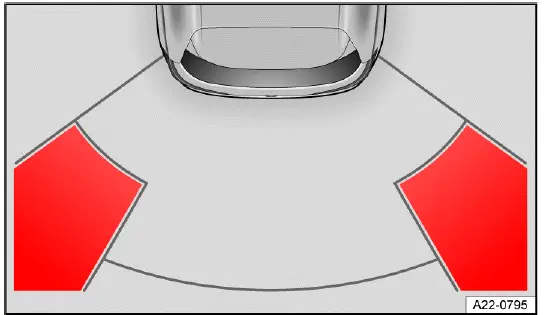
Fig. 128 Infotainment system: Rear Traffic Alert display (depending on the
vehicle equipment).
 Red section of the image:
Nearby obstacle. The vehicle is at risk. Brake!
Red section of the image:
Nearby obstacle. The vehicle is at risk. Brake!
 Yellow section of the image:
Obstacle in the
path of the vehicle. The vehicle is at risk. Steer around the obstacle.
Yellow section of the image:
Obstacle in the
path of the vehicle. The vehicle is at risk. Steer around the obstacle.
The red warning area indicates that the detected object is close enough to require immediate braking. A yellow warning area means the object is in or near the calculated path of the vehicle and the driver must slow down, steer carefully, or stop depending on the situation.
Calibration
The radar sensors calibrate once during the first kilometer of driving after the vehicle is delivered, and again if the sensor technology has been repaired. During this calibration phase, the range of the sensors may be limited.
After rear bumper repair, radar sensor replacement, paint work, or structural work near the rear of the vehicle, the driver should be aware that Rear Traffic Alert may need time or professional calibration before full performance is restored. Until the feature works normally, maneuver the Volkswagen Taos cautiously and do not depend on cross-traffic warnings alone.
Braking assistance systems
Information about braking assistance systems
Braking assistance systems can help stabilize the vehicle in critical driving or braking situations and may increase driving safety. These systems support the driver, but they cannot overcome physical limits, poor road grip, unsafe speed, or delayed driver reactions. The driver is always responsible for safe driving ⇒
 .
.
- If a braking assistance system is regulating, continue braking with the necessary force.
- If necessary, steer the vehicle.
- Keep looking where you want the vehicle to go and avoid sudden steering movements unless they are needed to prevent a collision.
WARNING
Braking assistance systems cannot replace the driver's attention and can only operate within their limitations.
Fast driving on icy, slippery, gravel-covered, or wet roads, as well as following the vehicle ahead too closely, may reduce vehicle stability and cause the driver to lose control. If the driver is careless, there is a risk of accidents, serious injuries, and death.
- Always stay attentive and do not rely solely on the system. The driver is always responsible for control of the vehicle.
- Always adapt your speed and driving style to visibility, weather, road surface, tire condition, and traffic conditions. Do not take unnecessary risks.
- Always keep the footwell beneath the pedals clear so that the brake pedal is unobstructed and can move freely.
- Always use suitable tires, as driving stability depends on the tires' ability to grip the road.
- Leave enough following distance so that braking assistance is not needed as a substitute for safe spacing.
- ESC, ABS and ASR only function correctly when all four wheels have the intended tires ⇒
 .
. - If the ABS malfunctions, the ESC, ASR and EDS also fail.
When the ignition is switched on, the condition of the braking functions is checked automatically. The indicator lights come on briefly and then turn off. If an indicator light remains on continuously, there is a malfunction. Contact an authorized Volkswagen dealer or authorized Volkswagen Service Facility immediately. Volkswagen recommends contacting an authorized Volkswagen dealer or authorized Volkswagen Service Facility.
In the Volkswagen Taos, warning lights related to braking or stability control should never be ignored. A fault in one braking assistance function can affect several related functions, especially when ABS, ESC, traction control, or electronic differential control depend on shared sensors and control modules.
WARNING
The effectiveness of ESC may be reduced considerably if other components and systems that affect driving dynamics have not been maintained correctly or are malfunctioning. This applies especially to changes to the suspension and unapproved wheel or tire combinations. Accidents and serious or fatal injuries could result.
- Ensure that conversions and modifications to the vehicle are only performed by an authorized Volkswagen dealer or authorized Volkswagen Service Facility. Volkswagen recommends contacting an authorized Volkswagen dealer or authorized Volkswagen Service Facility.
- Always use suitable tires, as driving stability depends on the tires' ability to grip the road.
- After suspension repairs, wheel changes, tire replacement, or accident damage, have related systems checked if warning lights appear or handling feels different.
Electronic Stability Control (ESC)
 ESC is regulating the vehicle
to reduce the risk of skidding and improve driving stability ⇒
ESC is regulating the vehicle
to reduce the risk of skidding and improve driving stability ⇒
 .
The indicator light
flashes yellow.
.
The indicator light
flashes yellow.
ESC can selectively brake individual wheels and adjust engine output to help the driver maintain control when the vehicle begins to understeer, oversteer, or lose stability. The driver may feel brief braking pulses or a reduction in power when ESC is active.
Anti-Slip Regulation (ASR)
 ASR is regulating the vehicle
to reduce the risk of the wheels spinning. The indicator light flashes yellow.
ASR is regulating the vehicle
to reduce the risk of the wheels spinning. The indicator light flashes yellow.
ASR reduces drive power at wheels that are spinning and adapts drive power to the road conditions. ASR makes it easier to start, accelerate, and drive up hills ⇒
 .
.
This traction support is especially helpful on wet roads, loose surfaces, snow, or steep inclines. Even so, the driver must accelerate smoothly and avoid demanding more grip than the tires can provide.
Anti-Lock Brake System (ABS)
ABS helps prevent the wheels from locking during braking so that the vehicle can still be steered ⇒
 .
.
During hard braking, the brake pedal may pulse and operating noises may be heard. This is normal when ABS is active. Keep pressing the brake pedal firmly and steer around hazards if needed.
Brake Assist System (BAS)
BAS can help reduce the vehicle braking distance. BAS increases braking power when the driver presses the brake pedal quickly in emergency situations ⇒
 .
.
The system recognizes a rapid brake pedal movement as a possible emergency stop and helps build braking pressure faster. The driver should continue pressing the pedal until the danger has passed.
Electronic Differential Lock (EDL and XDL)
EDS automatically applies the brakes to a wheel that starts spinning and transfers drive power to the other driving wheels.
XDS is an extension of the electronic differential lock and improves traction with braking support to help keep the vehicle in its lane.
These functions can support traction during acceleration, cornering, and low-grip driving. They do not make the vehicle immune to sliding, so speed and steering input must still match the road conditions.
Multi Collision Brake
The Automatic Post-Collision Braking System automatically brakes the vehicle if the airbag control module has detected a collision in an accident situation.
This function is designed to help reduce the chance of a second impact after an initial collision. It may slow the vehicle if the driver is unable to react immediately, but the driver should still brake and steer if possible.
Requirements for automatic braking:
 The driver does not press the
accelerator pedal.
The driver does not press the
accelerator pedal.
Brake booster
The braking support only functions when the engine is running and it enhances the pressure applied to the brake pedal by the driver.
If the braking support is not working or the vehicle is being towed, you will need to press the brake pedal harder because the lack of braking assistance will increase the braking distance ⇒
 .
.
WARNING
Driving without the brake booster or when the brake booster's function is limited can increase the braking distance significantly. This may lead to accidents resulting in serious or fatal injuries.
- Never stop the engine or switch the ignition off while the vehicle is moving.
- Press the brake pedal harder if the brake booster does not work or the vehicle is being towed.
- Always keep the footwell beneath the pedals clear so that the brake pedal is unobstructed and can move freely.
- If braking effort suddenly feels higher than usual, drive cautiously, increase following distance, and have the braking system checked as soon as possible.
For safe operation of the Volkswagen Taos, braking assistance systems, tires, suspension, and brake components should be maintained in proper condition. These systems can support the driver in critical moments, but the best protection is still careful speed control, enough distance, and early braking.
Switching the braking support system on and off
Driving situations
If a special setting for the braking assistance system is no longer needed, switch the braking support system back on completely as soon as possible ⇒
 .
.
These settings are intended only for specific driving situations, such as driving on loose surfaces or freeing a stuck vehicle. During normal road driving, the braking assistance systems in the Volkswagen Taos should remain fully active so that ESC, ASR, ABS, and related stability functions can support the driver when needed.
WARNING
When ESC is switched off, the risk of the vehicle swerving, skidding, or becoming difficult to control is significantly higher. The vehicle can be difficult for inexperienced drivers to handle, especially at higher speeds or on slippery surfaces. Accidents and serious or fatal injuries could result.
- Switch ESC off only if you are experienced in driving off-road and the driving situation clearly requires it.
- Do not take any risks. Drive slowly, keep enough distance, and switch the system back on when normal driving resumes.
Switching on and off
1. Open the vehicle settings of the Infotainment system ⇒ Vehicle settings menu.
2. Open the settings for ESC parking systems.
3. Select the function.
If the driving situation no longer exists, the brake system should be switched on again completely ⇒
 .
.
After changing an ESC or ASR setting, pay attention to the indicator lights in the instrument cluster. If a warning light remains on unexpectedly or the Volkswagen Taos feels less stable than usual, reduce speed and restore the normal setting when it is safe to do so.
ASR
It can be helpful to switch off ASR when the vehicle is driven on loose ground, such as gravel, snow, sand, or mud, or when rocking the vehicle back and forth to free it if it is stuck ⇒
 .
.
When ASR is off, the drive wheels may spin more freely. This can sometimes help the tires build momentum on loose surfaces, but it also reduces traction control support and can make the vehicle harder to manage if the driver accelerates too aggressively.
 ASR is manually switched off. The
yellow indicator light turns on.
ASR is manually switched off. The
yellow indicator light turns on.
ESC Off
The function assists experienced drivers with off-road driving. ESC is switched off and stabilizing interventions are not performed. Always read the safety instructions ⇒
 .
.
With ESC switched off, the vehicle may not correct skidding or unstable movement in the same way as during normal operation. Use this setting only at low speeds and only in conditions where reduced intervention is necessary.
 ESC is manually switched off. The
yellow indicator light turns on.
ESC is manually switched off. The
yellow indicator light turns on.
Troubleshooting
 ABS failure or malfunction
The yellow indicator light turns on. This means the Anti-Lock Brake System may not be available or may be operating with restrictions.
1. Contact an authorized Volkswagen dealer or authorized Volkswagen Service Facility. Volkswagen recommends contacting an authorized Volkswagen dealer or authorized Volkswagen Service Facility ⇒
 .
.
The vehicle can be braked without ABS.
However, if ABS is not functioning, the wheels may lock during hard braking, especially on wet, icy, loose, or uneven surfaces. Brake carefully, avoid sudden steering movements, and increase following distance until the Volkswagen Taos has been inspected.
 ESC malfunction
The yellow indicator light turns on. ESC has been switched off.
There is a fault or malfunction. The stability control function may be restricted, and the vehicle may not receive the usual corrective braking or engine control support in critical driving situations.
1. Switch the ignition off and on.
2. Drive a short distance at a speed of approximately 15 km/h (approx. 9 mph) to 20 km/h (approx. 12 mph).
3. If the
 indicator light stays
on, contact a suitably qualified professional. Volkswagen recommends contacting an
authorized Volkswagen dealer or authorized Volkswagen Service Facility.
indicator light stays
on, contact a suitably qualified professional. Volkswagen recommends contacting an
authorized Volkswagen dealer or authorized Volkswagen Service Facility.
Until the fault is corrected, drive more cautiously than usual. Avoid high speeds, sharp steering inputs, and aggressive acceleration, particularly on curves, wet pavement, snow, gravel, or steep roads.
Noises in the braking assistance systems
When the braking assistance systems are actively regulating, the brake pedal may move, vibrate, or feel different, and operating noises may occur.
1. Continue braking with the necessary force and steer the vehicle as required.
These noises and pedal movements can be normal when ABS, ESC, ASR, or related braking assistance functions are working. Do not release the brake pedal simply because it vibrates during an emergency stop; keep steady pressure and guide the vehicle in the intended direction.
WARNING
If the
 brake warning light
comes on together with the
brake warning light
comes on together with the
 indicator light, the regulating function of the ABS could
be malfunctioning. This can cause the rear wheels to lock when braking. This
could cause you to lose control of the
vehicle and lead to accidents with serious or fatal injuries.
indicator light, the regulating function of the ABS could
be malfunctioning. This can cause the rear wheels to lock when braking. This
could cause you to lose control of the
vehicle and lead to accidents with serious or fatal injuries.
- Drive at low speed to the nearest authorized Volkswagen dealer or authorized Volkswagen Service Facility to have the brake system checked. Volkswagen recommends contacting an authorized Volkswagen dealer or authorized Volkswagen Service Facility.
- Avoid sudden braking or driving maneuvers.
- Keep a greater distance from vehicles ahead and avoid roads or conditions that require heavy braking whenever possible.
WARNING
If the
 indicator light does
not turn off, or comes on during the journey, the ABS is not working correctly.
The vehicle
can only be stopped with the normal brakes. If the ABS is restricted, this may
lead to accidents causing damage to the
vehicle and serious or fatal injuries.
indicator light does
not turn off, or comes on during the journey, the ABS is not working correctly.
The vehicle
can only be stopped with the normal brakes. If the ABS is restricted, this may
lead to accidents causing damage to the
vehicle and serious or fatal injuries.
- Contact an authorized Volkswagen dealer or authorized Volkswagen Service Facility. Volkswagen recommends contacting an authorized Volkswagen dealer or authorized Volkswagen Service Facility.
- Do not ignore ABS or brake warning lights in the Volkswagen Taos, because a restricted braking support function can change braking behavior in an emergency.
For normal driving, the braking support systems should remain switched on. Temporarily deactivating ASR or ESC may be useful in limited situations, but full assistance should be restored once the vehicle is back on firm ground or normal roads.