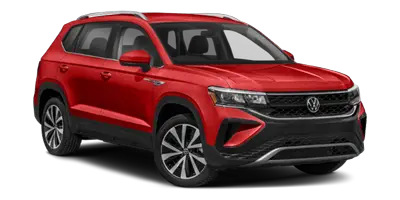
Volkswagen Taos: Practical equipment
Storage compartments
Introduction
WARNING
Loose objects can be thrown around inside the vehicle during sudden steering, braking, or evasive maneuvers. This can distract the driver, interfere with pedal operation, cause a loss of control, and lead to accidents with serious or fatal injuries.
- Store objects only in closed storage compartments and make sure they are secured before driving.
- Always keep storage compartments closed while the vehicle is moving.
- Do not place mobile devices, small electronics, keys, or similar loose objects in the rear center armrest storage system while driving.
- Only hang lightweight clothing, up to a maximum of 2.5 kg (approximately 5.5 lbs), from the coat hooks in the vehicle.
- Never leave heavy, hard, fragile, or sharp objects in clothing pockets because they can become dangerous during sudden braking or a collision.
Storage areas in the Volkswagen Taos are intended for everyday convenience, but they must be used carefully. Items that seem harmless while the vehicle is parked can become hazardous if the vehicle stops suddenly, changes direction quickly, or is involved in an accident.
WARNING
Incorrect use of the cup holders can cause injuries. While driving, during a sudden braking maneuver, or in the event of an accident, objects placed in the cup holder may be thrown around and cause serious injuries. Hot drinks can also spill and cause serious burns.
- Only place soft, break-resistant, closed containers in the cup holder.
- Integrated storage systems of the rear center armrest must always be used in the locked end positions.
- Do not place hot beverages in the cup holders while driving.
- Make sure that only suitably sized drink containers are placed in the cup holder. Drinks must always sit firmly and securely.
- Do not use the cup holder for tools, glass bottles, cans with sharp edges, or loose items that could fall out while driving.
WARNING
If the glove compartment is open while driving, objects may be thrown into the vehicle interior. This can distract the driver, affect vehicle control, and cause accidents with serious or fatal injuries.
- Always keep the glove compartment closed while driving.
- Before setting off, check that documents, small accessories, charging cables, and other loose items are fully inside the compartment and cannot fall out.
WARNING
Closed beverage bottles can explode from heat or burst from freezing temperatures and may cause severe injuries.
- Never leave closed beverage bottles in an extremely hot or extremely cold vehicle.
- Remove pressurized containers, sealed drinks, and temperature-sensitive items from the vehicle when outside temperatures are very high or very low.
NOTICE
Objects stored in the vehicle may be damaged by strong sunlight, heat, or cold. They may also damage the vehicle interior if they melt, leak, expand, or deform.
- Never leave objects, groceries, medications, cosmetics, electronics, or other temperature-sensitive items in the vehicle interior.
- Bear in mind that objects made from transparent materials, such as transparent suction cups on door windows, can concentrate sunlight and may damage interior surfaces.
- Avoid placing items on the dashboard, near air vents, or in direct sunlight for long periods.
NOTICE
Depending on the vehicle equipment, the rear center armrest may have a storage system. Folding the rear center armrest back into the seat with the storage system open can damage the cup holder or the armrest mechanism.
- Before folding in the rear center armrest, make sure that all objects have been removed and that integrated storage systems are closed or folded in.
- Do not force the armrest back into position if resistance is felt. Check the cup holder and storage area first.
For safe everyday use in the Volkswagen Taos, keep the passenger compartment organized and avoid leaving loose items on seats, the floor, the dashboard, or the rear center armrest. Proper storage helps protect occupants and prevents damage to interior trim during normal driving.
Cup Holder in the Rear Center Armrest
Please read the introductory information and heed the Warnings and
Notice ⇒
 and
and
 Introduction.
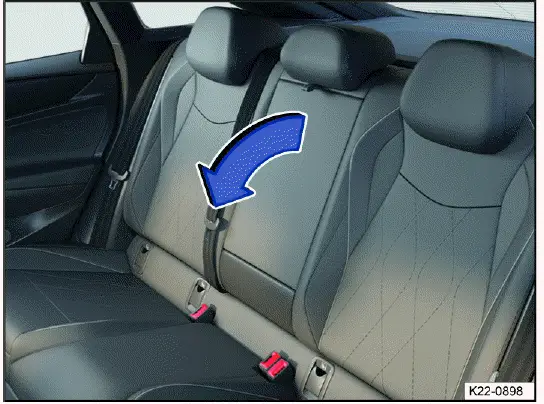
Fig. 129 In the backrest of the center seat: folding rear center armrest
(general example).
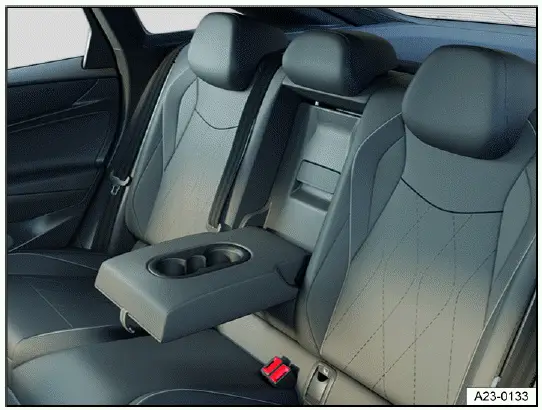
Fig. 130 In the rear center armrest: cup holder (general example).
There is a cup holder in the rear center armrest. It is intended for securely holding suitable drink containers when the armrest is folded down and locked in its usable position.
- To fold forward: pull the center armrest in the direction of the arrow using the loop fig. 129. Lower it carefully so that it rests securely and does not drop suddenly.
- To fold back: fold the center armrest upward in the opposite direction of the arrow fig. 129 and press it all the way toward the seat backrest.
Before folding the armrest back into the rear seat, remove cups, bottles, small objects, and any items from the storage area. This helps prevent spills, rattling noises, broken containers, or damage to the cup holder mechanism.
Passengers must not sit in the center rear seat when the center armrest is folded down.
When the rear center armrest is lowered, the center seating position is not available for use. Always fold the armrest fully back into the seatback before carrying a passenger in the center rear seat, and make sure the seating position, head restraint, and safety belt can be used correctly.
The rear cup holder in the Volkswagen Taos should only be used when the vehicle is being driven calmly and the drink containers are stable. During rough roads, quick turns, or sudden braking, passengers should hold containers securely or remove them from the cup holder to avoid spills and injury.
Sockets
Introduction
Electrical devices can be connected to the sockets in the vehicle. These sockets are intended for suitable accessories and mobile devices, such as phone chargers, small electronics, or approved vehicle equipment.
The 12 V socket only works when the ignition is switched on. In the Volkswagen Taos, this helps reduce unintended battery drain, but connected devices should still be monitored and disconnected when they are no longer needed.
WARNING
Using sockets and connected electrical devices incorrectly can cause overheating, electrical faults, fires, and serious or fatal injuries.
- If an electrical device, plug, adapter, or cable becomes too warm, turn off the device immediately and disconnect it from the socket.
- Be aware that sockets and devices connected to them may still be used, for example by children in the vehicle, even when the ignition is switched off, depending on equipment and power supply behavior.
- Do not leave connected devices unattended if they become warm, charge irregularly, or show signs of damage.
- Keep charging cables away from pedals, seat rails, sharp trim edges, and moving parts.
NOTICE
Electrical devices that are unsuitable, not approved, defective, or connected incorrectly may damage the vehicle or its electronics.
- Never connect electrical devices that provide power, such as solar panels, battery chargers, or external power supplies, to the 12 V socket in order to charge the 12 V vehicle battery.
- Only use electrical devices that have been tested for compliance with the applicable directives for electromagnetic compatibility.
- Do not use malfunctioning devices, damaged plugs, loose adapters, exposed wiring, or accessories that do not fit securely in the socket.
- To reduce the risk of damage from voltage fluctuations, turn electrical devices off before switching the ignition on or off and before starting the engine.
- Refer to the operating instructions for the electrical devices before connecting them in the vehicle.
NOTICE
The vehicle electrical system can be damaged when the maximum load is exceeded. Overloaded sockets may overheat, stop working, or cause a fuse to blow.
- Never connect electrical devices that draw more than the specified load of a 12 V socket.
- Do not connect several high-power devices through splitters, adapters, or extension cables if their combined load exceeds the permitted output.
 The 12 V vehicle battery will
drain if the ignition and electrical devices are switched on while the engine is
switched off.
The 12 V vehicle battery will
drain if the ignition and electrical devices are switched on while the engine is
switched off.
To help protect the battery, disconnect chargers, coolers, dash cameras, and other accessories when the vehicle is parked for a long time. If the battery charge becomes low, some electrical functions may be limited or unavailable.
 Unshielded devices can cause
malfunctions in the radio, the Infotainment system and in the vehicle
electronics, depending
on the vehicle equipment.
Unshielded devices can cause
malfunctions in the radio, the Infotainment system and in the vehicle
electronics, depending
on the vehicle equipment.
Electrical interference may appear as radio noise, unstable charging, connection interruptions, or unexpected behavior in nearby electronics. Use quality accessories and remove any device that causes repeated interference.
Sockets in the vehicle
Please read the introductory information and heed the Warnings and
Notice ⇒
 and
and
 Introduction.
Do not exceed the maximum power of the sockets. The power draw of external devices is indicated on their identification labels, packaging, or operating instructions.
Before connecting an accessory in the Volkswagen Taos, check its voltage and power requirements. If the device requires more current than the socket can safely provide, do not use it in the vehicle.
12 V socket
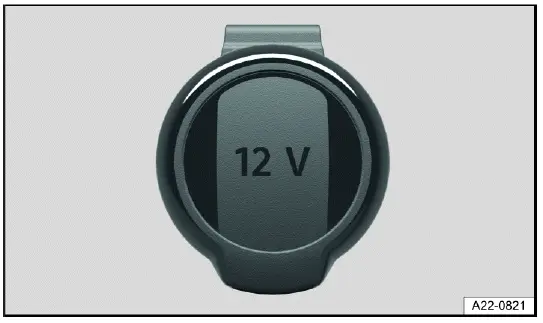
Fig. 131 In the front storage compartment or in the luggage compartment on
the left-hand side: Folding 12 V socket
(general example).
The total continuous output of all 12 V sockets in the vehicle is 120 watts ⇒ Introduction.
The maximum power of a 12 V socket in the vehicle with the engine running totals 180 watts.
The higher maximum output is intended only for short-term use and only when the conditions are suitable. If a device draws a high amount of power for too long, the socket, plug, wiring, or fuse may be overloaded.
NOTICE
Using 12 V sockets for too long at maximum power can cause the fuse to blow.
- Never use 12 V sockets at their maximum power for longer than 10 minutes.
- Only ever use a single 12 V socket at maximum power.
- If a device stops working through the socket, disconnect it and check whether the device, adapter, or vehicle fuse may be the cause.
Charging Options for Mobile Devices
Please read the introductory information and heed the Warnings and
Notice ⇒
 and
and
 Introduction.
You can charge mobile devices in the vehicle either wirelessly, depending on equipment, or by using the built-in USB-C connectors. These charging options are intended for compatible phones, tablets, and small electronic devices.
Charging with USB-C Connectors
The vehicle may contain the following USB-C ports. Some ports support both data transmission and charging, while others are designed only for charging.
 Symbol for a USB port for
data transmission and charging.
Symbol for a USB port for
data transmission and charging.
 Symbol for a USB port for charging only.
Use the correct port for your device and function. If you need smartphone integration, media transfer, or data communication, connect the device to a USB port that supports data transmission. For charging only, a charging-only USB-C port is sufficient.
Available Charging Power
Voltages up to 20 V are provided via the USB port, which enables charging power of up to 45 W.
Depending on the vehicle equipment, the following charging profiles may be supported by the USB ports:
- Legacy charging (2.5 W).
- BC1.2 (7.5 W).
- USB-C charging (15 W).
- USB power delivery (up to 45 W).
The actual charging power of the connected device depends on the following aspects:
- Supported charging profiles.
- Device charge level.
- Device temperature.
- Charging cable used.
- The number of devices connected at the same time.
- Whether the device limits charging to protect its battery from heat or high charge levels.
For best charging performance in the Volkswagen Taos, use a high-quality USB-C cable that supports the required charging profile. A damaged, low-quality, or charge-only cable may reduce charging speed or prevent data transfer.
 For double USB ports, the
charging power can be split between both ports.
For double USB ports, the
charging power can be split between both ports.
If two devices are connected to a double USB port, each device may charge more slowly than when only one device is connected. Charging speed may also decrease if a phone is being used for navigation, wireless services, music streaming, or other high-power functions at the same time.
Wireless charging function
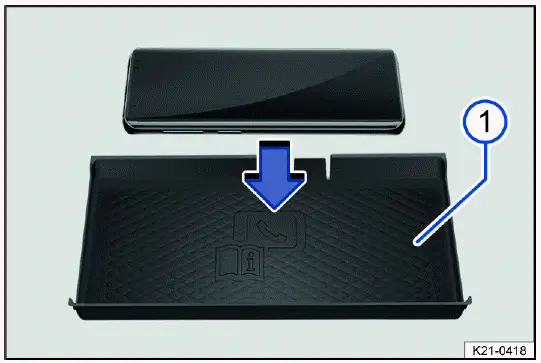
Fig. 132 In the center console: storage for wireless charging function
(general example).
- Liner mat with telephone symbol.
The wireless charging function depends on the vehicle equipment and is not available in all countries. In the Volkswagen Taos, this feature is intended to make everyday phone charging more convenient by allowing a compatible mobile phone to charge without connecting a cable.
Wireless charging enables energy transfer over a short distance through electromagnetic induction for cell phones that are Qi-certified.
The rear shelf with liner mat fig. 132 for the wireless charging function is located in the area of the center console and is designed for only one Qi-certified mobile phone at a time. The phone must lie flat on the charging surface so that the charging coil in the phone can align properly with the charging area.
On some vehicles, the liner mat fig. 132 has a telephone symbol indicating the center position. This marking helps the driver or passenger place the phone in the most suitable area for stable charging.
The charging power is 5 watts. Actual charging speed can vary depending on the phone model, battery level, phone temperature, protective case, and whether the device is being used for navigation, calls, music streaming, or other power-consuming functions.
If the vehicle interior is cooled by the air conditioner, cool air is directed into the storage compartment, depending on the vehicle equipment. This can help reduce heat buildup around the phone during charging, although the phone may still warm up during normal wireless charging operation.
Qi Standard
The Qi standard enables wireless charging of suitable Qi-certified cell phones. To find out whether a cell phone supports the Qi standard, see the cell phone operating instructions. An overview of Qi-certified cell phones can be viewed under the following external link of the Wireless Power Consortium, Inc:
https://www.wirelesspowerconsortium.com/products
Volkswagen AG assumes no liability for the completeness and accuracy of this list. The manufacturer of the cell phone may provide additional information regarding compatibility.
Cell phones that are not Qi-certified may be subject to limitations with regard to wireless charging. Some devices may charge slowly, charge intermittently, or fail to start charging if their coil position, case design, or software charging profile is not compatible with the vehicle charging shelf.
Wireless Cell Phone Charging
Requirements
 A suitable cell phone that is
no larger than the designated rear shelf and is Qi-certified.
A suitable cell phone that is
no larger than the designated rear shelf and is Qi-certified.
1. Remove any foreign objects from the storage compartment prior to charging ⇒
 .
.
2. Remove the protective case of the cell phone and any other foreign objects, if present, then place the cell phone flat against the rear shelf with the display facing upward.
The charging process starts automatically when the phone is positioned correctly and the charging area recognizes a compatible device.
3. Refer to the operating instructions for the cell phone.
The Infotainment system informs you when the charging process is starting and, if applicable, if there are any foreign objects with metal components in the storage compartment.
Depending on the vehicle equipment, the charging function can be deactivated manually in the Infotainment system.
For reliable charging in the Volkswagen Taos, place the phone centrally on the liner mat and avoid stacking items underneath or on top of the phone. Coins, keys, metal plates, magnetic mounts, cards, or thick cases can interrupt charging and may cause heat buildup.
WARNING
Notifications on the cell phone display may distract the driver. Looking at messages, calls, app alerts, or charging information while driving can result in accidents and serious injury or death.
- Make sure that no objects interfere with the closing function of the cover.
- If the rear shelf includes a cover, always keep the cover closed while driving.
- Do not adjust, read, or operate the cell phone while driving. Stop the vehicle safely first if attention to the phone is necessary.
WARNING
Metal objects on the shelf can become very hot during wireless charging. This may cause burns, smoke, damage to interior materials, or fires.
- Do not place metal objects or objects with metal components on the wireless charging shelf.
- Remove any foreign objects immediately.
- Before charging, check the shelf for coins, keys, jewelry, metal cases, magnetic plates, tools, or other conductive items.
NOTICE
If cards or other objects with magnetic strips or chips are placed on the rear shelf for wireless charging, the data stored on these may be damaged.
- Do not place any ID cards, debit cards or credit cards with magnetic strips or chips on the wireless charging shelf.
- Keep access cards, parking cards, passports with chips, and similar items away from the charging area.
Wireless charging in the Volkswagen Taos is best used for one compatible phone at a time. If charging stops repeatedly, the phone becomes unusually hot, or a foreign object warning appears, remove the phone and check the tray before trying again.
Troubleshooting
Please read the introductory information and heed the Warnings and
Notice ⇒
 and
and
 Introduction.
Cell phone is not Charging
A message regarding a foreign object in the storage compartment may be displayed in the Infotainment system.
If the cell phone is in an unfavorable position on the liner mat, this can impair the charging function. This can be caused by changes in position, even small shifts that may occur as a result of vibration while driving.
The position of the cell phone must be corrected in order to restore proper charging function.
1. Align the cell phone centrally on the charging surface.
The charging function can also be impaired by metallic parts, in particular magnetic parts of a cell phone or its protective case.
1. Rotate the mobile phone approx. 180º with the display still facing upward on the charging surface.
If charging still does not start, remove the phone from the shelf, wait briefly, and place it back on the liner mat. Also check whether the phone supports Qi charging, whether wireless charging is enabled on the device, and whether the phone case is too thick or contains magnets, metal plates, card holders, or accessories.
If the device charges with a cable but not wirelessly, the cause may be phone compatibility, phone temperature, software settings, or the position of the charging coil. Try charging the phone without the case and make sure no other object is touching the charging area.
If the wireless charging function in the Volkswagen Taos remains unavailable after repositioning the phone and removing foreign objects, check the Infotainment system settings and have the vehicle inspected by suitably qualified professionals if the problem continues.