
Volkswagen Taos: Driver information
- Symbols in the instrument cluster
- Warning and information texts
- Introduction to the instrument cluster
- Volkswagen Digital Cockpit Pro
- Volkswagen Digital Cockpit Basic
- Tachometer
- Fuel gauge
- Engine coolant temperature gauge
- Driving data menu
- Service
- Time
- Sport displays
- Vehicle settings menu
- Dynamic Road Sign Display
Symbols in the instrument cluster
The warning and indicator lights in the instrument cluster can illuminate individually or together, depending on the situation detected by the vehicle systems. These lights may indicate active functions, driver assistance status, operating conditions, malfunctions, service needs, or urgent safety warnings. In the Volkswagen Taos, some symbols appear briefly when the ignition is switched on as part of a system check and should go out after a short time if no fault is present.
Indicator lights that appear in the light switch are explained separately in the "Lights" chapter ⇒ Switching the lights on and off. Because warning lights can relate to safety, braking, steering, engine operation, tire pressure, driver assistance systems, or electrical supply, the message in the instrument cluster should always be read together with the symbol. This helps the driver understand whether the vehicle can continue to be driven, whether service is needed soon, or whether the vehicle must be stopped immediately.
WARNING
Failure to respond to illuminated warning lights and messages may result in a vehicle breakdown, accidents, serious injuries, or death. A warning symbol is not only a reminder; it is part of the vehicle’s safety information system and should be treated seriously whenever it appears.
- Never ignore illuminated warning lights and messages. Check the instrument cluster display and follow the related instructions in the Owner’s Manual.
- Stop the vehicle as soon as it is safe to do so if the warning message instructs you not to continue driving or if vehicle behavior changes noticeably.

 Do not continue driving!
Central warning light ⇒ Priority 1 warning message. This warning means a serious condition has been detected and immediate attention is required before the vehicle is driven farther.
 Fasten safety belt ⇒ Fasten seat
belts reminder and seat belt safety indicator. This symbol reminds occupants to fasten their seat belts and may remain active until the belt is properly latched.
Fasten safety belt ⇒ Fasten seat
belts reminder and seat belt safety indicator. This symbol reminds occupants to fasten their seat belts and may remain active until the belt is properly latched.
 Electronic parking brake
switched on ⇒ Electronic parking brake. The symbol confirms that the electronic parking brake is applied.
Electronic parking brake
switched on ⇒ Electronic parking brake. The symbol confirms that the electronic parking brake is applied.
Holding force of the electronic parking brake too low ⇒ Electronic parking brake. If this message appears, the vehicle may not be secured correctly and the parking brake system should be checked according to the manual instructions.

 Do not continue driving!
Brake system malfunction ⇒ Brake system malfunctioning. A brake system warning can indicate a serious fault, and the Volkswagen Taos should not be driven until the cause is checked by a qualified professional.
 Do not continue driving!
Brake fluid level too low ⇒ Brake fluid level. Low brake fluid can reduce braking performance and may indicate leakage or worn brake components.

 Do not continue driving!
Brake system malfunction ⇒ Brake system malfunctioning. If the warning appears again or remains active, stop safely and arrange inspection before continuing.
 Check brake system ⇒ Brake pad
wear indicator. This message can indicate that the brake pads have reached a wear limit and should be inspected or replaced.
Check brake system ⇒ Brake pad
wear indicator. This message can indicate that the brake pads have reached a wear limit and should be inspected or replaced.
 Take over steering and be ready
to brake. ⇒ Introduction. The driver must immediately take control and be prepared to brake because the assistance system may not continue supporting the situation.
Take over steering and be ready
to brake. ⇒ Introduction. The driver must immediately take control and be prepared to brake because the assistance system may not continue supporting the situation.

 Do not continue driving!
Engine oil level too low ⇒ Engine oil level very low. Driving with very low oil level can cause severe engine damage, so the oil level must be checked immediately.

 Do not continue to drive!
Engine oil pressure too low ⇒ Engine oil pressure too low. Low oil pressure is a critical warning and can quickly lead to internal engine damage if the engine continues running.

 Do not continue to drive!
Engine coolant system malfunction ⇒ Engine coolant. This warning can relate to overheating, low coolant level, or cooling system malfunction and should be addressed before further driving.

 Do not continue driving!
Steering malfunction ⇒ Steering malfunction. Steering assistance may be reduced or unavailable, making the vehicle harder to control.
 Rear Traffic Alert has detected
an obstacle to the rear ⇒ Rear Traffic Alert. Check the surroundings carefully and do not rely only on the system display when reversing.
Rear Traffic Alert has detected
an obstacle to the rear ⇒ Rear Traffic Alert. Check the surroundings carefully and do not rely only on the system display when reversing.

 Do not continue driving!
12 V energy supply malfunction ⇒ 12-volt power supply. An electrical supply fault can affect starting, lighting, control modules, and safety systems.
 Collision warning ⇒ Warning
levels and braking support. The system has detected a possible collision risk and may request immediate driver action.
Collision warning ⇒ Warning
levels and braking support. The system has detected a possible collision risk and may request immediate driver action.
 Take over the steering
immediately ⇒ Take over the steering immediately. The driver must place both hands on the steering wheel and resume active control.
Take over the steering
immediately ⇒ Take over the steering immediately. The driver must place both hands on the steering wheel and resume active control.

 Do not continue to drive!
Transmission overheating ⇒ Transmission overheating. Stop safely and allow the transmission to cool as instructed, because continued driving may cause damage.
 Central warning light ⇒ Priority
2 warning message. A priority 2 warning normally indicates a fault or condition that requires attention soon, but it may not always require an immediate stop.
Central warning light ⇒ Priority
2 warning message. A priority 2 warning normally indicates a fault or condition that requires attention soon, but it may not always require an immediate stop.
 Airbag or safety belt
pretensioner with diagnostic device switched off ⇒ Airbag system or safety belt
pretensioners deactivated with diagnostic device
Airbag or safety belt
pretensioner with diagnostic device switched off ⇒ Airbag system or safety belt
pretensioners deactivated with diagnostic device
Airbag or safety belt pretensioner malfunction ⇒ Airbag system or safety belt pretensioners malfunction. Have the restraint system checked because protection in a crash may be reduced.
 Front passenger's front airbag
deactivated ⇒ Front passenger's front airbag switched off. This indicator should be checked carefully when a passenger or child restraint is in the front passenger seat.
Front passenger's front airbag
deactivated ⇒ Front passenger's front airbag switched off. This indicator should be checked carefully when a passenger or child restraint is in the front passenger seat.
 Front passenger's airbag enabled
⇒ Front passenger's front airbag enabled. The indicator confirms that the front passenger airbag is active under the current seat and occupant conditions.
Front passenger's airbag enabled
⇒ Front passenger's front airbag enabled. The indicator confirms that the front passenger airbag is active under the current seat and occupant conditions.
 Emergency Call Service limited ⇒
Emergency Call Service limited
Emergency Call Service limited ⇒
Emergency Call Service limited
Emergency Call Service malfunctioning ⇒ Emergency Call Service malfunction. The emergency call function may not be fully available and should be checked if the message remains active.
 Electronic parking brake
malfunction ⇒ Electronic parking brake malfunction. The parking brake may not operate normally, so the vehicle should be secured carefully and inspected.
Electronic parking brake
malfunction ⇒ Electronic parking brake malfunction. The parking brake may not operate normally, so the vehicle should be secured carefully and inspected.
 Check brake system ⇒ Brake pad
wear indicator. Brake pads may be worn and service may be required to maintain braking performance.
Check brake system ⇒ Brake pad
wear indicator. Brake pads may be worn and service may be required to maintain braking performance.
 Comes on: Electronic Stability
Control (ESC) malfunction ⇒ ESC malfunction
Comes on: Electronic Stability
Control (ESC) malfunction ⇒ ESC malfunction
Flashes: Electronic Stability Control (ESC) or Anti-slip regulation (ASR) in operation ⇒ Electronic Stability Control (ESC). A flashing light usually means the system is actively helping stabilize the vehicle or reduce wheel spin.
 Electronic Stabilization Control
(ESC) switched off ⇒ ESC Off
Electronic Stabilization Control
(ESC) switched off ⇒ ESC Off
Anti-Slip Regulation (ASR) switched off ⇒ ASR. When stability or traction functions are switched off, the vehicle may respond differently during acceleration, cornering, or slippery road driving.
 Anti-Lock Braking System (ABS)
malfunction ⇒ ABS failure or malfunction. Normal braking may still be available, but ABS regulation may not function correctly.
Anti-Lock Braking System (ABS)
malfunction ⇒ ABS failure or malfunction. Normal braking may still be available, but ABS regulation may not function correctly.
 Engine oil system malfunction ⇒
Engine oil system malfunction
Engine oil system malfunction ⇒
Engine oil system malfunction
Engine oil level too low ⇒ Engine oil level too low
Engine oil level too high ⇒ Engine oil level too high. Both low and excessive oil levels can affect lubrication and engine operation, so the oil level should be checked according to the correct procedure.
 Engine oil system malfunction ⇒
Engine oil system malfunction. If this symbol remains on, service diagnosis may be necessary.
Engine oil system malfunction ⇒
Engine oil system malfunction. If this symbol remains on, service diagnosis may be necessary.
 Tank almost empty ⇒ Fuel tank
almost empty. Refuel soon to avoid running out of fuel and to prevent driving range from becoming too limited.
Tank almost empty ⇒ Fuel tank
almost empty. Refuel soon to avoid running out of fuel and to prevent driving range from becoming too limited.
 Semi-automated driving
assistance (Travel Assist) not available ⇒ Travel Assist is not available or is
not functioning as expected. The driver must control speed, distance, and steering without relying on this assistance function.
Semi-automated driving
assistance (Travel Assist) not available ⇒ Travel Assist is not available or is
not functioning as expected. The driver must control speed, distance, and steering without relying on this assistance function.
 Tank cap not closed ⇒ Fuel tank
cap open. Check that the fuel filler cap or fuel filler flap area is closed correctly.
Tank cap not closed ⇒ Fuel tank
cap open. Check that the fuel filler cap or fuel filler flap area is closed correctly.
 Driving light failure ⇒ Exterior
lighting malfunction. One or more exterior lights may not be working, which can reduce visibility and vehicle recognition by other road users.
Driving light failure ⇒ Exterior
lighting malfunction. One or more exterior lights may not be working, which can reduce visibility and vehicle recognition by other road users.
 Rain/light sensor malfunction ⇒
Rain/light sensor malfunction, ⇒ Rain/light sensor malfunction. Automatic light or wiper functions may be limited when this sensor is not operating correctly.
Rain/light sensor malfunction ⇒
Rain/light sensor malfunction, ⇒ Rain/light sensor malfunction. Automatic light or wiper functions may be limited when this sensor is not operating correctly.
 Windshield wiper malfunction ⇒
Windshield wiper malfunction. Wiper operation may be restricted, which can affect visibility during rain or snow.
Windshield wiper malfunction ⇒
Windshield wiper malfunction. Wiper operation may be restricted, which can affect visibility during rain or snow.
 Washer fluid level too low ⇒
Washer fluid level too low. Refill washer fluid as soon as practical to maintain windshield cleaning performance.
Washer fluid level too low ⇒
Washer fluid level too low. Refill washer fluid as soon as practical to maintain windshield cleaning performance.
 Steering malfunction ⇒ Steering
malfunction. Steering assistance may be reduced, and the vehicle should be checked if the warning remains active.
Steering malfunction ⇒ Steering
malfunction. Steering assistance may be reduced, and the vehicle should be checked if the warning remains active.

 Do not continue to drive!
Tire pressure low ⇒ Tire pressure low. Stop safely, check the tires for visible damage, and correct tire pressures according to the placard and manual instructions.
 Do not continue to drive!
Tire pressure monitoring system malfunction ⇒ Tire Pressure Monitoring System malfunction. The system may not reliably detect low tire pressure until the malfunction is corrected.
 Autonomous Emergency Braking
(Front Assist) switched off ⇒ Using Front Assist. The vehicle may not provide the expected collision warning or braking support while this function is off.
Autonomous Emergency Braking
(Front Assist) switched off ⇒ Using Front Assist. The vehicle may not provide the expected collision warning or braking support while this function is off.
 Cruise control system
malfunction ⇒ Cruise control system malfunction. Cruise control may not be available until the fault is corrected.
Cruise control system
malfunction ⇒ Cruise control system malfunction. Cruise control may not be available until the fault is corrected.
 Adaptive cruise control (ACC)
not available ⇒ ACC is not available. The driver must control speed and following distance manually.
Adaptive cruise control (ACC)
not available ⇒ ACC is not available. The driver must control speed and following distance manually.
 Semi-automatic vehicle control
in a medical emergency (Emergency Assist) is functioning ⇒ Driving with
Emergency Assist
Semi-automatic vehicle control
in a medical emergency (Emergency Assist) is functioning ⇒ Driving with
Emergency Assist
Lane Assist in control ⇒ Driving with Lane Assist. The system may be supporting steering within its operating limits, but the driver remains responsible for control of the Volkswagen Taos at all times.
 Blind Spot Monitor active ⇒
"Blind Spot" Monitor malfunction. Check the related message to confirm whether the system is active, limited, or malfunctioning.
Blind Spot Monitor active ⇒
"Blind Spot" Monitor malfunction. Check the related message to confirm whether the system is active, limited, or malfunctioning.
 Rear Traffic Alert brakes ⇒
Automatic braking intervention. The system may apply braking when an obstacle is detected while reversing, but the driver must still check the surroundings.
Rear Traffic Alert brakes ⇒
Automatic braking intervention. The system may apply braking when an obstacle is detected while reversing, but the driver must still check the surroundings.
 Engine control malfunction ⇒
Engine control malfunction. Engine performance may be reduced and service diagnosis may be required.
Engine control malfunction ⇒
Engine control malfunction. Engine performance may be reduced and service diagnosis may be required.
 Exhaust system malfunction ⇒
Exhaust-related malfunction. Emissions-related operation may be affected, and the vehicle should be checked if the warning remains on.
Exhaust system malfunction ⇒
Exhaust-related malfunction. Emissions-related operation may be affected, and the vehicle should be checked if the warning remains on.
 Particulate filter clogged with
soot ⇒ Particulate filter clogged with soot. Follow the instructions in the manual, because incorrect driving behavior or ignoring the warning can lead to further faults.
Particulate filter clogged with
soot ⇒ Particulate filter clogged with soot. Follow the instructions in the manual, because incorrect driving behavior or ignoring the warning can lead to further faults.
 Engine RPM limited ⇒ Engine
speed limited. The engine control system may limit speed to protect components or respond to a detected fault.
Engine RPM limited ⇒ Engine
speed limited. The engine control system may limit speed to protect components or respond to a detected fault.
 12-volt power supply malfunction
⇒ 12-volt power supply. Electrical functions may be restricted, and the vehicle battery or charging system may require inspection.
12-volt power supply malfunction
⇒ 12-volt power supply. Electrical functions may be restricted, and the vehicle battery or charging system may require inspection.
 Transmission malfunction ⇒
Transmission overheating. Transmission operation may be limited, and continued driving without checking the message may increase the risk of damage.
Transmission malfunction ⇒
Transmission overheating. Transmission operation may be limited, and continued driving without checking the message may increase the risk of damage.
 Vehicle key not in vehicle ⇒
Valid vehicle key cannot be detected. The key may be outside the cabin, shielded, or affected by a weak battery.
Vehicle key not in vehicle ⇒
Valid vehicle key cannot be detected. The key may be outside the cabin, shielded, or affected by a weak battery.
 Press the brake pedal. ⇒ The
engine is not starting, ⇒ Driving is restricted by the selector lever lock. Pressing the brake pedal may be required before starting the engine or moving the selector lever.
Press the brake pedal. ⇒ The
engine is not starting, ⇒ Driving is restricted by the selector lever lock. Pressing the brake pedal may be required before starting the engine or moving the selector lever.
 Turn signals ⇒ Turn signal
indicator light. The symbol flashes when the turn signals or hazard flashers are operating.
Turn signals ⇒ Turn signal
indicator light. The symbol flashes when the turn signals or hazard flashers are operating.
 Cruise control switched on,
regulation active ⇒ Introduction. The system is maintaining the selected speed within its operating limits.
Cruise control switched on,
regulation active ⇒ Introduction. The system is maintaining the selected speed within its operating limits.
 Lane Assist active ⇒ Driving
with Lane Assist. The lane keeping system is available and may assist with steering depending on road markings and conditions.
Lane Assist active ⇒ Driving
with Lane Assist. The lane keeping system is available and may assist with steering depending on road markings and conditions.
 Semi-automated driving
assistance (Travel Assist) active ⇒ Introduction. Travel Assist may support steering, speed, and distance control when operating conditions are met.
Semi-automated driving
assistance (Travel Assist) active ⇒ Introduction. Travel Assist may support steering, speed, and distance control when operating conditions are met.
 Adaptive Cruise Control (ACC)
regulates, no vehicle driving ahead is detected ⇒ Switching ACC on and
off. The system is regulating the selected speed without tracking a vehicle directly ahead.
Adaptive Cruise Control (ACC)
regulates, no vehicle driving ahead is detected ⇒ Switching ACC on and
off. The system is regulating the selected speed without tracking a vehicle directly ahead.
 Adaptive Cruise Control (ACC)
regulates, vehicle driving ahead is detected ⇒ Switching ACC on and off. The system is adjusting speed based on the detected vehicle ahead within ACC limits.
Adaptive Cruise Control (ACC)
regulates, vehicle driving ahead is detected ⇒ Switching ACC on and off. The system is adjusting speed based on the detected vehicle ahead within ACC limits.
 Hill Descent Control is active ⇒
Hill Descent Control. The system may help control speed on steep descents when conditions allow.
Hill Descent Control is active ⇒
Hill Descent Control. The system may help control speed on steep descents when conditions allow.
 High beams or headlight flasher ⇒
Switching the high beam headlights on and off. The symbol confirms that high beam lighting or headlight flashing is active.
High beams or headlight flasher ⇒
Switching the high beam headlights on and off. The symbol confirms that high beam lighting or headlight flashing is active.
 Hill Descent Control is not
active ⇒ Hill Descent Control. The system is not currently controlling descent speed.
Hill Descent Control is not
active ⇒ Hill Descent Control. The system is not currently controlling descent speed.
 Outside temperature is below +39
ºF (+4 ºC) ⇒ Volkswagen Digital Cockpit Pro Information Displays,
⇒ Volkswagen Digital Cockpit Basic Information Displays. Roads may be icy even when the displayed temperature is slightly above freezing.
Outside temperature is below +39
ºF (+4 ºC) ⇒ Volkswagen Digital Cockpit Pro Information Displays,
⇒ Volkswagen Digital Cockpit Basic Information Displays. Roads may be icy even when the displayed temperature is slightly above freezing.
 Start/Stop system active ⇒
Start-stop system. The engine may be switched off automatically while the vehicle is stopped and operating conditions are met.
Start/Stop system active ⇒
Start-stop system. The engine may be switched off automatically while the vehicle is stopped and operating conditions are met.
 Start/Stop system not available ⇒
Start-stop system. The system may be temporarily unavailable due to temperature, battery condition, engine load, climate settings, or other operating factors.
Start/Stop system not available ⇒
Start-stop system. The system may be temporarily unavailable due to temperature, battery condition, engine load, climate settings, or other operating factors.
 Service due ⇒ Service interval
display. The vehicle is reminding the driver that scheduled maintenance is due or approaching.
Service due ⇒ Service interval
display. The vehicle is reminding the driver that scheduled maintenance is due or approaching.
 Semi-automated driving assistance
(Travel Assist) active, Adaptive Cruise Control active, adaptive lane
guidance inactive ⇒ Introduction. Speed and distance control may be active while lane guidance is not currently available.
Semi-automated driving assistance
(Travel Assist) active, Adaptive Cruise Control active, adaptive lane
guidance inactive ⇒ Introduction. Speed and distance control may be active while lane guidance is not currently available.
 High beam assistance active ⇒
Switching on high beam assistance. The system may automatically switch high beams on or off when conditions allow.
High beam assistance active ⇒
Switching on high beam assistance. The system may automatically switch high beams on or off when conditions allow.
 Take over the steering ⇒ Take
over the steering. The driver must steer actively and remain attentive to the road.
Take over the steering ⇒ Take
over the steering. The driver must steer actively and remain attentive to the road.
 Autonomous Emergency Braking
(Front Assist) starts ⇒ Autonomous Emergency Braking starts. The system may begin braking support when a collision risk is detected, but driver braking and steering remain essential.
Autonomous Emergency Braking
(Front Assist) starts ⇒ Autonomous Emergency Braking starts. The system may begin braking support when a collision risk is detected, but driver braking and steering remain essential.
 Distance warning ⇒ Warning
levels and braking support. The vehicle has detected that the following distance may be too short for the current situation.
Distance warning ⇒ Warning
levels and braking support. The vehicle has detected that the following distance may be too short for the current situation.
 Offroad driving profile ⇒
Driving mode properties. This profile adjusts vehicle behavior for off-road or loose-surface conditions when available.
Offroad driving profile ⇒
Driving mode properties. This profile adjusts vehicle behavior for off-road or loose-surface conditions when available.
 Eco driving mode ⇒ Driving mode
properties. Eco mode is designed to support more efficient driving behavior and may adjust powertrain or comfort functions.
Eco driving mode ⇒ Driving mode
properties. Eco mode is designed to support more efficient driving behavior and may adjust powertrain or comfort functions.
 Normal driving mode ⇒ Driving
mode properties. Normal mode provides balanced vehicle settings for everyday driving.
Normal driving mode ⇒ Driving
mode properties. Normal mode provides balanced vehicle settings for everyday driving.
 Sport driving mode ⇒ Driving
mode properties. Sport mode may sharpen driving response and change system behavior for a more dynamic feel.
Sport driving mode ⇒ Driving
mode properties. Sport mode may sharpen driving response and change system behavior for a more dynamic feel.
 Individual driving mode ⇒
Driving mode properties. Individual mode allows selected settings to be adjusted separately depending on equipment.
Individual driving mode ⇒
Driving mode properties. Individual mode allows selected settings to be adjusted separately depending on equipment.
 Snow driving mode ⇒ Driving mode
properties. Snow mode can help adapt vehicle response for slippery winter road conditions.
Snow driving mode ⇒ Driving mode
properties. Snow mode can help adapt vehicle response for slippery winter road conditions.
 Offroad Custom driving profile ⇒
Driving mode properties. This profile may allow off-road related settings to be adapted for specific terrain or driver preference.
Offroad Custom driving profile ⇒
Driving mode properties. This profile may allow off-road related settings to be adapted for specific terrain or driver preference.
 Mobile phone connected via
Bluetooth ⇒ Volkswagen Digital Cockpit Pro Information Displays,
⇒ Volkswagen Digital Cockpit Basic Information Displays. A compatible phone is connected and may be available for calls, audio, or other supported features.
Mobile phone connected via
Bluetooth ⇒ Volkswagen Digital Cockpit Pro Information Displays,
⇒ Volkswagen Digital Cockpit Basic Information Displays. A compatible phone is connected and may be available for calls, audio, or other supported features.
 Mobile phone battery charge
level ⇒ Volkswagen Digital Cockpit Pro Information Displays,
⇒ Volkswagen Digital Cockpit Basic Information Displays. The display may show the connected phone’s battery level when supported by the device.
Mobile phone battery charge
level ⇒ Volkswagen Digital Cockpit Pro Information Displays,
⇒ Volkswagen Digital Cockpit Basic Information Displays. The display may show the connected phone’s battery level when supported by the device.
 Note about information in the
Owner's Manual ⇒ Note about information in the Owner's Manual. This symbol directs the driver to additional manual information for proper understanding of the feature or warning.
Note about information in the
Owner's Manual ⇒ Note about information in the Owner's Manual. This symbol directs the driver to additional manual information for proper understanding of the feature or warning.
 Rear seat information muted ⇒
Parking. This symbol indicates that rear seat information or related alerts may be muted depending on the vehicle setting or situation.
Rear seat information muted ⇒
Parking. This symbol indicates that rear seat information or related alerts may be muted depending on the vehicle setting or situation.
Warning and information texts
The status of certain vehicle functions and components is checked when the ignition is switched on and, in many cases, continuously while driving. If a system detects an irregular condition, malfunction, low operating fluid level, or safety-related issue, the instrument cluster may show a red or yellow warning symbol together with a message. In some situations, an acoustic warning may also sound to draw the driver’s attention more quickly. The exact appearance of messages, symbols, and warning layouts may vary depending on the instrument cluster version installed in the Volkswagen Taos.
Any current malfunctions can also be called up manually through the vehicle menus. To review them, open the Vehicle status or Vehicle menu ⇒ Vehicle settings menu. This can help the driver check active messages again after the first warning has disappeared from the main display.
 Priority 1 warning message
The red central warning light flashes or comes on, sometimes together with warning tones or additional symbols. A Priority 1 warning normally indicates a serious fault or hazardous condition that requires immediate attention before the vehicle is driven farther.
 Do
not continue driving! There is a hazard. Check the malfunction immediately and do not ignore the message. Contact an authorized Volkswagen dealer or authorized Volkswagen Service Facility immediately for assistance, especially if braking, steering, oil pressure, coolant temperature, tire pressure, or electrical supply warnings are displayed.
Do
not continue driving! There is a hazard. Check the malfunction immediately and do not ignore the message. Contact an authorized Volkswagen dealer or authorized Volkswagen Service Facility immediately for assistance, especially if braking, steering, oil pressure, coolant temperature, tire pressure, or electrical supply warnings are displayed.
 Priority 2 warning message
The yellow central warning light flashes or comes on, in some cases together with warning tones or additional symbols. A Priority 2 warning usually means that a system fault, operating limitation, service need, or insufficient fluid level has been detected.
Malfunctions or low operating fluids can cause vehicle damage, reduced system performance, or additional faults if they are ignored. Check the malfunction as soon as possible and follow the related instructions shown in the display or described in the Owner’s Manual. Immediately contact an authorized Volkswagen dealer or authorized Volkswagen Service Facility to have the system checked. Volkswagen recommends contacting an authorized Volkswagen dealer or authorized Volkswagen Service Facility when diagnosis, troubleshooting, replacement parts, software-related checks, or repair procedures are required.
 Note about information in the
Owner's Manual
Note about information in the
Owner's Manual
You can find more information about the existing warning message in the Owner's Manual. This note directs the driver to the section that explains the warning light meaning, possible causes, system limits, and the correct action to take.
Informational text
Informational text gives details about various processes in the vehicle. These messages may describe active functions, system status, temporary restrictions, service reminders, driver assistance availability, or operating conditions that do not always indicate a malfunction.
 If there are multiple warning
messages, the symbols will appear consecutively for several seconds. The symbols
will
appear until the malfunction is corrected. When several messages are active in the Volkswagen Taos, read each one carefully because more than one system may require attention.
If there are multiple warning
messages, the symbols will appear consecutively for several seconds. The symbols
will
appear until the malfunction is corrected. When several messages are active in the Volkswagen Taos, read each one carefully because more than one system may require attention.
 If warning messages about
malfunctions appear when the ignition is switched on, settings or information
displays may not
appear as described. If the malfunction persists, contact a suitably qualified
professional. Volkswagen recommends
contacting an authorized Volkswagen dealer or authorized Volkswagen Service
Facility. A persistent message can indicate that the vehicle should be checked with proper diagnostic equipment before normal operation is continued.
If warning messages about
malfunctions appear when the ignition is switched on, settings or information
displays may not
appear as described. If the malfunction persists, contact a suitably qualified
professional. Volkswagen recommends
contacting an authorized Volkswagen dealer or authorized Volkswagen Service
Facility. A persistent message can indicate that the vehicle should be checked with proper diagnostic equipment before normal operation is continued.
Introduction to the instrument cluster
The vehicle is equipped with a Volkswagen Digital Cockpit. The instrument cluster displays essential driving information, including speed, warning lights, indicator lights, vehicle messages, selected driver assistance information, and other data needed while operating the vehicle. Depending on equipment, the display layout and available views can be adjusted to suit the driver’s preference.
In addition, the following functions, among others, are available depending on the equipment:
- Various menus, such as menus for driver assistance systems, vehicle status, audio, telephone, navigation, and driving data.
- Status displays for the driver assistance systems, including information about active, inactive, or temporarily unavailable functions.
- Display messages that explain vehicle conditions, service needs, system restrictions, or required driver actions.
- Warning and indicator lights that help identify malfunctions, active systems, safety reminders, and important operating conditions.
- Information about economy and range, including fuel consumption, estimated driving range, and efficiency-related data where available.
Content can be individually adapted and settings can be changed in the menus. The available options depend on the instrument cluster version, vehicle equipment, market configuration, and connected Infotainment system. In the Volkswagen Taos, these menus help organize important driver information in one central display area.
WARNING
Operating the Volkswagen Digital Cockpit and Infotainment system can distract you from traffic. If the driver is distracted while driving, accidents and serious or fatal injuries can occur. Even a short glance away from the road can delay reaction time in traffic, at intersections, or in changing road conditions.
- Always drive attentively and responsibly.
- Never operate the instrument cluster while driving if doing so would distract you from traffic or vehicle control.
- Only adjust any settings in the instrument cluster or Infotainment system when the vehicle is stationary and it is safe to do so.
WARNING
If there is a serious fault in the instrument cluster, the display
 may be turned off. The red central
warning light may also
come on. No further warnings can be displayed. This may result in vehicle
breakdowns while driving, accidents and
serious or fatal injuries. If the display is not working, the driver may not receive important warnings about braking, steering, engine temperature, oil pressure, tire pressure, or other safety-related systems.
may be turned off. The red central
warning light may also
come on. No further warnings can be displayed. This may result in vehicle
breakdowns while driving, accidents and
serious or fatal injuries. If the display is not working, the driver may not receive important warnings about braking, steering, engine temperature, oil pressure, tire pressure, or other safety-related systems.
- Safely stop the vehicle as soon as traffic conditions allow.
- See an authorized Volkswagen dealer or authorized Volkswagen Service Facility for assistance before continuing normal operation.
 After starting the engine
when the 12 V vehicle battery is severely drained or when it has been replaced
or jump-started, the system settings, e.g. personal convenience settings and
programming, and user profiles may be changed or erased. This can affect stored preferences such as display views, convenience settings, driver profiles, clock settings, and selected system options.
After starting the engine
when the 12 V vehicle battery is severely drained or when it has been replaced
or jump-started, the system settings, e.g. personal convenience settings and
programming, and user profiles may be changed or erased. This can affect stored preferences such as display views, convenience settings, driver profiles, clock settings, and selected system options.
Check and correct the settings after the 12 V vehicle battery is sufficiently recharged. If settings cannot be restored or warning messages remain active, the vehicle may need to be checked with suitable diagnostic equipment.
Volkswagen Digital Cockpit Pro
Overview of the Volkswagen Digital Cockpit Pro
The Volkswagen Digital Cockpit Pro is a fully digital instrument cluster with a high-resolution TFT color display. It replaces conventional analog-style gauges with a configurable display that can show driving data, engine speed, vehicle status, navigation information, assistance system details, warning messages, and other important driver information. By selecting different information profiles, the driver can change what appears in addition to the standard dials, such as the tachometer and speed display. In this section, the term Volkswagen Digital Cockpit Pro refers to the Pro digital instrument cluster used in the Volkswagen Taos.
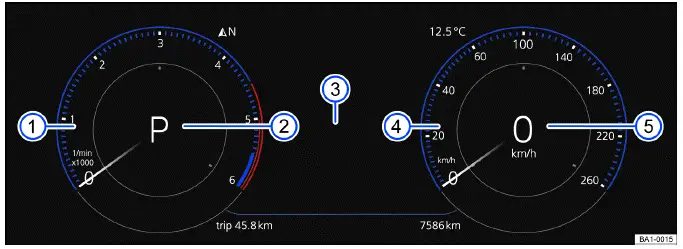
Fig. 9 In the instrument panel: Volkswagen Digital Cockpit Pro (general
example).
- Tachometer (RPM of the running engine). The tachometer shows engine speed and helps the driver understand how the engine is operating during acceleration, cruising, or manual gear selection.
- Currently engaged gear or selector lever level ⇒ Driving. This display shows the selected driving range or gear status so the driver can quickly confirm whether the vehicle is in Park, Reverse, Neutral, Drive, or another available driving mode.
- Displays. This area can show different vehicle information depending on the selected view, active menus, warning messages, assistance systems, navigation prompts, and equipment installed in the 2023 Volkswagen Taos or other applicable model year.
- Speedometer. The speedometer provides the main road speed reading and remains one of the most important displays while driving.
- Digital speed display. The digital speed readout gives a clear numerical speed value, which can be easier to read quickly than an analog-style dial in certain driving situations.
Operating the Volkswagen Digital Cockpit Pro
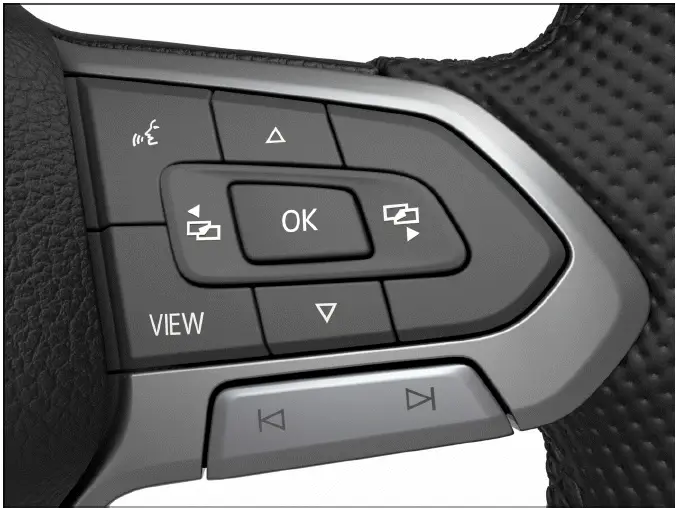
Fig. 10 Right side of the multi-function steering wheel: Operating the
Volkswagen Digital Cockpit Pro (variant 1).
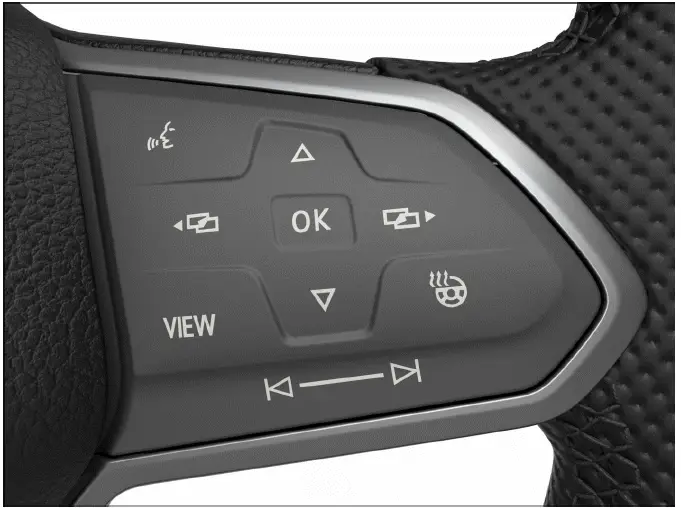
Fig. 11 Right side of the multi-function steering wheel: Operating the
Volkswagen Digital Cockpit Pro (variant 2).
Vehicles with multi-function steering wheel: Menus cannot be opened when a priority 1 warning message is displayed → page, Warning and information texts. This prevents the driver from overlooking a critical message that may require immediate action. Some messages can be confirmed and hidden using the
 button on the
multifunction
steering wheel fig. 10, fig. 11, but the related malfunction or warning must still be handled according to the instructions in the Owner’s Manual.
button on the
multifunction
steering wheel fig. 10, fig. 11, but the related malfunction or warning must still be handled according to the instructions in the Owner’s Manual.
Selecting a menu or information display
Vehicles with multi-function steering wheel:
1. Switch the ignition on. The instrument cluster activates and performs the necessary system checks before normal display functions are available.
2. If a message or vehicle icon is displayed, press the
 button, repeatedly if necessary. This allows the driver to acknowledge messages that can be hidden, while important warnings may remain visible until the condition is corrected.
3. To display a menu and to scroll through the menu, press the
 or
or
 button. Use these controls to move through available information displays without reaching for the Infotainment screen.
4. To open the displayed menu or the information display, press the
 button on the windshield wiper
lever or wait until
the menu or information display opens automatically after a few seconds. Depending on equipment, the available menus may include driving data, assistance systems, audio information, telephone information, navigation, vehicle status, and service-related messages.
button on the windshield wiper
lever or wait until
the menu or information display opens automatically after a few seconds. Depending on equipment, the available menus may include driving data, assistance systems, audio information, telephone information, navigation, vehicle status, and service-related messages.
Applying settings in the menus
Vehicles with multi-function steering wheel:
1. Press the
 or
or
 arrow button in the displayed menu
until the preferred menu item is highlighted. Move through the list carefully so the intended setting is selected before it is changed.
arrow button in the displayed menu
until the preferred menu item is highlighted. Move through the list carefully so the intended setting is selected before it is changed.
The item is marked with a frame around it. This visual marking shows which menu item will be opened, switched on, switched off, or adjusted if the driver confirms the selection.
2. Press the
 button to apply the
desired changes. In the Volkswagen Taos Digital Cockpit Pro, confirmation may change the selected display, activate a function, open a submenu, or save a setting depending on the menu.
button to apply the
desired changes. In the Volkswagen Taos Digital Cockpit Pro, confirmation may change the selected display, activate a function, open a submenu, or save a setting depending on the menu.
A check mark
 indicates that the
respective function is switched on. If no check mark is shown, the function may be inactive, unavailable, or not selected in the current menu.
indicates that the
respective function is switched on. If no check mark is shown, the function may be inactive, unavailable, or not selected in the current menu.
3. To return to the menu selection, press the
 or
or
 button. This returns the display to the previous menu level or allows the driver to continue selecting another information area.
VIEW button on multi-function steering wheel
You can use the
 button to switch
between the classic display of dials, the large platform without information
profiles,
and the enhanced view with highlighted information profiles. The classic display
shows the large dials on the right and left side,
and the selected information profile is displayed in the center. This gives the driver a choice between a traditional gauge-style layout and a more information-focused display, depending on driving conditions and personal preference.
button to switch
between the classic display of dials, the large platform without information
profiles,
and the enhanced view with highlighted information profiles. The classic display
shows the large dials on the right and left side,
and the selected information profile is displayed in the center. This gives the driver a choice between a traditional gauge-style layout and a more information-focused display, depending on driving conditions and personal preference.
1. Press and hold the button to select from the preset information profiles in the list. These profiles can change the way information is grouped and presented in the 2023 Volkswagen Taos, or other applicable model year depending on equipment and software version:
Classic View without information profiles. This view keeps the display simple and focuses on the main driving information.
Automatic The information profiles adjust to the selected driving mode. Only for vehicles with Driving Mode Selection. In this mode, the display can adapt to the selected driving character so the most relevant information is easier to see.
Preset 1 Individual selection of information profiles. This preset can be used to create a preferred display arrangement for everyday driving.
Preset 2 Individual selection of information profiles. A second preset allows another driver or another driving situation to have a different display setup.
Preset 3 Only on vehicles with standard factory-installed navigation system. This preset may be useful when route guidance or navigation-related information is needed more prominently in the instrument cluster.
Navigation map in the Volkswagen Digital Cockpit Pro
Depending on the vehicle equipment, the Volkswagen Digital Cockpit Pro may display a detailed navigation map. This can help the driver keep route guidance directly in the forward line of sight, reducing the need to look away from the road toward the Infotainment display.
The navigation map can be displayed in three sizes. With the larger map view, the navigation map is shown across the entire display. To select the desired map size, proceed as follows:
1. Select menu item Navigation. This opens the navigation-related display area if the feature is available in the Volkswagen Taos equipment configuration.
2. Press the
 button on the
multi-function steering wheel to switch between the map sizes. Choose the view that gives enough route detail without covering information you need for driving.
button on the
multi-function steering wheel to switch between the map sizes. Choose the view that gives enough route detail without covering information you need for driving.
3. Press the
 or
or
 arrow buttons on the multi-function
steering wheel to zoom in or out. Zooming in can make nearby streets and turns easier to see, while zooming out gives a broader view of the route ahead.
arrow buttons on the multi-function
steering wheel to zoom in or out. Zooming in can make nearby streets and turns easier to see, while zooming out gives a broader view of the route ahead.
4. When zooming manually, press the
 button on the multi-function steering wheel to switch to auto-zoom. Auto-zoom can adjust the map scale automatically based on route guidance and driving situation.
Depending on the equipment, navigation will be shown on two screens or only on one screen. The navigation map may appear in the Volkswagen Digital Cockpit Pro and in the Infotainment system or just in the Infotainment system. If the navigation map is shown in the Infotainment system, only navigation arrows are shown in the Volkswagen Digital Cockpit. The exact display behavior can depend on the installed navigation system, active route guidance, selected view, and vehicle configuration.
 If warning messages about
malfunctions appear when the ignition is switched on, settings or information
displays may not
appear as described. If the malfunction persists, contact a suitably qualified
professional. Volkswagen recommends
contacting an authorized Volkswagen dealer or authorized Volkswagen Service
Facility. In this situation, some menus, settings, navigation views, or information displays may be limited until the underlying fault is diagnosed and corrected.
If warning messages about
malfunctions appear when the ignition is switched on, settings or information
displays may not
appear as described. If the malfunction persists, contact a suitably qualified
professional. Volkswagen recommends
contacting an authorized Volkswagen dealer or authorized Volkswagen Service
Facility. In this situation, some menus, settings, navigation views, or information displays may be limited until the underlying fault is diagnosed and corrected.
WARNING
Operating the Volkswagen Digital Cockpit and Infotainment system can distract you from traffic. If the driver is distracted while driving, accidents and serious or fatal injuries can occur. Even when the display is easy to read, changing menus, adjusting settings, or reviewing detailed information should not take attention away from the road, surrounding traffic, pedestrians, cyclists, or changing driving conditions.
- Always drive attentively and responsibly.
- Never operate the instrument cluster while driving if doing so would distract you from safe vehicle control.
- Only adjust any settings in the instrument cluster or Infotainment system when the vehicle is stationary and it is safe to make changes.
Volkswagen Digital Cockpit Pro Information Displays
Information profiles
Using the Digital Cockpit menu item in the vehicle Infotainment system vehicle settings, you can select different topic-specific information profiles ⇒ Vehicle settings menu. These profiles change the way information is presented in the instrument cluster, allowing the driver to focus on the data that is most useful for the current trip, driving style, or route. Depending on the selected information profile, the Volkswagen Digital Cockpit Pro may show additional information in the center of the dials, or the dials may be reduced or hidden so the selected information can be shown across a larger part of the display. In the Volkswagen Taos, this makes the digital cockpit more flexible than a conventional instrument cluster because the driver can choose between a classic driving view, assistance-related information, navigation guidance, economy data, or other useful displays. The following information profiles can be selected:
- Audio. Digital display of the current audio playback, including the active media source, track information, or radio-related content when supported by the Infotainment system.
- Acceleration. Graphic display of the longitudinal and lateral acceleration. This view can help show how the vehicle is responding during acceleration, braking, and cornering.
- Comfort drive Travel Assist. Visual display of various driver assistance systems ⇒ Driver assistance systems. This profile can make it easier to monitor assistance system status while driving the Volkswagen Taos on highways or longer routes.
- Distance. Display of the distance driven. This can be useful for trip tracking, fuel economy checks, and comparing different driving routes.
- Gear indicator. Display of the current gear or the selected gear. This information helps the driver understand the current transmission status and selected driving range.
- Speed. Display of the speed. The digital speed view provides a clear numerical speed reading that can be easier to read quickly than a dial-style display.
- Elevation. Display of the current elevation above sea level. This can be useful when driving through mountains, steep roads, or changing terrain.
- Compass. Digital compass display. The compass helps indicate the direction of travel when navigation guidance is not active or when the driver wants a quick orientation reference.
- Navigation. Graphic display of arrow navigation. This profile can show route guidance directly in the instrument cluster when the system and equipment support it.
- Range. Display of the range. This shows the estimated distance the vehicle can still travel based on fuel level, consumption, and current driving conditions.
- Consumption. Graphic display of the current consumption and the digital display of the average consumption. This can help the driver adjust driving behavior for better efficiency.
- Traffic sign recognition. Display of detected traffic signs. When available and functioning within system limits, this view can help remind the driver of posted speed limits or other detected signs.
- Destination arrival information. Display of remaining driving time, the distance to the destination, and the estimated arrival time. This information is especially helpful during route guidance because it keeps key trip details visible without needing to switch to the Infotainment screen.
Depending on the equipment, model year, software version, and market configuration, the number and scope of the information profiles that can be selected may vary. Volkswagen Taos may therefore show slightly different menu options or display behavior depending on installed equipment.
Possible displays in the Volkswagen Digital Cockpit Pro
Depending on the vehicle equipment, different information may be shown in the Volkswagen Digital Cockpit Pro. These displays help the driver monitor vehicle status, driving conditions, system messages, and comfort or navigation functions in one central location:
- Outside temperature display. Shows the measured outside temperature and may include a frost warning symbol in cold conditions.
- Detected road sign from the traffic sign recognition. Displays recognized traffic signs when the system is available and able to detect them.
- Driver assistance systems. Shows information for available assistance features, their status, and possible limitations.
- Driving data menu and menus for various settings. Gives access to trip data, consumption information, display settings, and other configurable items.
- Speed warnings. Alerts the driver when a selected speed threshold is exceeded.
- Speed warning for winter tires. Provides a reminder if the vehicle is driven above the recommended or set speed limit for installed winter tires.
- Open doors, hood and trunk lid. Shows whether a door, the hood, or the trunk lid is open or not fully closed.
- Infotainment system and navigation information. Displays selected audio, phone, media, or route guidance details depending on equipment.
- Odometer displays. Shows total distance and other mileage-related information.
- Compass display. Provides directional information when available.
- Radiator fan run-on. Indicates that the radiator fan may continue operating after the engine is switched off, depending on temperature and cooling needs.
- Engine code (). Shows engine-related identification information when available through the applicable display or service-related function.
- Service interval display. Reminds the driver when inspection or maintenance is due or approaching.
- Status display for the start-stop system ⇒ Start/Stop system. Shows whether the system is active, inactive, or temporarily unavailable.
- Phone information. Displays connected phone status, call information, or related mobile device details when supported.
- Time. Shows the current clock setting from the vehicle system.
- Selector lever position. Displays the selected transmission range or gear position.
- Warning and information texts. Shows messages related to vehicle functions, malfunctions, safety warnings, or driver actions.
- Warning and indicator lights ⇒ Symbols in the instrument cluster. These symbols help identify active systems, safety reminders, service needs, and warning light meaning in the Volkswagen Taos instrument cluster.
Outside temperature display
When outside temperatures are colder than approximately +4ºC (+39ºF), a snowflake symbol also appears on the outside temperature display
 . This symbol remains on until the outside temperature rises above +6 ºC (+43 ºF). The warning is intended to remind the driver that road surfaces may be slippery even if the temperature reading is slightly above the freezing point.
In the following situations, the temperature displayed may be higher than the actual outside temperature due to heat radiating from the engine or from nearby vehicle components:
- When the vehicle is stationary, especially after the engine has been running or the vehicle has been parked in direct sunlight.
- When the driving speed is very low, because there may not be enough airflow around the temperature sensor to show a fully representative outside reading.
The measurement range is from -45 ºC (-49 ºF) to +76 ºC (+169 ºF). Values outside normal driving conditions should be treated as reference information, and the driver should still judge road conditions visually and by vehicle behavior.
WARNING
Roads may be icy when outside temperatures are low, even if they are above the freezing point. Bridges, shaded roads, rural roads, and wet pavement can freeze earlier than surrounding surfaces. There is an increased risk of an accident on icy roads, which could result in serious or fatal injuries.
- If the
 symbol is
displayed in the instrument cluster display, drive with extra caution and avoid sudden steering, braking, or acceleration.
symbol is
displayed in the instrument cluster display, drive with extra caution and avoid sudden steering, braking, or acceleration. - Always adapt your speed and driving style to the visibility, weather, road and traffic conditions. Leave more distance from vehicles ahead when roads may be slippery.
- Never rely solely on the outside temperature display. Use the display as a helpful warning, but also pay attention to road surface appearance, weather changes, and the behavior of the Volkswagen Taos while driving.
Open doors, hood and trunk lid
If, after unlocking the vehicle or while driving, one or more doors, the hood, or the trunk lid are open or not fully closed, this condition is shown in the Volkswagen Digital Cockpit. An audible signal may also sound, depending on the driving situation and the type of message displayed. In the Volkswagen Taos, this warning helps the driver quickly identify an unsecured opening before continuing the trip, especially if the vehicle is already moving or passengers have recently entered or exited.
Speed warning for winter tires
If the set maximum speed for winter tires is exceeded, the digital instrument cluster displays a warning. This function is useful when winter tires have a lower approved speed rating than the vehicle’s possible road speed, and it helps the driver stay within the safe operating range of the installed tires.
Settings for the speed warning can be adjusted in the vehicle settings in the Infotainment system ⇒ Winter tires. On a 2022 Volkswagen Taos the available menu wording and adjustment options may vary slightly depending on equipment, market version, and software configuration.
Compass display
When the ignition is switched on, the instrument cluster display shows an abbreviation for the direction in which the vehicle is currently traveling, for example "NW" for northwest. This gives the driver a quick orientation reference without needing to open the navigation screen.
If the Infotainment system is switched on and route guidance is not active, the graphic display of a compass is also available. This can be helpful when driving in unfamiliar areas, on rural roads, or in places where the driver wants a simple direction reference rather than full navigation guidance.
Odometer displays
The odometer records the total distance that the vehicle has driven. This mileage is important for service history, maintenance planning, ownership records, warranty-related checks, and general vehicle condition evaluation.
The trip odometer shows the distance driven since it was last reset. It can be used to track fuel economy, measure a route, monitor business mileage, or compare distance between service intervals.
1. Reset the odometer via the Infotainment system or the service menu ⇒ Service menu. Make sure the correct display is selected before resetting trip data, because a reset cannot normally be undone.
Radiator fan run-on
This indicator appears after the ignition has been switched off if the radiator fan continues to run. This is not always a malfunction. The fan may continue operating to remove heat from the engine compartment, protect components, or support cooling after demanding driving conditions.
The radiator fan may continue running due to:
- Exhaust gas post-treatment, through particulate filter regeneration, for example. During this process, additional heat may be produced and cooling may continue after the engine is switched off.
- Active brake cooling after descent. Long downhill driving can generate heat in the braking system, and the vehicle may use cooling strategies to help manage temperature.
- Dissipation of engine heat after high load, e.g. trailer mode. After heavy acceleration, steep climbs, hot weather driving, or high-load operation, the 2023 Volkswagen Taos may continue fan operation to reduce heat soak.
Engine code
1. Open the service menu ⇒ Service menu. The service menu gives access to vehicle-related information that may be useful for maintenance, diagnostics, replacement parts identification, or service documentation.
2. Select the Engine code menu item. The engine code can help identify the exact engine version installed in the Volkswagen Taos, which is important when ordering parts, checking technical data, or reviewing repair information.
Phone information
If a cell phone is connected via Bluetooth, the Bluetooth symbol
 will be displayed in the Volkswagen
Digital Cockpit. This confirms that a compatible mobile device is connected and may be available for hands-free calling, audio playback, contact access, or other supported functions depending on phone and Infotainment system compatibility.
will be displayed in the Volkswagen
Digital Cockpit. This confirms that a compatible mobile device is connected and may be available for hands-free calling, audio playback, contact access, or other supported functions depending on phone and Infotainment system compatibility.
The
 symbol also indicates the
charge level of the mobile device. The displayed battery level depends on whether the connected phone supports this function and whether the connection is active.
symbol also indicates the
charge level of the mobile device. The displayed battery level depends on whether the connected phone supports this function and whether the connection is active.
Selector lever position
The engaged selector lever position is shown on the left side of the selector lever and in the Volkswagen Digital Cockpit. This allows the driver to quickly confirm whether the vehicle is in Park, Reverse, Neutral, Drive, Sport, or another available driving range.
If necessary, the respective gear is displayed in the Volkswagen Digital Cockpit when in the D/S selector lever position and when in tiptronic mode ⇒ Selector lever. This can be especially useful when the driver wants to monitor gear selection during manual-style shifting, hill driving, passing, or controlled acceleration.
 Suitably qualified
professionals can program or modify additional functions depending on the
vehicle equipment. These changes should only be made with proper technical knowledge, compatible diagnostic tools, and consideration of the vehicle’s equipment configuration.
Suitably qualified
professionals can program or modify additional functions depending on the
vehicle equipment. These changes should only be made with proper technical knowledge, compatible diagnostic tools, and consideration of the vehicle’s equipment configuration.
Volkswagen recommends contacting an authorized Volkswagen dealer or authorized Volkswagen Service Facility. For the Volkswagen Taos, this is especially important when coding, diagnostics, software-related checks, or feature activation may affect safety, convenience systems, or instrument cluster behavior.
 There are different
instrument clusters; therefore the versions and appearances of the displays may
vary. Malfunctions will
only be indicated by indicator lights if the display does not have warning or
information texts. Because of these differences, a 2023 Volkswagen Taos may show certain messages, icons, or layout details differently depending on equipment and software version.
There are different
instrument clusters; therefore the versions and appearances of the displays may
vary. Malfunctions will
only be indicated by indicator lights if the display does not have warning or
information texts. Because of these differences, a 2023 Volkswagen Taos may show certain messages, icons, or layout details differently depending on equipment and software version.
 Some displays in the
Volkswagen Digital Cockpit may be hidden due to events that occur suddenly, e.g.
incoming phone
calls. After the event is finished or dismissed, the previous information display may return automatically or may need to be selected again.
Some displays in the
Volkswagen Digital Cockpit may be hidden due to events that occur suddenly, e.g.
incoming phone
calls. After the event is finished or dismissed, the previous information display may return automatically or may need to be selected again.
 Depending on the equipment,
some settings and displays may also appear in the Infotainment system. This allows certain Volkswagen Taos driver information, phone details, display settings, and vehicle status functions to be accessed from more than one control area.
Depending on the equipment,
some settings and displays may also appear in the Infotainment system. This allows certain Volkswagen Taos driver information, phone details, display settings, and vehicle status functions to be accessed from more than one control area.
Volkswagen Digital Cockpit Basic
Overview of the Volkswagen Digital Cockpit Basic
The Digital Cockpit is a digital instrument cluster with a high-resolution TFT color display. It presents important driving information in a clear electronic layout and can show different views depending on the selected display mode, vehicle equipment, and driver preference. In the Volkswagen Taos, this system helps combine speed, engine information, driver assistance status, range, temperature, warning messages, and other vehicle data in one central display area.
By selecting different views, such as the tachometer view, digital speed view, or classic speedometer-style display, the driver can change how the main information appears. Additional content may also be shown in the main display area and in the secondary display areas, making the instrument cluster more useful than a fixed analog layout.
The term "Volkswagen Digital Cockpit" is used below to refer to the digital instrument cluster. Depending on the model year, software version, and equipment level, a 2022 Volkswagen Taos may show small differences in graphics, available views, or menu behavior.
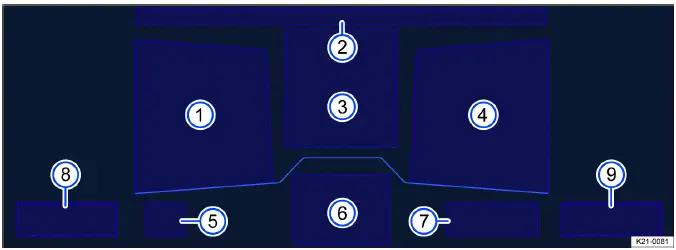
Fig. 12 In the instrument panel: Volkswagen Digital Cockpit Basic (general
example).
- Secondary display area. This area can show supporting information such as trip data, audio details, navigation cues, or other selected vehicle information.
- Time, compass and temperature. This section gives the driver quick access to basic orientation and environmental information without opening another menu.
- Main display area. The main display presents the selected view, such as digital speed, speedometer, tachometer, vehicle messages, or other key driving information.
- Secondary display area. A second supporting display area may be configured separately, allowing the driver to keep another type of information visible.
- Currently engaged gear or selector lever level. This display helps confirm the active gear range or selector lever position while driving or maneuvering.
- Active driver assistance. This area can show the status of available driver assistance systems when they are active, limited, or ready for operation.
- Range. The range display estimates how far the vehicle can travel with the available fuel under current driving conditions.
- Coolant temperature gauge. This gauge helps monitor engine operating temperature and can alert the driver to abnormal cooling system conditions.
- Fuel gauge. The fuel gauge shows the remaining fuel level and helps the driver plan refueling before the tank becomes too low.
Operating the Volkswagen Digital Cockpit Basic
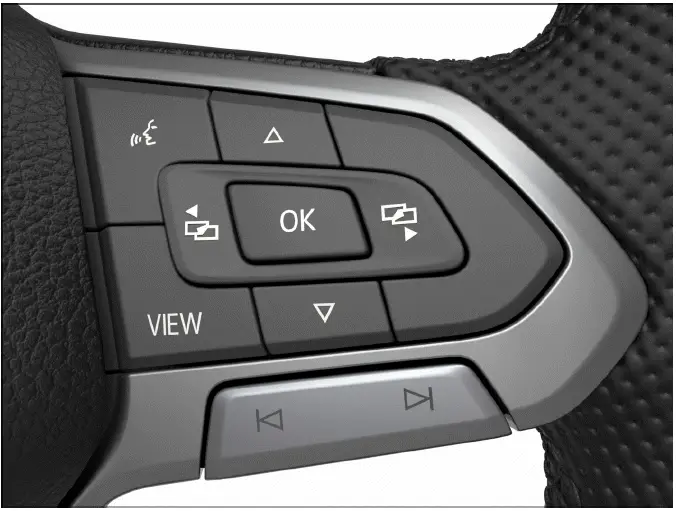
Fig. 13 Right side of the multi-function steering wheel: Operating the
Volkswagen Digital Cockpit Basic (variant 1).
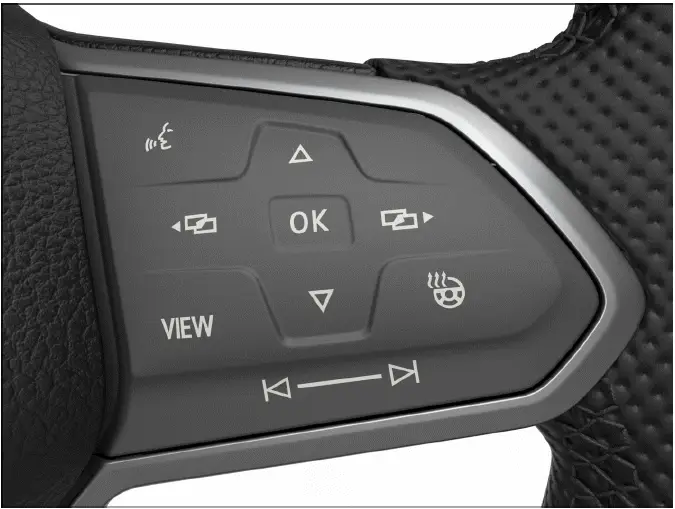
Fig. 14 Right side of the multi-function steering wheel: Operating the
Volkswagen Digital Cockpit Basic (variant 2).
Vehicles with multi-function steering wheel: Menus cannot be opened when a priority 1 warning message is displayed → page, Warning and information texts. This helps keep critical warnings visible until the driver has noticed the issue and taken the proper action. Some messages can be confirmed and hidden using the
 button on the
multifunction
steering wheel fig. 13, fig. 14. However, hiding a message does not correct the condition that caused it, so the warning light meaning and related instructions should still be checked in the Owner’s Manual.
button on the
multifunction
steering wheel fig. 13, fig. 14. However, hiding a message does not correct the condition that caused it, so the warning light meaning and related instructions should still be checked in the Owner’s Manual.
Views in the main display area
1. Vehicles with multi-function steering wheel: Press the
 button to switch the main display. This allows the driver to choose the view that is easiest to read for the current driving situation.
The following views can be shown in the display area:
Digital view Digital speedometer with secondary displays. This view focuses on a clear numerical speed reading while still allowing additional information to remain visible at the sides.
Speed Classic display of the speedometer as a dial. This layout is familiar to drivers who prefer a traditional gauge-style view in the Volkswagen Taos instrument cluster.
Tachometer Classic display of the tachometer as a dial. This view emphasizes engine speed and can be useful when the driver wants to monitor RPM during acceleration, hill driving, or manual-style gear selection.
Depending on the vehicle equipment, the amount of information shown and the scope thereof may vary. Some versions may show more secondary display choices, while others may have a simpler layout based on equipment, market version, or software configuration.
 After switching off the
ignition, a display is shown with information on the vehicle status, e.g. total
mileage. This after-drive display can help the driver review basic vehicle information before leaving the vehicle.
After switching off the
ignition, a display is shown with information on the vehicle status, e.g. total
mileage. This after-drive display can help the driver review basic vehicle information before leaving the vehicle.
 In the speed and tachometer
views, an additional secondary display can be configured in the center of the
dial. This makes it possible to combine a classic gauge appearance with selected digital information.
In the speed and tachometer
views, an additional secondary display can be configured in the center of the
dial. This makes it possible to combine a classic gauge appearance with selected digital information.
Selecting secondary displays
Vehicles with multi-function steering wheel: The secondary displays can be configured or hidden independently of each other. This allows the driver to keep only useful information visible and reduce unnecessary display clutter.
Various driving data, navigation information, audio playback details, or phone interface information can be shown on the secondary displays. In the Volkswagen Taos Digital Cockpit Basic, these small display areas are helpful for keeping key trip or media information visible without changing the entire main display. To select the secondary displays, proceed as follows:
1. Select the right or left secondary display area using the
 or
or
 buttons. Make sure the correct side of the display is highlighted before changing the information shown there.
2. Select the preferred secondary display using the
 and
and
 arrow buttons. Scroll through the available options until the desired display is shown.
3. Confirm your selection with the
 button. The selected information will then be applied to the chosen secondary display area.
Selecting secondary displays in the dial
Vehicles with multi-function steering wheel:
1. Select the preferred secondary display using the
 and
and
 arrow buttons. The available choices may include driving data, range, audio, phone, navigation, or other display content depending on equipment.
2. Confirm your selection with the
 button. The chosen item appears in the center of the dial if the selected view supports this layout.
 If warning messages about
malfunctions appear when the ignition is switched on, settings or information
displays may not
appear as described. If the malfunction persists, contact a suitably qualified
professional. Volkswagen recommends
contacting an authorized Volkswagen dealer or authorized Volkswagen Service
Facility. On a 2022 Volkswagen Taos a persistent warning may limit display functions until the system is checked with suitable diagnostic equipment.
If warning messages about
malfunctions appear when the ignition is switched on, settings or information
displays may not
appear as described. If the malfunction persists, contact a suitably qualified
professional. Volkswagen recommends
contacting an authorized Volkswagen dealer or authorized Volkswagen Service
Facility. On a 2022 Volkswagen Taos a persistent warning may limit display functions until the system is checked with suitable diagnostic equipment.
WARNING
Operating the Volkswagen Digital Cockpit and Infotainment system can distract you from traffic. If the driver is distracted while driving, accidents and serious or fatal injuries can occur. Menu changes, display adjustments, and information selection should never take attention away from steering, braking, traffic signs, pedestrians, cyclists, or surrounding vehicles.
- Always drive attentively and responsibly.
- Never operate the instrument cluster while driving if it distracts you from safe control of the vehicle.
- Only adjust any settings in the instrument cluster or Infotainment system when the vehicle is stationary and the driving situation allows it.
Volkswagen Digital Cockpit Basic Information Displays
Possible displays
Depending on the vehicle equipment, different information may be shown in the main display and secondary display areas of the Volkswagen Digital Cockpit Basic. These displays help the driver keep track of vehicle status, trip data, assistance systems, navigation prompts, warning messages, and comfort-related information without leaving the instrument cluster view. In the Volkswagen Taos, the exact layout and available display items may vary by equipment level, software version, and market configuration.
- Outside temperature display. Shows the measured outside temperature and may display a frost warning symbol in cold conditions.
- Time and date. Displays the current time and date from the vehicle system.
- Digital speed. Shows the vehicle speed as a clear numerical readout.
- Detected road sign from the traffic sign recognition. Shows recognized signs when the system is available and operating within its limits.
- Driver assistance systems. Displays the status of assistance functions, including active, inactive, or limited operation where applicable.
- Driving data menu, e.g. Travel time/distance driven. Provides trip-related information such as driving time, distance, and other useful journey data.
- Speed warning for winter tires. Helps remind the driver when a set maximum speed for winter tires has been exceeded.
- Open doors, hood and trunk lid. Indicates if a door, the hood, or the trunk lid is open or not fully closed.
- Odometer displays. Shows total vehicle mileage and trip-related distance information.
- Compass display. Gives a direction reference while driving.
- Radiator fan run-on. Indicates that the radiator fan may continue running after the ignition is switched off.
- Engine code (). Provides engine identification information through the service menu when available.
- Navigation information. Shows route guidance details, arrows, destination information, or related navigation prompts depending on equipment.
- Engine oil temperature. Displays oil temperature information when supported by the instrument cluster configuration.
- Radio information. Shows selected radio or media playback details.
- Service interval display. Reminds the driver when scheduled maintenance is due or approaching.
- Status display for the start-stop system ⇒ Start/Stop system. Shows whether the system is active, temporarily unavailable, or switched off.
- Phone information. Displays Bluetooth phone connection status, call information, or mobile device details where supported.
- Selector lever position. Shows the current transmission range or gear selection.
- Warning and information texts. Displays messages about vehicle conditions, driver actions, system limitations, or malfunctions.
- Warning and indicator lights. Shows symbols that help explain active systems, safety reminders, service needs, and warning light meaning.
- Destination information. Shows travel time, distance, or arrival-related information when route guidance is active.
 You can adjust further
settings in the submenu. The available submenu options depend on the display item selected and the equipment installed in the vehicle.
You can adjust further
settings in the submenu. The available submenu options depend on the display item selected and the equipment installed in the vehicle.
Outside temperature display
When outside temperatures are colder than approximately +4ºC (+39ºF), a snowflake symbol also appears on the outside temperature display
 . This symbol remains on until the outside temperature rises above +6 ºC (+43 ºF). The symbol is a caution reminder that slippery road surfaces may be possible even if the displayed temperature is slightly above freezing.
In the following situations, the temperature displayed may be higher than the actual outside temperature due to heat radiating from the engine or surrounding vehicle components:
- When the vehicle is stationary, especially after the engine has been running or the vehicle has been parked in a warm area.
- When the driving speed is very low, because there may not be enough airflow around the temperature sensor to give a fully representative reading.
- The measurement range is from -45 ºC (-49 ºF) to +76 ºC (+169 ºF). Treat extreme readings as reference information and continue to judge the road surface and weather conditions carefully.
WARNING
Roads may be icy when outside temperatures are low, even if they are above the freezing point. Bridges, shaded sections of road, wet pavement, and rural roads can freeze sooner than surrounding surfaces. There is an increased risk of an accident on icy roads, which could result in serious or fatal injuries.
- If the
 symbol is
displayed in the instrument cluster display, drive with extra caution and avoid sudden steering, braking, or acceleration.
symbol is
displayed in the instrument cluster display, drive with extra caution and avoid sudden steering, braking, or acceleration. - Always adapt your speed and driving style to the visibility, weather, road and traffic conditions. Leave more following distance when roads may be slippery.
- Never rely solely on the outside temperature display. Use it as a helpful warning, but also pay attention to road appearance, precipitation, traffic behavior, and how the vehicle responds while driving.
Open doors, hood and trunk lid
If, after unlocking the vehicle or while driving, any doors and/or the hood or trunk lid are open or not fully closed, this is displayed in the Volkswagen Digital Cockpit and an audible signal may also sound. This warning helps the driver identify an unsecured opening before continuing the trip, especially if passengers have recently entered or exited the vehicle or cargo has been loaded into the trunk.
Speed warning for winter tires
If the set maximum speed is exceeded, this will be shown in the digital instrument cluster. The function is useful when winter tires with a specific speed rating are installed, because it helps the driver stay within the permitted speed range for those tires.
Settings for the speed warning can be adjusted in the vehicle settings in the Infotainment system ⇒ Winter tires. The exact menu path or wording may differ slightly depending on the Volkswagen Taos equipment and software version.
Compass display
If the Compass secondary display is activated, the direction in which you are currently driving is shown as a blue arrow with a depiction of the vehicle and a compass. This gives the driver a quick orientation reference without needing full route guidance or a separate navigation screen.
Radiator fan run-on
This indicator appears after the ignition has been switched off if the radiator fan continues to run. Fan run-on is not always a malfunction. It may be part of normal cooling strategy after demanding driving, high temperatures, or system conditions that require additional heat dissipation.
The radiator fan may continue running due to:
- Exhaust gas post-treatment, through particulate filter regeneration, for example. This process can create additional heat, so cooling may continue briefly after the engine is switched off.
- Active brake cooling after descent. Long downhill driving can generate heat in the braking system, and the vehicle may use cooling logic to help manage component temperature.
- Dissipation of engine heat after high load, e.g. trailer mode. High engine load, steep climbs, hot weather, or repeated acceleration can leave residual heat that needs to be reduced after stopping.
Engine code (EC)
1. Open the service menu ⇒ Service menu. The service menu can provide information that may be useful for maintenance, diagnostics, replacement parts identification, or service documentation.
2. Select the Engine code menu item. The engine code helps identify the specific engine version installed in the Volkswagen Taos, which can be important when checking technical data, repair information, or compatible components.
Navigation information
When route guidance is activated, the Navigation instruction auxiliary display shows the direction of travel as an arrow. This allows the driver to follow key route prompts without constantly looking at the main Infotainment screen.
An arrow behind the entry in the configuration menu indicates a submenu. Opening the submenu provides additional route-related options where available.
The submenu lists your home address and a list of your most recent destinations. Route guidance can be started with the
 button. This shortcut can make it faster to begin navigation to frequently used destinations.
Phone information
If the Phone secondary display is activated and a cell phone is connected via Bluetooth, the Bluetooth symbol
 will be
displayed in the Volkswagen Digital Cockpit. The
will be
displayed in the Volkswagen Digital Cockpit. The
 symbol also indicates the charge
level of the mobile device. The displayed information depends on the connected phone, Bluetooth compatibility, and active Infotainment settings.
symbol also indicates the charge
level of the mobile device. The displayed information depends on the connected phone, Bluetooth compatibility, and active Infotainment settings.
 In the submenu, a list of the
most recent phone calls is shown and you have the option to call the displayed
contacts back. Use this function only when it does not distract from driving, or operate it while the vehicle is stationary.
In the submenu, a list of the
most recent phone calls is shown and you have the option to call the displayed
contacts back. Use this function only when it does not distract from driving, or operate it while the vehicle is stationary.
Selector lever position for automatic transmission
The selector lever position and, depending on the driving mode, the gear that is engaged, are shown on the selector lever and in the Volkswagen Digital Cockpit. This helps the driver quickly confirm the active transmission range while starting, parking, reversing, or driving.
The gear shift pattern is displayed when the brake or the selector lever in the instrument cluster are actuated. If manual-style shifting or a sport driving range is used, the displayed gear information can help the driver monitor transmission behavior more clearly.
Destination information
When route guidance is activated, the Destination information secondary display shows the predicted journey time and distance from the destination. This makes it easier to check arrival-related details without changing the main navigation view.
 Some displays in the
Volkswagen Digital Cockpit may be hidden due to events that occur suddenly, e.g.
incoming phone
calls. After the event ends or is dismissed, the previous display may return automatically or may need to be selected again.
Some displays in the
Volkswagen Digital Cockpit may be hidden due to events that occur suddenly, e.g.
incoming phone
calls. After the event ends or is dismissed, the previous display may return automatically or may need to be selected again.
 Depending on the equipment,
some settings and displays may also appear in the Infotainment system. This allows certain display settings, vehicle status information, phone details, and navigation functions to be accessed from more than one control area.
Depending on the equipment,
some settings and displays may also appear in the Infotainment system. This allows certain display settings, vehicle status information, phone details, and navigation functions to be accessed from more than one control area.
Tachometer
The start of the red area on the tachometer indicates the maximum permissible engine speed for all gears when the engine is run in and at operating temperature. The tachometer helps the driver monitor engine RPM and avoid operating the engine beyond the safe range.
Before reaching the red area, shift to the next highest gear, select the selector lever position D/S or take your foot off the accelerator pedal. Keeping the engine out of the red zone helps protect internal components and supports smoother, more efficient driving.
NOTICE
A heavy engine load, especially when the engine is cold, can lead to engine damage. Cold engine oil does not circulate and protect components as effectively as it does at normal operating temperature.
- Avoid high engine speeds, full acceleration and heavy engine loads when the engine is cold.
- To prevent engine damage, the tachometer indicator may only be in the red area of the scale briefly.
 Shifting up early helps save
fuel and reduce operating noises. Smooth acceleration and timely upshifts can also reduce engine strain during everyday driving.
Shifting up early helps save
fuel and reduce operating noises. Smooth acceleration and timely upshifts can also reduce engine strain during everyday driving.
Fuel gauge
Digital fuel gauge
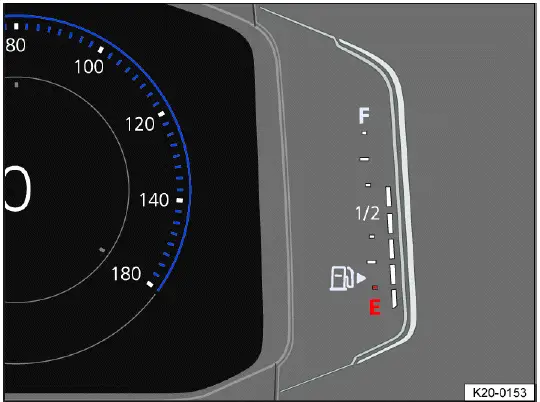
Fig. 15 In the Volkswagen Digital Cockpit Pro: fuel gauge (general example).
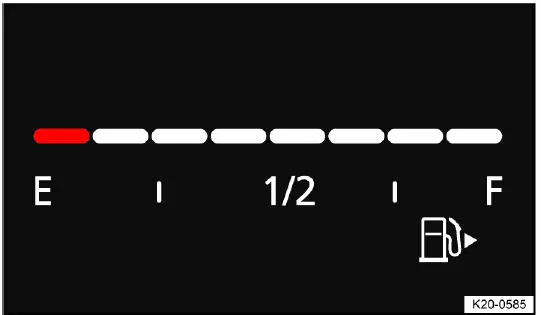
Fig. 16 In the Volkswagen Digital Cockpit Basic: fuel gauge (general
example).
WARNING
If the fuel level is too low, the engine may receive an irregular fuel supply and begin to sputter, hesitate, or shut off, especially when driving uphill, downhill, or around long curves. A fuel shortage can lead to a vehicle breakdown while driving, which increases the risk of accidents, serious injuries, or fatal injuries. If the engine cuts out because of insufficient fuel or interrupted fuel delivery, steering assistance, driver assistance systems, and brake support systems may no longer function as expected.
- Check that the fuel tank is always sufficiently filled before longer trips, highway driving, mountain roads, or driving in remote areas.
- Always refill the fuel when the fuel tank is only 1/4 full. This helps prevent low-fuel operation and gives the driver enough reserve for traffic delays or unexpected detours.
NOTICE
Irregular fuel supply can cause misfiring and allow unburnt fuel to enter the exhaust system. This may damage exhaust components and can also lead to engine performance problems.
- Never drive with a completely empty fuel tank. Refuel in time when the low-fuel warning appears in the Volkswagen Taos instrument cluster.
 The small arrow next to the
fuel pump symbol on the fuel gauge indicates which side of the vehicle the fuel
filler flap is on. This is useful when approaching a fuel pump and helps the driver position the vehicle correctly for refueling.
The small arrow next to the
fuel pump symbol on the fuel gauge indicates which side of the vehicle the fuel
filler flap is on. This is useful when approaching a fuel pump and helps the driver position the vehicle correctly for refueling.
Troubleshooting
 Fuel tank almost empty
The yellow indicator light turns on. The reserve supply, shown by the red marking, is being used. Refueling should not be delayed because remaining range can change quickly depending on speed, load, road grade, and driving style.
1. Refuel at the next opportunity. If the warning appears during highway or rural driving, plan the next safe stop before the fuel level becomes critically low.
 Fuel tank cap open
The yellow indicator light turns on. This means the fuel tank cap or fuel filler area may not be closed correctly.
1. Close the fuel tank cap. After closing, check whether the warning disappears after the vehicle system recognizes the corrected condition.
Engine coolant temperature gauge
Digital coolant temperature gauge
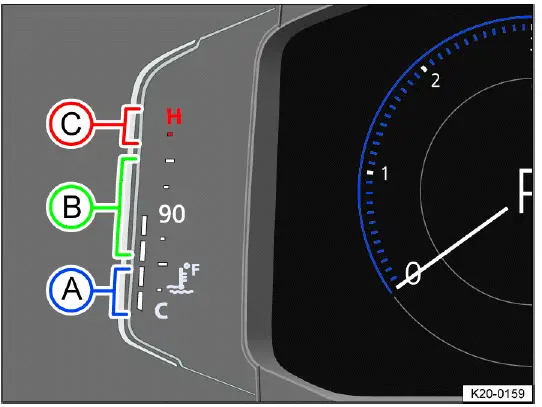
Fig. 17 In the Volkswagen Digital Cockpit Pro: coolant temperature gauge
(general example).
- Cold range. The engine has not reached its operating temperature yet. Avoid high engine RPMs, sudden acceleration, and heavy engine load while the engine is cold, because oil and coolant temperatures may not yet be suitable for demanding operation.
- Normal range. The coolant temperature is within the usual operating area. Under normal driving conditions, the gauge should remain in this range.
- Warning range. The needle may move into the warning range when engine load is heavy, especially in hot weather, steep climbs, stop-and-go traffic, or high-load driving. If this happens, reduce engine load and pay attention to any warning messages.
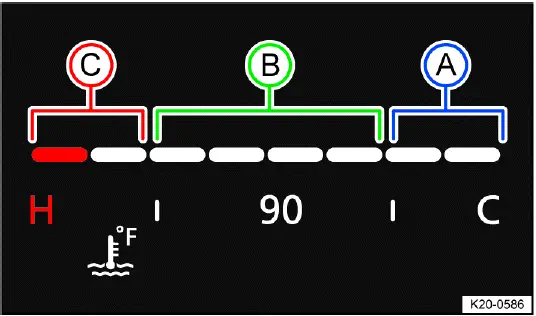
Fig. 18 In the Volkswagen Digital Cockpit Basic: coolant temperature gauge
(general example).
- Cold range. The engine is not at operating temperature yet. Drive gently until the temperature rises into the normal range, and avoid full throttle or high engine speed during this period.
- Normal range. The engine coolant temperature is within the expected operating zone. This indicates that the cooling system is regulating temperature under current conditions.
- Warning range. The needle may move into the warning range when engine load is heavy, particularly when outside temperatures are high. If the gauge continues to rise or a warning light appears, stop safely and follow the troubleshooting instructions.
If the
 warning light flashes,
the coolant temperature is too high or the coolant level is too low ⇒
Troubleshooting. In this situation, continuing to drive the Volkswagen Taos can cause serious engine damage, so the warning should be handled immediately.
warning light flashes,
the coolant temperature is too high or the coolant level is too low ⇒
Troubleshooting. In this situation, continuing to drive the Volkswagen Taos can cause serious engine damage, so the warning should be handled immediately.
Driving data menu
The driving data menu shows driving and consumption information collected by the vehicle. Depending on equipment, various driving data can be displayed, including fuel consumption, range, average speed, trip time, distance driven, and other trip-related values. The displayed values depend on current driving style, vehicle status, particle filter regeneration when applicable, traffic conditions, terrain, and recent driving pattern. Because the data is calculated as an average over different distances or time periods, the value shown at any moment may differ from the actual average for a full trip.
Since start memory
If the trip is interrupted for more than two hours, the memory is erased. This memory is useful for reviewing the data from the current drive, such as distance, travel time, or fuel consumption since the vehicle was started.
Since refuel memory
Display and memory of the collective driving and consumption data. The memory is erased when the vehicle is refueled, making it useful for comparing fuel economy between fill-ups.
Extended period memory
The memory collects the driving data up to 19 hours and 59 minutes or 99 hours and 59 minutes driving time, or 1999.9 km (miles) or 9999.9 km (miles) distance driven. If one of these maximum thresholds is reached, the memory is erased. The maximum thresholds may vary depending on the version of the instrument cluster and vehicle configuration.
Volkswagen Digital Cockpit Pro Driving Data Menu
The driving data is available in the context menu of the Volkswagen Digital Cockpit Pro. On the Volkswagen Taos, this allows the driver to review trip and consumption values directly in the instrument cluster without opening a separate screen.
Switching Between the Displays in the Volkswagen Digital Cockpit Pro
Vehicles with multi-function steering wheel:
1. Press the
 or
or
 button on the multi-function
steering wheel. Use these buttons to move through the available driving data screens while keeping your hands near the steering wheel controls.
button on the multi-function
steering wheel. Use these buttons to move through the available driving data screens while keeping your hands near the steering wheel controls.
Switching Memories in the Volkswagen Digital Cockpit Pro
Vehicles with multi-function steering wheel:
1. Press the
 button on the
multi-function steering wheel. This changes between the available memory views, such as since start, since refuel, or long-term data.
button on the
multi-function steering wheel. This changes between the available memory views, such as since start, since refuel, or long-term data.
Deleting Driving Data Memories in the Volkswagen Digital Cockpit Pro
Vehicles with multi-function steering wheel:
1. Select the memory to be erased. Make sure the correct memory is selected before resetting, because deleted trip data cannot normally be restored.
2. Press the
 button on the
multi-function steering wheel. The selected memory is cleared and begins recording new values from that point.
button on the
multi-function steering wheel. The selected memory is cleared and begins recording new values from that point.
 If you would like to know how
many kilometers are driven in the course of a day, clear the Long-term memory
before you
start driving and read it at the end of the day. This is a practical way to track daily mileage without using a separate trip log.
If you would like to know how
many kilometers are driven in the course of a day, clear the Long-term memory
before you
start driving and read it at the end of the day. This is a practical way to track daily mileage without using a separate trip log.
Adjustable Speed Warning
The following setting can be used to set an individual speed warning. This function can help the driver stay aware of a chosen speed limit, for example during long highway driving, winter tire use, or areas where a personal speed reminder is helpful.
Vehicles with multi-function steering wheel:
1. Select the Warning at --- km/h or Warning at --- mph display. The unit shown depends on the instrument cluster settings and market configuration.
2. Press the
 button on the
multi-function steering wheel to save the current speed and to activate the
warning.
button on the
multi-function steering wheel to save the current speed and to activate the
warning.
3. Set the speed on the multi-function steering wheel within approximately five seconds by pressing the
 and
and
 arrow
buttons. Then press the
arrow
buttons. Then press the
 button or
wait several seconds.
button or
wait several seconds.
The speed will then be saved and the warning will be activated. When the set value is exceeded, the instrument cluster can remind the driver with the relevant warning display.
4. Press the
 button again to
deactivate.
button again to
deactivate.
The stored speed is erased. A new warning speed can be set again later if needed.
The warning can be set for speeds between 30 km/h (18 mph) and 250 km/h (155 mph).
Depending on the country, a single warning tone sounds at speeds of over approximately 80 km/h (approximately 50 mph), and from approximately 120 km/h (approximately 75 mph), a continuous warning tone sounds. The
 yellow indicator
light
will also be displayed in the instrument cluster display. This warning is
required by law and cannot be altered.
yellow indicator
light
will also be displayed in the instrument cluster display. This warning is
required by law and cannot be altered.
Volkswagen Digital Cockpit Basic Driving Data Menu
The driving data is available in the secondary display area of the Volkswagen Digital Cockpit Basic. This lets the driver keep trip information visible while the main display continues to show speed, tachometer, or other primary information.
Selecting the Driving Data Menu in the Volkswagen Digital Cockpit Basic
Vehicles with multi-function steering wheel:
1. Select the right or left secondary display area using the
 or
or
 buttons. This determines which side of the display will be changed.
2. Select your preferred driving data menu using the
 and
and
 arrow buttons. Scroll through the options until the desired driving data view is displayed.
3. Confirm your selection with the
 button. The chosen driving data view will then appear in the selected secondary display area.
Resetting the Driving Data Menu in the Volkswagen Digital Cockpit Basic
Vehicles with multi-function steering wheel:
1. Press the
 or
or
 button.
2. Select the corresponding driving data menu in the configuration menu using
the
 and
and
 arrow buttons.
An arrow behind the entry in the configuration menu indicates a submenu. Open the submenu to reach additional settings or reset options.
3. In the submenu, select Reset data and confirm by pressing the
 button. The selected driving data values are then reset and begin recording again from zero or from the next drive cycle.
Driving Data in the Infotainment system
Driving Data can be displayed in the Infotainment system in addition to being displayed in the instrument cluster. This gives the driver another place to review consumption, range, speed, and trip values when the vehicle is stationary or when settings are being adjusted.
Selecting Displays in the Infotainment System
You can select the driving data you would like to display using the vehicle settings in the Infotainment system ⇒ Vehicle settings menu. Available options may differ depending on the infotainment version and equipment installed in the Volkswagen Taos.
 Consumption
The average fuel consumption is displayed after approximately 300 m (approx. 984 ft). Before that distance is reached, the displayed value may not yet represent a meaningful trip average.
Range
This indicates the approximate distance in km (miles) the vehicle can travel under the same driving conditions. Range can change depending on fuel level, driving style, traffic, terrain, temperature, and accessory use.
 Speed
Speed
The average speed is displayed after approximately 100 m (approximately 328 ft). The value is calculated from recent driving and may change as traffic conditions, stops, and driving speed vary.
WARNING
If the driver is distracted while driving, accidents and serious injuries can occur. Operating the Volkswagen Digital Cockpit and Infotainment system can distract you from traffic, even if the operation only takes a few seconds.
- Always drive attentively and responsibly.
- Never operate the instrument cluster while driving if doing so takes your attention away from the road.
- Only adjust any settings in the instrument cluster or Infotainment system when the vehicle is stationary and it is safe to make changes.
Service
Service menu
Depending on the vehicle equipment, certain settings and service-related functions can be accessed through the service menu. This menu is useful for checking service information, displaying the engine code, resetting selected service reminders, adjusting time settings, and reviewing vehicle data that may be needed during maintenance. In the Volkswagen Taos, the exact menu items may vary depending on the instrument cluster version, Infotainment system, and market configuration.
Opening the Service Menu in the Volkswagen Digital Cockpit Pro
1. Select the Range information profile. This places the instrument cluster in the correct display area before opening the hidden service-related menu.
2. Press and hold the
 button on the
multifunction steering wheel for approximately four seconds. Hold the button steadily until the service menu appears.
button on the
multifunction steering wheel for approximately four seconds. Hold the button steadily until the service menu appears.
3. Navigate in the menu using the buttons on the multi-function steering wheel. Move through the available items carefully before selecting a reset or service function.
Opening the Service Menu in the Volkswagen Digital Cockpit Basic
1. Select the Travel time/distance driven secondary display. This prepares the instrument cluster for service menu access in the Basic display layout.
2. Press and hold the
 or
or
 button on the multi-function
steering wheel in the same direction for approximately six
seconds. Keep the button pressed long enough for the instrument cluster to open the menu.
button on the multi-function
steering wheel in the same direction for approximately six
seconds. Keep the button pressed long enough for the instrument cluster to open the menu.
3. Use the
 and
and
 arrow buttons to navigate the menu. The available options may depend on the Digital Cockpit version installed in the vehicle.
Resetting the service interval display
1. Select Service menu. Make sure you are resetting the correct service-related display before confirming the action.
2. Follow the instructions in the instrument cluster display. The display will guide you through the reset process and may request confirmation before the reset is applied.
Resetting the oil change service
1. Select Reset oil change service menu. This should only be done after the oil change service has actually been completed.
2. Follow the instructions in the instrument cluster display. Resetting the oil change service at the wrong time can cause incorrect service information to be shown later.
Resetting the Trip Odometer on the Volkswagen Digital Cockpit Pro
1. Select Reset trip menu. This function clears the trip odometer value so a new distance measurement can begin.
2. Follow the instructions in the instrument cluster display. After the reset, the trip distance will start recording again from zero.
Displaying the engine code
1. Select Engine code menu. The engine code can be useful for service documentation, parts identification, diagnostic work, and repair information.
The engine code is shown on the instrument cluster display. For the Volkswagen Taos, this information helps confirm the exact engine version before ordering replacement parts or checking technical data.
Setting the time
1. Select Time menu. This allows the time setting to be adjusted directly through the instrument cluster menu where available.
2. Set the time with the
 and
and
 arrow buttons. Confirm the correct time after adjustment so the display, service reminders, and time-related functions remain accurate.
Displaying copyright information
1. Select the Copyright menu to access the copyright information. This section contains legal and software-related information connected with the vehicle systems.
Service interval display
Displays about service events appear in the instrument cluster display and in the Infotainment system. Because there are different versions of the instrument cluster and Infotainment system, the appearance, wording, icons, and menu path may vary slightly. The purpose of the display remains the same: to inform the driver when maintenance is due or approaching.
Service appointments at Volkswagen are divided into oil change services and inspections. The service interval display informs the driver about the next service appointment that includes an engine oil change and about the next inspection. This helps owners plan maintenance before the service due date is missed.
The service intervals are specified for vehicles with the fixed oil change service interval. In this case, the service schedule follows a defined time or mileage pattern.
Intervals are determined individually on vehicles with the flexible oil change service interval. Oil change services only need to be performed when the vehicle calculates that they are required. The calculation may consider operating conditions and personal driving style, such as frequent short trips, cold starts, stop-and-go traffic, highway driving, temperature, and engine load. The service early warning message is first displayed 30 days prior to the calculated oil change service due date. The displayed remaining distance to be traveled is always rounded to 100 km (miles), and the remaining time is rounded to whole days.
Service notification
If an oil change service or an inspection service is due in the near future, a service notification will be displayed when the ignition is switched on. This gives the driver advance notice before the actual service event is reached.
The specified mileage or time is the distance or time until the next service can be completed. Use this information to schedule service before the interval expires, especially before long trips or heavy vehicle use.
Service event
When an oil change service or an inspection service is due, a chime will sound when switching on the ignition and you can then see a wrench symbol
 for a few
seconds in the Volkswagen Digital Cockpit together with one of the following
displays:
for a few
seconds in the Volkswagen Digital Cockpit together with one of the following
displays:
Inspection now!
Oil change now!
Oil change service and inspection now!
Checking a service due date in the Infotainment system
When the ignition is on, the engine is off and the vehicle is stationary, the current service due date can be checked through the Infotainment system. This is useful when planning maintenance or confirming whether a service reminder is related to an oil change, inspection, or both.
1. Depending on the vehicle equipment, press the
 button or function key on the
Infotainment system and select the
Vehicle menu.
button or function key on the
Infotainment system and select the
Vehicle menu.
Or: depending on the vehicle equipment, press the
 button or function key.
2. Depending on how your vehicle is equipped, select the Settings menu. The menu wording may differ slightly depending on the system version.
3. Select the Service menu item to display the service information. The current due date, remaining distance, or remaining time may be shown depending on the service interval type.
Checking a service due date in the Volkswagen Digital Cockpit
When the ignition is on, the engine is off and the vehicle is stationary, the current service due date can be checked in the Volkswagen Digital Cockpit. This gives the driver another way to review maintenance timing without using the Infotainment screen.
1. Open the service menu ⇒ Service menu.
Resetting the service interval display
If the service interval display was not reset after the oil change service or inspection service, the display can be reset as follows: The service interval display can only be reset through the service menu ⇒ Service menu.
Do not reset the service interval display between service intervals or incorrect information will be displayed. A premature reset may cause the Volkswagen Taos service reminder to show the wrong remaining distance or time.
If the oil change service interval was manually reset, the service interval display then also switches to a fixed service interval, even on vehicles with the flexible oil change service interval. This can change how future oil change reminders are calculated.
 The service message
automatically disappears after a few seconds when the engine is running or by
pressing the
The service message
automatically disappears after a few seconds when the engine is running or by
pressing the
 button on the windshield wiper lever or the
 button on the multi-function
steering wheel. Hiding the message does not reset the service interval or complete the required maintenance.
button on the multi-function
steering wheel. Hiding the message does not reset the service interval or complete the required maintenance.
 If the 12 V vehicle battery
in a vehicle with the flexible service interval has been disconnected for an
extended period, the
time for the next oil change service cannot be calculated. Therefore, the
service interval displays may show incorrect
calculations. If this is the case, follow the maximum permissible maintenance
intervals and check the maintenance schedule instead of relying only on the displayed reminder.
If the 12 V vehicle battery
in a vehicle with the flexible service interval has been disconnected for an
extended period, the
time for the next oil change service cannot be calculated. Therefore, the
service interval displays may show incorrect
calculations. If this is the case, follow the maximum permissible maintenance
intervals and check the maintenance schedule instead of relying only on the displayed reminder.
Time
Setting the time in the Infotainment system
1. Depending on the design, press the
 button or function key and open the
Vehicle menu. This menu gives access to vehicle-related settings, including time and date options where available.
button or function key and open the
Vehicle menu. This menu gives access to vehicle-related settings, including time and date options where available.
Or: depending on the vehicle equipment, press the
 button or function key. The exact button design may vary depending on the Infotainment version installed in the Volkswagen Taos.
2. Depending on how your vehicle is equipped, open the Settings menu. Some versions may place the time setting directly in the vehicle menu, while others may require opening an additional settings area.
3. Select the Time and date menu item to set the time. Correct time settings are useful for trip information, navigation estimates, service reminders, connected phone functions, and general display accuracy.
Setting the Time in the Volkswagen Digital Cockpit Pro
1. Select the Range information profile. This places the Volkswagen Digital Cockpit Pro in the correct display context before opening the service menu.
2. Press and hold the
 button on the
multi-function steering wheel until the service menu is available in the
instrument
cluster display ⇒ Service menu. Hold the button steadily until the menu appears.
button on the
multi-function steering wheel until the service menu is available in the
instrument
cluster display ⇒ Service menu. Hold the button steadily until the menu appears.
3. Select Time menu. This opens the time adjustment function in the instrument cluster.
4. Set the correct time using the
 or
or
 arrow buttons. After adjusting the value, make sure the displayed time is correct before leaving the menu.
Setting the Time in the Volkswagen Digital Cockpit Basic
1. Open the service menu ⇒ Service menu. This menu contains several basic service and display-related functions.
2. Select the Time menu. The time setting can then be adjusted directly from the Digital Cockpit Basic display.
3. Set the correct time with the
 button. If the time is not retained correctly, check whether the 12 V vehicle battery has recently been disconnected, replaced, or discharged.
Sport displays
Performance monitor
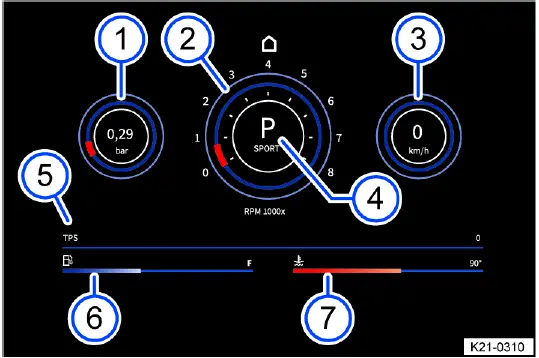
Fig. 19 On the Infotainment system screen: performance monitor.
- Boost pressure indicator. This display shows turbocharger boost pressure and helps illustrate how much forced-air support the engine is using.
- Tachometer. The tachometer shows engine speed in revolutions per minute.
- Speed display. This area shows the current driving speed.
- Gear indicator. The display shows the selected gear or selector lever position.
- TPS display. This display shows throttle position and responds to accelerator pedal input.
- Fuel gauge. The fuel gauge gives a visual indication of remaining fuel.
- Coolant temperature gauge. This gauge shows coolant temperature behavior during operation.
The performance monitor is a display for sporty driving. The digital instruments show values in real time for engine power, temperature, and acceleration that are determined by sensors in the vehicle. This gives the driver an overview of the driving dynamics. In the Volkswagen Taos, the performance monitor can be helpful for understanding how the vehicle responds during acceleration, climbing, passing, or more dynamic driving, but it should never replace attention to the road.
Depending on the vehicle equipment, the amount of information shown and the scope thereof may vary. Some display values may be shown differently depending on the Infotainment version, engine configuration, software, and selected vehicle settings.
Opening the performance monitor
1. Swipe left on the home screen of the Infotainment system. This moves to the next available screen area where additional vehicle functions may be shown.
2. Tap the Sport function key. The performance monitor opens if the function is available for the vehicle equipment.
The following instruments can be displayed:
- Boost pressure indicator: the boost pressure indicator fig. 19 (left) displays the boost pressure between the turbocharger and the engine in bar. The fuller the bar on the display, the more engine power is being used. This is useful for seeing how engine load changes during acceleration or uphill driving.
- Tachometer: The tachometer fig. 19 specifies the engine revolutions per minute. Monitoring engine speed can help the driver avoid unnecessary high RPM operation.
- Speed display: The speed display fig. 19 shows the speed currently being driven at in km/h. Always follow posted speed limits and adapt speed to road and traffic conditions.
- Gear indicator: the gear indicator fig. 19 shows the currently engaged gear or the selector lever position. This helps confirm the active driving range during manual-style shifting or sport-oriented driving.
- TPS display: The TPS display fig. 19 shows the throttle position. The horizontal bar moves right when the accelerator pedal is pressed. A higher value means the driver is requesting more engine response.
- Fuel gage: This display fig. 19 is synonymous with the fuel display on the Volkswagen Digital Cockpit. If the vehicle is consuming fuel, the horizontal bar moves left. The display is intended as a quick visual reference and should be read together with the regular fuel gauge.
- Coolant temperature gage: This display fig. 19 is synonymous with the
temperature display on the Volkswagen Digital
Cockpit. If the engine is exposed to excessive load or high outside
temperatures, the horizontal bar moves right. This is
not a cause for concern as long as the
 indicator light in the
instrument cluster display is off or blinking. If a warning appears, reduce load, drive carefully, and follow the coolant temperature instructions in the Owner’s Manual.
indicator light in the
instrument cluster display is off or blinking. If a warning appears, reduce load, drive carefully, and follow the coolant temperature instructions in the Owner’s Manual.
WARNING
If the driver is distracted, accidents and serious injuries can occur. Operating the Infotainment system can distract you from traffic. Even a short glance at sport displays can reduce reaction time in traffic, on curves, or during sudden braking situations.
- Always drive attentively and responsibly.
- Adjust settings in the Infotainment system only when the vehicle is stationary.
NOTICE
A heavy engine load, especially when the engine is cold, can lead to engine damage. Cold oil and coolant do not protect or stabilize engine temperature as effectively as they do after the engine reaches normal operating temperature.
- Avoid high engine speeds, full acceleration and heavy engine loads when the engine is cold.
- To prevent engine damage, the tachometer indicator may only be in the red area of the scale briefly.
 Because of the methods that
are used to determine power in the vehicle, the displayed values may not be
completely
precise. Use the values as driving information rather than as exact measurement data.
Because of the methods that
are used to determine power in the vehicle, the displayed values may not be
completely
precise. Use the values as driving information rather than as exact measurement data.
Vehicle settings menu
You can switch individual functions and systems on and off and adjust settings in the vehicle settings menu in the Infotainment system. This menu allows the driver to customize supported comfort, display, assistance, and vehicle-related functions in one central place.
Opening the Vehicle settings Menu
1. Switch the ignition on. Some settings may only be available when the vehicle systems are active.
2. If necessary, switch on the Infotainment system. Wait until the system has finished starting before selecting menus.
3. Depending on the equipment, press the
 button or function key and select
the Vehicle menu.
button or function key and select
the Vehicle menu.
Or: depending on the design, press the
 button or function key and select
the Settings menu.
button or function key and select
the Settings menu.
Or: Tap the
 function key and select
the Car menu.
function key and select
the Car menu.
4. To open other menus in the Vehicle settings menu or to adjust settings to the menu items, tap the function key and select the relevant function keys. Read the displayed option before changing it, because some settings affect driver assistance, display behavior, lighting, locking, or comfort functions.
5. Tap the
 function key to return
to the previous menu.
function key to return
to the previous menu.
A check mark
 indicates that the
respective function is switched on. If the check mark is not shown, the function may be inactive, unavailable, or not selected.
indicates that the
respective function is switched on. If the check mark is not shown, the function may be inactive, unavailable, or not selected.
System settings and vehicle information display
- Vehicle settings (setup). This area contains configurable vehicle functions depending on equipment.
- Depending on vehicle equipment: Performance monitor ⇒ Performance monitor. This gives access to sport-related real-time display values.
- Depending on vehicle equipment: Lap timer. This function may be available for timing driving sessions where permitted and safe.
- Off-road display ⇒ Offroad display. This can show information useful for rough roads, inclines, and off-road-related driving situations.
- Volkswagen Digital Cockpit (Pro) ⇒ Volkswagen Digital Cockpit Pro, ⇒ Volkswagen Digital Cockpit Pro Information Displays. This menu can control or display information related to the Pro instrument cluster.
- Volkswagen Digital Cockpit (Basic) ⇒ Volkswagen Digital Cockpit Basic, ⇒ Volkswagen Digital Cockpit Basic Information Displays. This menu applies to the Basic digital instrument cluster and its available display views.
- Active media. Shows information about the current audio or media source.
- Driving Data. Displays trip, range, fuel consumption, and average speed information.
- Vehicle status. Shows active vehicle messages, warnings, and status information relevant to the Volkswagen Taos.
- Radio station selection. Allows station-related information or selection options depending on the Infotainment system.
 After starting the engine
when the 12 V vehicle battery is severely drained or has been replaced or
jump-started, system
settings, e.g. personal convenience settings and programming, may be adjusted or
deleted. Check and correct the settings
after the 12 V vehicle battery is sufficiently recharged. This may include time, display preferences, comfort settings, user profiles, and other stored vehicle options.
After starting the engine
when the 12 V vehicle battery is severely drained or has been replaced or
jump-started, system
settings, e.g. personal convenience settings and programming, may be adjusted or
deleted. Check and correct the settings
after the 12 V vehicle battery is sufficiently recharged. This may include time, display preferences, comfort settings, user profiles, and other stored vehicle options.
WARNING
If the driver is distracted, accidents and serious injuries can occur. Operating the Infotainment system can distract you from traffic. Menu changes should be made only when doing so will not interfere with safe vehicle control.
- Always drive attentively and responsibly.
- Adjust settings in the Infotainment system only when the vehicle is stationary.
Dynamic Road Sign Display
Introduction
The Dynamic Road Sign Display detects standard road signs using a camera in the interior rearview mirror base and informs the driver of detected speed limits and passing restrictions. Within the system limits, the system also displays an additional sign to indicate special restrictions. The system may also continue to display the valid speed limit on roads without signs. This function is designed to support the driver by making important traffic information easier to notice, but it does not replace careful observation of actual road signs.
The traffic signs recorded by the Dynamic Road Sign Display are shown in the display of the Volkswagen Digital Cockpit. In the Volkswagen Taos, this helps keep speed limit and passing restriction information close to the driver’s main line of sight, where it can be checked together with speed, warning messages, and other driving information.
Depending on the Infotainment system installed in the vehicle, the road signs may also be displayed there. The exact display layout can vary by equipment level, software version, map data availability, and market configuration.
Dynamic Road Sign Display is always active when the ignition is started. The system begins working automatically, but its performance depends on camera visibility, road sign condition, current vehicle data, and the information available from the Infotainment system.
Road sign display
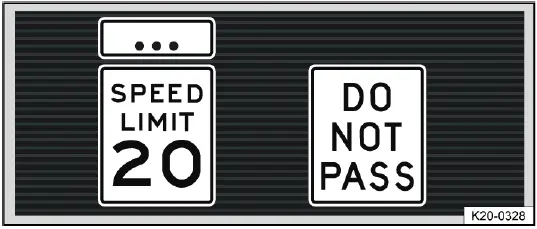
Fig. 20 In the instrument cluster display: recognized speed limits (general
example).
After checking and evaluating information from the front camera, the Infotainment system, and current vehicle data, the Dynamic Road Sign Display can show up to two valid traffic signs and one generic additional sign fig. 20. The displayed signs are intended to help the driver recognize speed limits, passing restrictions, or special conditions more easily, but they must always be compared with the actual traffic situation.
1st position: The road sign that is currently valid is shown on the left-hand side of the display, for example a speed limit of 20 mph (approx. 35 km/h). This is normally the most important sign for the current driving situation.
2nd position: Another road sign can be displayed in the second position, such as a passing restriction. This allows the instrument cluster to show more than one relevant rule when the system recognizes multiple restrictions.
Additional signs: A recognized additional sign is displayed above the applicable traffic sign. Depending on the system, a generic additional sign may be displayed instead of the exact sign detected by the camera. The applicable traffic sign in the instrument cluster is then supplemented by this additional sign to indicate that the restriction may apply only under certain conditions, such as weather, time, lane, vehicle type, or road situation.
WARNING
The Dynamic Road Sign Display is not a replacement for the driver's attention and works only within the system limitations. This means that the Dynamic Road Sign Display cannot detect all road signs and may not react, may react with a delay, or may show information that does not match the current traffic situation. Driving recommendations and road signs displayed in the system may differ from the signs installed on the road, temporary construction signs, local traffic rules, or changing road conditions.
- Observe the system limitations ⇒ Limits of the Dynamic Road Sign Display.
- Always stay attentive and do not rely solely on the system. The driver is always responsible for control of the vehicle.
- Traffic signs on the roads and traffic regulations must always take precedence over driving recommendations and displays from the Dynamic Road Sign Display function.
- Always adapt your speed and driving style to the visibility, weather, road and traffic conditions.
Limits of the Dynamic Road Sign Display
Please read the introductory information and heed the Warnings and
Notice ⇒
 Introduction.
Error messages
No road signs available. The system is in the initialization phase. This can happen shortly after the ignition is switched on, before the camera and related vehicle data are fully ready.
Or: the vehicle has not detected any road signs. This may occur on roads without signs, in areas where signs are outside the camera view, or when the system cannot evaluate available information reliably.
Error: Dynamic Road Sign Display. System malfunction. If the malfunction persists, contact a qualified service professional. Volkswagen recommends contacting an authorized dealer or authorized Service Facility. Professional diagnosis may be needed if the system repeatedly fails, does not display road signs, or shows an error after the windshield and camera area have been checked.
Speed Alert currently not available. The speed alert from the Dynamic Road Sign Display is malfunctioning. If the malfunction continues, have the system checked by a qualified technician. Until the function is restored, monitor speed limits manually and follow posted traffic signs.
Dynamic Road Sign Display: Clean windshield! The windshield is dirty in the area around the camera or weather conditions are interfering with the camera view. Clean the windshield, especially around the interior rearview mirror base. In the Volkswagen Taos, the camera must have a clear view through the glass for road sign recognition to work properly.
Dynamic Road Sign Display is currently limited. Data is not being transmitted by the Infotainment system. Check that valid map data is loaded in the Infotainment system. If map data is missing, outdated, or unavailable, the system may not be able to support road sign display as expected.
Or: the vehicle is located in an area that is not detected on the map stored in the Infotainment system. In this case, the system may still recognize signs with the camera, but some functions may be limited.
No data available. The Dynamic Road Sign Display function is not supported in the country where the vehicle is currently being operated. Local road sign formats, map coverage, or regional regulations may prevent the system from operating.
Functional limitations
The Dynamic Road Sign Display is subject to system limitations. Even when the function is active, it may not always recognize, interpret, or display signs correctly. The following conditions may cause the Dynamic Road Sign Display function to be limited or to not operate at all:
- High ambient temperature or long exposure to direct sunlight, which may affect camera operation or display accuracy.
- Poor visibility, such as in snow, heavy rain, fog, road spray, or dusty conditions.
- Glare, for example from oncoming traffic, low sun, reflections, wet pavement, or bright road surfaces.
- High speeds, because the camera has less time to detect and evaluate traffic signs.
- If the camera is obstructed or dirty, especially in the windshield area near the interior rearview mirror.
- If road signs are outside of the camera's visual field, positioned unusually, or placed too far from the road.
- If road signs are partially or completely covered, for example by trees, snow, dirt, road work equipment, parked vehicles, or other traffic.
- If road signs are not in the standard format, are faded, poorly illuminated, or use a format the system cannot interpret.
- If there are damaged or bent road signs that are difficult for the camera to recognize correctly.
- If there are variable traffic signs on overhead signs (variable display of road signs by LED s or other lighting), especially if the display is flickering, partially blocked, or difficult to read.
- If there is outdated map material in the Infotainment system, which can lead to differences between displayed information and current road rules.
- If there are stickers on vehicles that indicate road signs, such speed limits on commercial vehicles. The system may incorrectly interpret these markings as real traffic signs.
Operating the Dynamic Road Sign Display
Please read the introductory information and heed the Warnings and
Notice ⇒
 Introduction.
Speed warning
If the Dynamic Road Sign Display function detects that a valid speed limit is being exceeded, it may warn the driver audibly, or visually and audibly, with a message in the instrument cluster display. This warning is intended to draw attention to the detected speed limit, but the driver must still check the actual posted signs and control the speed of the Volkswagen Taos according to the road and traffic situation.
The speed warning can be set or completely deactivated in the Infotainment system ⇒ Vehicle settings menu. The speed warning can be set to a value of 0 mph (0 km/h), 3 mph (5 km/h) or 5 mph (10 km/h) over the permitted speed. Choose a setting that supports safe driving without causing unnecessary distraction from frequent alerts.





Volkswagen Taos (Type CL) 2022-2026 Owner's Manual
Driver information
- Symbols in the instrument cluster
- Warning and information texts
- Introduction to the instrument cluster
- Volkswagen Digital Cockpit Pro
- Volkswagen Digital Cockpit Basic
- Tachometer
- Fuel gauge
- Engine coolant temperature gauge
- Driving data menu
- Service
- Time
- Sport displays
- Vehicle settings menu
- Dynamic Road Sign Display
